

Description
Add Screen Indicators to Any Game in Minutes!
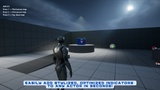
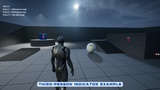
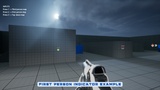
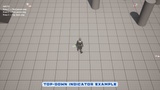
Add fully customizable screen indicators to any type of game — Third-Person, Top-Down, Side-Scroller and more — in just 2 minutes.
The Voyager Screen Indicator system makes it easy to highlight objectives, AI targets, or points of interest on the HUD, even when they’re off-screen.
Built for real production use.
This system is battle-tested inside our full game frameworks:
Voyager: Third Person Shooter Template: (Link)
Defender: Top Down Shooter Template: (Link)
Defender: Side Scroller Shooter Kit: (Link)
Optimized for clarity, modularity, and fast integration into any Blueprint-only project.
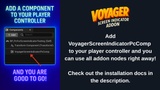
Add a component to your player controller and you can use screen indicators right away!
🎮 Useful links
Download Playable Demo: https://drive.google.com/file/d/1hQnwiqb9DixyGGYUxPeJ9i1lcoOTD7hU/view?usp=sharing
Installation: https://docs.google.com/document/d/1GCFv0CpkjmCl27T4PFpVwVPvqD6S3cO9hhu-XBPtuuw
Discord: https://discord.com/invite/nvWkAVzMSM
How-to videos
▶️ How to use screen indicators in my project?: https://www.youtube.com/watch?v=K5zvPcO_YVc (08:46)
🌟 Key Benefits
• Fully Blueprint-based – no C++ required
• Modular – works with quests, AI targets, objectives, etc.
• Compatible with TPS, Top-Down, Side-Scroller, and more
• Plug & play setup – functional in under 2 minutes
• Lightweight, scalable, and performance-optimized
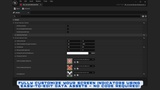
🔧 General Options
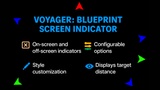
• Offscreen Only Mode: Displays indicators only when the target is off-screen.
• Screen Edge Clamp Mode: Clamps indicators to screen edges for a cleaner HUD.
• Optional Background Image: Add a stylized image behind your marker.
• Indicator Area Type: Customize the screen zone behavior.
🎨 Style & Visual Controls
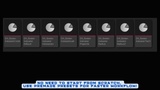
• Offscreen Marker Scale – adjust size of off-screen icons
• Marker Image Offset – fine-tune marker position
• Arrow Scale – control arrow size
• Background Image Scale – customize background icon
• Distance Text Color & Opacity – stylize distance display
• Distance Text Font – set your own font for distance readout
🖼️ Custom Material Support
• Off-Screen Marker Material – assign your own material
• On-Screen Marker Material – customize on-screen targets
• Arrow Material – directional arrow styling
## Setup
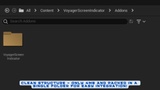
Migrate the BP_ScreenIndicatorManager into your project’s Content directory. (Content/Voyager/Addons/VoyagerScreenIndicator/BP_ScreenIndicatorManager.uasset)
Add VoyagerScreenIndicatorPcComp component to your player controller.
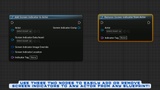
Call AddScreenIndicatorToActor, RemoveScreenIndicatorFromActor from any blueprint!
© Game Dev Voyager
[email protected]
https://www.fab.com/tr/sellers/Game%20Dev%20Voyager
This asset is entirely handcrafted. The thumbnail image was generated using AI for promotional purposes only.