Description
The engine can already tell you what is big. Almost nothing tells you what is wrong.
TextureMedic measures every texture in your project without opening a single package, separates
genuine waste from settings that are simply incorrect, and lets you fix both in bulk — with a full
change list before anything is written and one-click undo after.
### It measures the whole project in seconds
Dimensions and pixel format are both recorded in the asset registry, so a project with forty
thousand textures is measured in the time it takes to list them. Nothing is loaded. Sort by memory,
resolution or format, filter by folder, and see the total for exactly what is on screen.
Every byte comes from the engine's own pixel-format block table, with the real mip chain summed
rather than approximated — not a percentage somebody liked the sound of.
### It finds the bugs that never look like bugs
Some texture settings are not a matter of budget. They are wrong, and they never announce
themselves:
- Grayscale compression with sRGB enabled does not give you G8. The engine silently falls back
to uncompressed RGBA8 — eight times the memory. Epic documents this in a tooltip on the
compression dropdown and nowhere else. In most projects this is the single largest win available.
- sRGB on a normal map, mask or roughness texture applies a curve meant for colour perception to
data that was never colour. Every material sampling it gets values that are subtly wrong, forever.
It does not crash, does not warn, and does not look broken — so nobody ever files it.
- A texture sampled as a normal map that was never compressed as one. The material editor reports
this when you compile it, which is no help at all across four hundred materials nobody has opened
since the day they were made.
- Uncompressed art, missing mip chains, non-power-of-two imports, and the editor-icon compression
setting quietly storing shipping textures at four bytes a pixel.
### Three numbers, and never one
Most tools would add all of that up and print one big headline. TextureMedic reports three, on
purpose:
- Recoverable — what pressing Fix All actually gives back. Only correctness findings with an
automatic fix count, so the number is reproducible by pressing the button.
- Potential — available from waste findings, if you agree with them. Dropping a resolution is a
decision, not a fix.
- Added by correctness fixes — because some fixes cost memory. A normal map wrongly stored as
BC1 doubles in size when it is correctly stored as BC5. Hiding that would be a lie by omission the
first time somebody applied everything and measured the result.
Where a fix does not deterministically change the pixel format, no saving is claimed at all.
### Batch editing that cannot bite you
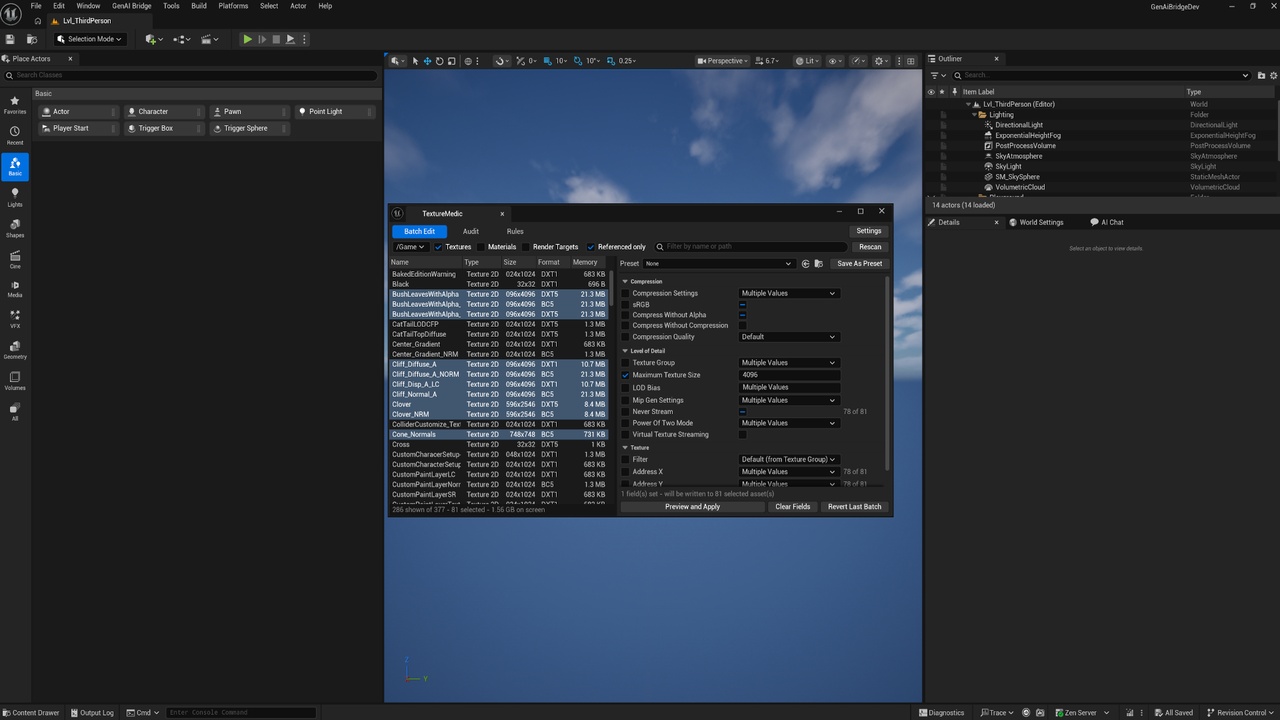
26 fields across Compression, Level of Detail, Texture and Import Adjustments — compression
settings, sRGB, texture group, maximum size, LOD bias, mip generation, Never Stream, virtual
texturing, filtering, addressing, flip green channel, and the full set of import colour adjustments.
Only fields you explicitly tick are ever written, so a preset carrying three settings cannot reset
the other twenty-three. Mixed values across a selection show as Multiple Values. A field that
cannot reach every selected asset says so — 12 of 30 — instead of silently doing nothing.
Nothing is written until you have seen the exact change list: one row per property that would
actually move, with the value before and after, exportable to CSV. The entire batch is a single undo
transaction, so Ctrl+Z puts every asset back in one step, and there is an explicit Revert Last Batch
button as well.
### Decide it once, keep it
Presets are assets that store only the fields that were set when you saved them. Rules bind a
preset to a folder or a name pattern — so /Game/Props gets one resolution ceiling and
/Game/Characters/Hero gets another, and the tool stops guessing what is "too big". One Re-apply
Rules button puts the whole project back in line after three months of imports.
### Also finds
Materials over the sampler budget (SM5 exposes 16 slots and the engine reserves several — a material
past a dozen will fail to compile on some targets, and mobile and VR are tighter still); textures
pinned in memory with Never Stream; and one source image imported twice as separate assets, which a
byte-identical comparison can never pair.
Runs headless as a commandlet for CI, exiting non-zero only on a Critical finding.
### Ideal for
Any project shipping to a platform with a memory budget — which is all of them. Especially mobile
and VR, where the sampler budget and the streaming pool are hard limits rather than guidelines, and
any team that has ever asked where 4 GB of textures came from.