

Описание
Edit imported SoundWave samples directly in Unreal Engine Details: remove DC offset, invert polarity, normalize peaks, select mono channels, reverse audio, crossfade loops and apply linear fades. Keep your existing SoundCue and MetaSound references.
Overview
Shape the sample. Keep the workflow.
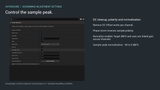
SoundWave Adjustment Settings brings practical sample editing into the SoundWave asset editor. A focused Sample Adjustment section lets sound designers refine imported audio where they already audition and organize it.
Make a centered mono variation, prepare a reversed transition, balance sample peaks or shape a loop boundary. The plugin retains the original imported PCM and recalculates from it on each edit, so adjustments do not accumulate destructively. Restore Original, Undo/Redo and settings-preserving reimport support day-to-day iteration.
Results are stored in the standard SoundWave audio data. Existing SoundCue and UE5 MetaSound Wave Player references use the adjusted asset without a special runtime node or a replacement asset type. Processing takes place in the editor; packaged games use Unreal Engine's normal audio pipeline.
Sample Adjustment features
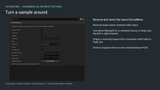
Remove DC Offset: subtract the mean of each source channel before other processing.
Phase Invert: invert sample polarity across all channels while preserving timing.
Normalize: set the final sample peak with a linked gain across channels. Enabling Normalize unlocks Target dBFS, from -96 to 0 dBFS.
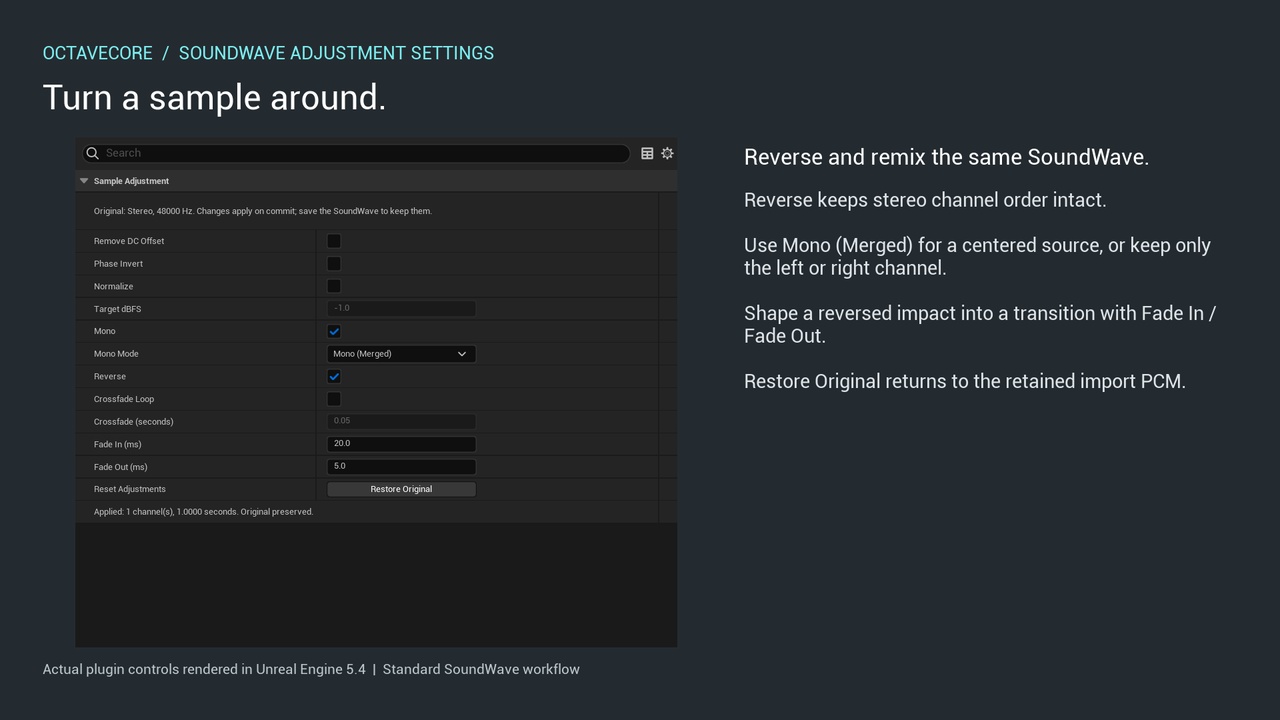
Mono: convert stereo originals using Left Only, Right Only or Merged. Original mono sources are clearly marked, checked and disabled.
Reverse: reverse frames without swapping left and right channels.
Crossfade Loop: overlap the tail and head using complementary linear fade-out/fade-in gains. The output is shortened by the consumed overlap.
Fade In / Fade Out: shape sample boundaries with linear fades in milliseconds.
Restore Original: reset adjustments and restore the retained import PCM.
Practical examples
Prepare one-shot variations. Normalize final sample peaks and use short fades where needed, then audition perceived loudness in context.
Create a mono source for spatial playback. Duplicate a stereo SoundWave and choose Merged or a single channel. Existing Unreal attenuation and spatialization settings remain available.
Build a reverse transition. Reverse an impact and shape the beginning and ending with millisecond fades.
Prepare looping ambience. Start with a short tail/head crossfade, enable loop playback in the player and audition repeated boundaries.
Continue working in existing graphs. Adjust and save the referenced SoundWave, then restart audition in SoundCue or a UE5 MetaSound Source.
Technical details
Plugin module : SoundWaveAdjustmentSettings - Editor
Runtime plugin modules : None
C++ source included : Yes
Input : Ordinary imported mono/stereo SoundWave audio
Internal sample representation : Engine-imported 16-bit PCM; floating-point processing intermediates
Directly tested engine builds : 4.24.3, 5.0.3, 5.4.4
Tested editor / build platform : Windows Win64
Packaging exercised : Development and Shipping
Playback paths exercised : SoundWave, SoundCue, streaming; MetaSound on UE5
Additional runtime library : None
Included content assets : None; no example or test project required
Documentation : Illustrated Korean PDF; Korean and English written guides
Support : [email protected]
Usage notes
Normalization targets sample peaks, not LUFS or true peak. Merging opposite-polarity stereo channels can cause cancellation. Crossfade shortens the sample and does not itself enable repeated playback; choose the overlap by listening. Combining loop crossfade with endpoint fades applies those fades on every repetition.
The retained original increases editor asset storage and undo memory use but is excluded from cooked audio. Keep the plugin installed while you need its editor restore and re-editing functions. Changes rebuild the affected audio resources, so restart audition after committing an edit.
Procedural, surround, ambisonic and custom import-data assets are outside scope. UE4.24 does not contain MetaSound. Intermediate engine releases, later releases and platforms other than Win64 are not presented as tested compatibility. Platform codecs and downstream graph effects can further alter the final signal.