



설명
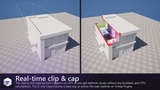
Cut through anything, in real time. Drop a volume into your level and the geometry inside it disappears instantly with the cut cross-section filled live on the GPU so it reads as solid material, not a hollow shell. No mesh editing, no booleans, no baking. Move the volume and the section updates the same frame.
CliperVolume brings the architectural section cube to Unreal Engine as a live, animatable object. Scale a box, sphere or capsule over any part of your scene to produce building sections, floor plans, cutaways, exploded views and interior reveals then animate the whole thing in Sequencer for construction sequences, product reveals or walkthrough transitions.
Non-destructive by design. Clipping happens per-pixel in the material, so your source assets are never modified. A one-click Material Patcher prepares your existing materials. Including engine and marketplace content, which is mirrored into your project rather than altered in engine/plugin source. Every change is fully reversible.
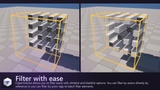
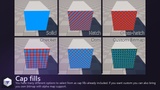
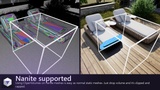
Built for real projects. We developed CliperVolume for our internal projects, battle-tested in many and productized it. Works with Nanite and Lumen. Per-volume whitelist/blacklist filtering lets one volume cut a single element while another cuts everything else. Cut faces can be a solid colour, a procedural hatch in the drafting convention, or your own texture with density measured in real-world centimetres so it stays locked to the geometry. An optional Occlude Light mode keeps sunlight and indirect bounce from leaking through the opening, so a sectioned interior still lights correctly.
Who it's for: We developed CliperVolume for our use at archviz and BIM presentation - design review and client walkthroughs - training and educational simulations that need to show what's inside a machine, vehicle or structure - product and industrial visualisation - digital twins - museum and exhibit interactives - level designers who want roof-off interior views - anyone who has ever wanted an X-ray of their scene without rebuilding it.
Showcase Video: https://www.youtube.com/watch?v=6uEJWGhnsPg&list=PLKUxjhjJi5bs
Tutorial Playlist: https://www.youtube.com/playlist?list=PLKUxjhjJi5bs
Documentation: https://fab.eek.digital/clipervolume/
Features:
Real-time section clipping. Drop a volume into the level, scale it over the scene, and the geometry inside it disappears. Nothing is destroyed and no meshes are modified - move the volume and the geometry comes straight back.
Solid section caps rendered on the GPU. Cut surfaces are filled live, so interiors read as solid material instead of hollow shells.
Six cap fills: Solid Color, Hatch, Cross Hatch, Dots, Checker, and Texture. Patterns are anchored to world scale on the cut face, with adjustable spacing, thickness and angle - 45 degrees by default, the drafting convention for section fill.
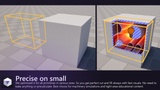
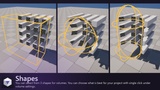
Three volume shapes: Box, Sphere and Capsule.
Up to four volumes clipping at once, each with independent shape, cap appearance and filtering.
One-click Material Patcher. An editor window scans your project's materials, tells you exactly which can be patched and why, and rewires them in a single pass. Materials it cannot patch are listed greyed out with the reason. Patches are reversible: Unpatch restores the original setup, and Repair fixes links broken by asset moves.
Filtering by actor, by actor tag, and by component name, with whitelists and blacklists, so a volume can affect only what you want it to.
Optional light occlusion, so interiors revealed by a cut are lit correctly instead of sitting in the shadow of a wall that is no longer visible.
Sequencer support. Volume transform, Enabled, and the cap colours are keyframeable for animated cutaway shots.
Project Settings for registration cost control: skip hidden or oversized primitives, skip foliage, and choose how plugin-provided actors are treated.
Documentation in-editor and online.
No runtime CPU geometry work. Clipping is driven entirely by material parameters and Custom Primitive Data.
Code Modules:
CliperVolume (Runtime)
CliperVolumeEditor (Editor)
Number of Blueprints: 3
Number of C++ Classes: 20
Network Replicated: No (clipping is a client-side rendering effect and carries
no replicated state)
Supported Development Platforms: Windows (Yes), Mac (No)
Supported Target Build Platforms: Win64
Example Project: https://drive.google.com/file/d/1e4n39ZRXM772t4z-6LopxiDcKmZz_g10/
Important/Additional Notes:
Unreal Engine 5.8 only, Win64 only. Both modules declare "PlatformAllowList": [ "Win64" ].
Materials must be patched once with the included Material Patcher before they respond to clipping. The patcher explains this in-window, and the documentation lists which blend modes are supported. Opaque materials are converted to Masked as part of patching.
The section cap is drawn after lighting and is deliberately unlit, so it reads as a clean drafting-style fill rather than picking up scene shadows or Lumen bounce.
Up to four volumes can clip at once. Enabling a fifth logs a warning and shows an on-screen notice naming the volumes that fall outside the limit, rather than failing silently.
Uses no third-party code, libraries or binaries. Every dependency is a first-party Epic module.