
Descrição
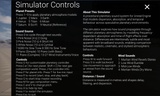
Planetary Dispersion is a real-time planetary auralisation and procedural sound-design system for Unreal Engine. It provides an interactive way to explore how sound might behave across planetary, lunar, exoplanetary, reference and speculative atmospheric conditions.
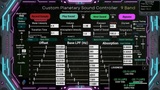
Built with MetaSounds and Blueprints, the system combines simplified atmospheric calculations with custom nine-band absorption, filtering and temporal-dispersion processing. Users can compare planetary models, create gas mixtures, process built-in or imported sounds, use live microphone input, record the output and operate multiple atmospheric zones simultaneously.
It is designed for sound designers, composers, game-audio practitioners, educators, researchers and developers.
Video Walkthrough
Watch the Planetary Dispersion Video Walkthrough
The walkthrough demonstrates the planetary models, audio processing, environmental controls, recording and batch processing.
Key Features
46 planetary, lunar, dwarf-planet, exoplanetary and reference models
Ten configurable atmospheric gas species
Simplified ideal-gas property calculations
Custom nine-band spectral and temporal processing
Speed-of-sound and propagation-delay modelling
Air, water, regolith and ice propagation modes
Built-in sounds, user WAV import and live microphone input
Atmospheric tuning and optional voice formant colour
Wind, seismic activity, environmental reverberation and Flux modulation
Master WAV recording and batch rendering
TXT, CSV and JSON report export
JSON configuration import and restoration
Multiple Atmosphere Zones with independent Sound Rigs
Customisable Blueprint and MetaSound architecture
Interactive interface with technical readouts
Planetary and Atmospheric Models
The 46 supplied models include terrestrial planets, gas and ice giants, moons, dwarf planets, exoplanets and controlled reference atmospheres. Selected environments include Earth, Mars, Venus, the outer planets, major moons, dwarf planets, WASP-121 b, WASP-39 b, 55 Cancri e, GJ 1214 b, K2-18 b, LHS 1140 b, TRAPPIST-1 models and pure-gas references.
Solar System models draw upon published information where available. Other models may represent published constraints or physically plausible scenarios rather than definitive atmospheric measurements.
Gas-Composition System
The Gas Composition interface controls carbon dioxide, nitrogen, methane, oxygen, argon, hydrogen, helium, water vapour, ammonia and sulfur dioxide. Users can select a supplied composition or construct a custom mixture. The application normalises the gas fractions and calculates mean molar mass, mixture heat capacity, heat-capacity ratio, speed of sound, density and characteristic acoustic impedance using a simplified ideal-gas model. These properties inform the custom brightness, absorption, filtering and temporal mappings.
Nine-Band Processing
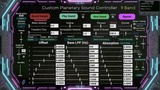
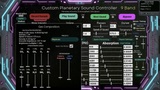
Planetary Dispersion divides audio into nine frequency regions. Each region can receive independent filtering, absorption, amplitude treatment and temporal offset.
Processing includes per-band filtering, distance-dependent loss, propagation delay, temporal separation, amplitude contrast, interpolated transitions, dry/wet control and bypass.
Audio Sources, Tuning and Recording
Built-in sounds include noise, sine tones, percussion, piano, strings, brass, woodwind, vocal and environmental material. Users can import a WAV file, process live microphone input, monitor the signal and record the final processed output.
Atmospheric Tuning applies a pitch shift derived from the selected speed of sound. It is intended for voice and air-column instruments and maintains the original playback duration.
Voice Formant Colour moves formant-like resonances using a biquad-filter bank without intentionally transposing the source. Both features are creative approximations.
Environmental Controls
The custom widget provides real-time control over:
Medium, distance, pressure, temperature, humidity and altitude
Speed of sound, atmosphere intensity, absorption and filtering
Temporal offset, amplitude contrast and transition time
Wind, seismic activity, reverberation and Dynamic Flux
Dry/wet balance and bypass
The interface displays distance, sound speed, propagation delay and atmospheric-loss information.
Multiple Atmosphere Zones
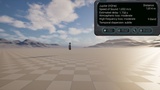
Multiple planetary environments can operate simultaneously within one level.
Each Atmosphere Zone can be assigned to a placed Planetary Sound Rig. Assets are reused, while each rig creates an independent audio instance with its own source, model and parameters.
This allows two or more sounds to be processed through different planetary models and heard together within the same virtual environment.
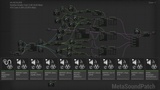
MetaSounds and Blueprints
The project uses a modular MetaSound Source and Patch architecture supported by Blueprint control logic. Blueprints manage calculations, controls, Atmosphere Zones, Sound Rig assignment, recording, playback, batch processing and configuration exchange. The included project can be inspected, modified or extended for sound design, game audio, teaching and creative research.
Import, Export and Batch Processing
Complete configurations can be exported as JSON and restored later, including model, gas, environmental and effect settings. TXT, CSV and JSON reports document settings, calculated gas properties, processing values and available loudness measurements.
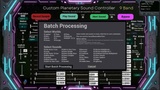
Batch processing allows multiple sound and planetary-model combinations to be rendered sequentially for comparison, evaluation or creative use.
Technical Information
Product type: Unreal Engine Complete Project
Engine: Developed and tested in Unreal Engine 5.7.2-5.8.2
Primary systems: Blueprints and MetaSounds
Planetary and reference models: 46
Configurable gas species: 10
Frequency-processing regions: 9
Input: Built-in sounds, live microphone and imported WAV
Output: Playback, WAV recording, batch rendering and reports
External audio middleware: Not required
Use: Sound design, game audio, composition, education and research
Live microphone input requires a compatible input device and operating-system microphone permission.
Model Scope
Planetary Dispersion is a creative, physically informed sound-design system rather than a mission-grade scientific simulator. Gas properties are estimated using a simplified ideal-gas model. The nine-band absorption, brightness, filtering and temporal-dispersion behaviours include custom mappings designed for comparative listening and creative use.
It does not completely model turbulence, complex chemistry, fluid dynamics, terrain diffraction or validated propagation for every world.
AI Usage Disclosure
Generative AI tools assisted with limited decorative visuals, technical troubleshooting, editing and documentation. The acoustic calculations, parameter mappings, programming, MetaSounds, Blueprints, audio content, system design, testing and creative decisions were developed and implemented by the author. All AI-assisted material was reviewed and verified by the author.
Additional Information
Technical documentation, research references, teaching resources and standalone versions are available at: