
Opis
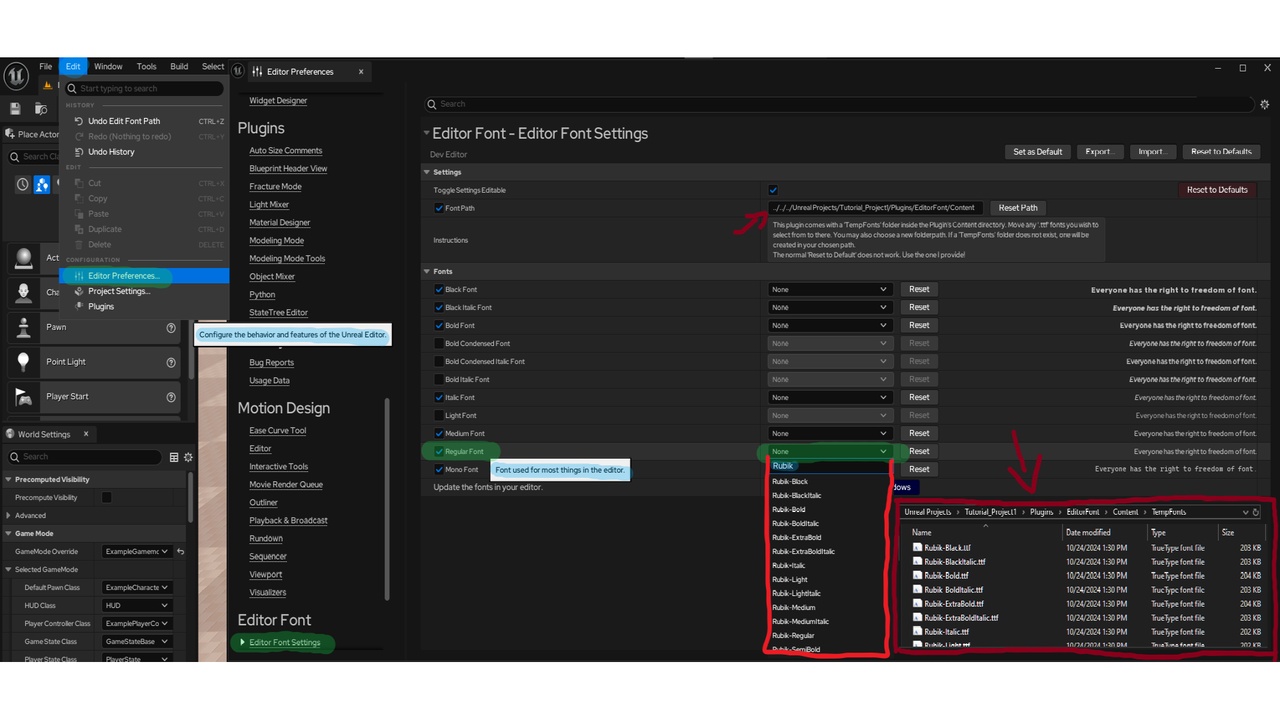
A plugin that helps you to switch the base fonts that Unreal Engine uses. Is able to manipulate all the default fonts, and comes with its own category in the Edit > Editor Preferences page of the settings.
NEW: Added button to the Edit dropdown menu. 'Edit > EditorFont Menu' will lead directly to the correct settings page.
Can accept and use any '.ttf' or '.otf' style font. You can download a bunch of them from google fonts or various other websites.
Most of the font fields use '.ttf', while the Japanese ones use '.otf'.
NEW: Font converter. Can convert any '.ttf' font to '.otf' font, all from within my plugin. Can convert a single font, or an entire folder.
NEW: Support for some localized fonts that don't use the English alphabet. (Sample text is using Google translate. Apologies for bad translations.)
Just put whatever fonts you want to use into the TempFonts folder or in your desired folderpath. (NOTE: If the parent directory you choose is valid, and you add a new folder name at the tail of the path, a new folder with that name will be created there.) There is also a file picker next to the path entry box!
You can use the checkbox next to each property to lock them individually, to not accidentally default restore them, and the one at the top will lock all the settings. The Reset button next to each property will reset only that property, and the red "Reset to Defaults" button will reset all unlocked properties.
If something goes catastrophically wrong you can reach out to me, and I can give you a rundown on how to fix it.
Big thanks to fontforge.org for their open source software that allowed me to make the font converter.
WARNING: Do not modify the Defaults file inside the Content folder of the plugin.
Discussion and questions thread: https://forums.unrealengine.com/t/editorfont-discussion-thread/2312529?u=xtheos
Video showing how the features of my plugin work: https://www.youtube.com/watch?v=0YaARkF4A3E (some things may have changed since time of recording.)