الوصف
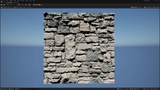
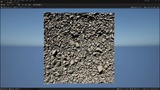
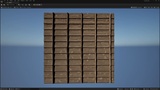
IHP (Implicit Heightfield Projection) is a real-time material plugin for Unreal Engine 5.8 (UE5) that turns heightmaps into convincing, view-dependent surface depth on low-poly meshes and landscapes. Create displacement-style detail without subdividing the mesh, enabling tessellation, or requiring Nanite displacement.
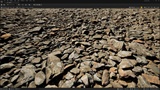
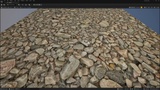
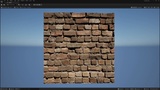
Give brickwork recessed mortar. Make stone surfaces feel layered. Bring depth to gravel, cracks, tiles and uneven ground. As the camera moves, the projected detail changes with the viewing angle instead of relying on surface shading alone.
MORE SURFACE DETAIL. LESS GEOMETRY PREPARATION
Not every brick needs its own mesh. Not every rocky surface needs a dense sculpt.
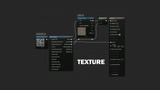
Keep the underlying geometry simple and build the detail into your material. Use a compatible heightmap, adjust the height range and texture scale, and explore the result in Unreal's Material Editor.
The included Material Function and demonstration material provide a starting point without writing shader code. No mesh subdivision or auxiliary cone-map baking is required.
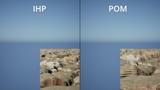
A CELL-EXACT ALTERNATIVE TO CONVENTIONAL "POM"
Looking for a Parallax Occlusion Mapping (POM) alternative or a different approach to parallax and relief mapping?
IHP's main intersection method traverses heightfield texel cells and analytically solves for the visible surface within each traversed interval. It does not simply increase the number of evenly spaced parallax samples.
By solving the surface between samples, the cell method addresses a source of missed fine features in conventional fixed-step searches.
Cell-exact refers to the selected mip-filtered heightfield. Quality budgets, numerical safeguards and refinement paths handle difficult cases.
START WITH A HEIGHTMAP, NOT A PREPROCESSING PIPELINE
Cone Step Mapping and Relaxed Cone Stepping (RCS/RCSM) use precomputed cone data to guide traversal. IHP's Texture2D workflow reads the heightmap directly, without requiring an auxiliary cone map.
Try another heightmap without generating cone data first. Standard texture import and mip generation still apply.
Select height from R, G, B or A to reuse packed material textures. The included sample packs height, roughness and specular together.
TWO HEIGHTFIELD WORKFLOWS IN ONE PLUGIN
IHP Height Projection: standard Texture2D heightmaps
Use compatible height textures for tiled materials and low-poly mesh detail. Control depth through the physical texture scale and height range. IHP_Standard provides the Classic Material Function workflow, including a decal-space option for decal material integration.
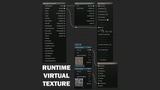
IHP Height Projection RVT: Runtime Virtual Texture heightfields
Use a Displacement Runtime Virtual Texture for landscape and large-surface materials. The RVT node derives its mapping from the selected RVT's world-space transform and exposes projection, normals, derivatives and self-shadow outputs. Combine height information in your RVT workflow, then project the resulting heightfield. Landscape layers, writers and volumes remain part of your setup. Visible detail depends on RVT resolution and residency.
DEPTH, NORMALS AND MATERIAL CONTROL TOGETHER
Projected UVs.
FinalUV lets base color, roughness and other texture channels follow the heightfield projection instead of staying on the original flat mapping.
Height-derived normals.
NormalTS reconstructs surface orientation from the heightfield. No separate normal map is needed for the shape already described by that height data.
Derivative-aware filtering.
WarpDDX and WarpDDY help keep downstream texture filtering consistent with the projected UVs. Connect them to Texture2D samples using Derivative mip mode.
Optional self-shadowing.
Supply a tangent-space light direction and choose horizon-only shading or a heightfield shadow probe, with independent quality, bias and softness controls. SelfShadow is a mask for your material, not automatic shadow integration for every scene light.
Optional Classic silhouette masking.
The Texture2D node can clip finite surface edges through SilhouetteMask in a Masked material. Ordinary geometry supports inward edge clipping; outward coverage requires suitable guard-band geometry. This feature is not active in the RVT node in version 1.0.0.
Diagnostic outputs.
Inspect projection confidence, fold behavior and solver residuals for advanced material development.
CHOOSE THE DETAIL YOUR SHOT NEEDS
Choose from four runtime view-quality levels: Fast, Production, Legendary and Reference. Adjust self-shadow quality independently instead of paying for a higher shadow budget whenever you increase view detail.
Mip-aware tracing considers the pixel footprint and traversal budget. Under demanding conditions, it can select a coarser heightfield mip to limit traversal work.
Balance appearance against GPU work for your actual scene. Cost depends on screen coverage, viewing angle, height range, resolution, enabled features and hardware. Texture2D and RVT have different sampling costs.
WHERE IHP FITS IN YOUR UNREAL ENGINE WORKFLOW
Create height-based detail for brick and stone walls, cobblestone, gravel, rocky ground, terrain surfaces, tiles, masonry, cracked plaster and architectural materials. Use it for environment art, game materials, architectural visualization and real-time presentations where the goal is convincing surface relief.
It is especially relevant when a normal map or Bump Offset does not provide the depth you need, but modeling or displacing additional geometry is unnecessary for the intended shot.
COMMON QUESTIONS
Can I use a displacement map on a low-poly mesh?
Yes, when the map represents height and the desired result is visual surface detail. IHP projects that heightfield in the material rather than moving mesh vertices. The mesh still needs suitable UVs, tangents and enough geometry for its overall shape.
Do I need Nanite or tessellation?
Neither is required for surface projection. It is a material-based alternative for situations where you were considering Nanite displacement or tessellation primarily to add surface detail. Nanite remains a broader geometry-rendering system; IHP does not replace it or produce equivalent physical geometry.
Is this a cheaper alternative to geometric displacement?
It avoids generating additional surface geometry and can reduce the preparation involved in a displacement workflow. GPU savings depend on your scene and settings. Compare at the visual quality you need; no technique is always faster.
Where do I connect my heightmap in the material?
For the Classic workflow, supply the height texture as a Texture Object to IHP or the included function. Use FinalUV for your material texture samples, NormalTS for the height-derived normal, and WarpDDX/WarpDDY for derivative sampling. This effect does not require connecting the map to World Position Offset or Pixel Depth Offset.
Can I use it for landscape displacement with RVT?
Yes, for visual surface detail from a compatible Displacement RVT. Landscape geometry and collision remain unchanged.
INCLUDED IN VERSION 1.0.0
The package contains the IHP C++ plugin with both Material Expression nodes, the IHP_Standard Material Function, and a compact demonstration level with a plane mesh, example material, material instance and two 1K sample textures.
The demo is a starting point for the Classic workflow, not a complete landscape or RVT environment pack. IHP is proprietary software with a protected core, not an open-source shader library.
COMPATIBILITY AND SETUP
Documentation (English): A complete user guide is included in the plugin at IHPHeightProjection/Docs/IHP_User_Guide.txt. Start with README.txt in the plugin folder. The guide covers installation, material setup, every Classic input and output, Runtime Virtual Texture setup, optional self-shadow and silhouette controls, modification, and troubleshooting. The example level is in IHPHeightProjection Content > IHP1 > Levels > L_IHP_Demo, and the reusable IHP_Standard material function is in IHP1 > MaterialFunc. No external SDK download or Engine-file modification is required.