




Description
A Revit -> 3ds Max -> Datasmith import lands ten thousand meshes, and most of them are the same wall. This is the top result on the Unreal forums for the problem, from a developer with exactly that project: "The number of Meshes to delete from the project is more than 10,000. This cannot be done manually." Six separate developers piled into that thread over six months. Nobody posted a tool. The closing note is "So yeah... it is not a one-click fix (yet)."
Unreal already ships the second half of the answer. Consolidate Assets replaces every reference and deletes the redundant copies, and it works perfectly — on two assets you selected by hand. Epic's own documentation walks you through four identical materials that you had to spot first. That is fine for four. It is not a plan for ten thousand.
The missing half is deciding which meshes are actually interchangeable, and being right about it. That is what this does.
It groups them for you, then makes you look before it acts
One command produces a designed HTML diff and changes nothing:
UnrealEditor-Cmd.exe MyProject.uproject -run=MeshConsolidator -Path=/Game
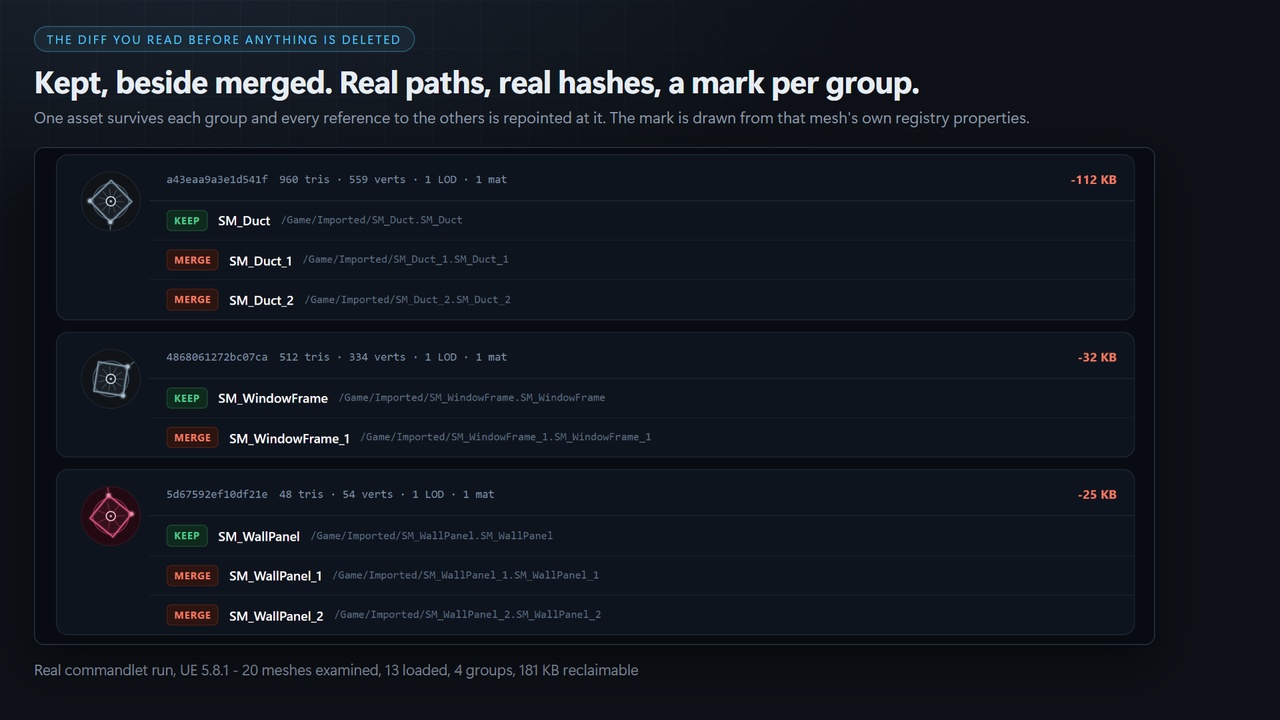
You get a page showing, per group, the asset that will be kept beside the assets that will be merged into it, the bytes each group reclaims, and the two numbers that matter most: meshes examined against meshes loaded. Read it. Then run it again with -Apply.
-Apply consumes the plan the scan wrote. It does not re-scan. A person reads the report between those two commands, and an apply that quietly re-derived its own list would make that review decorative.
Fast because it refuses to open most of your project
Hashing geometry means loading meshes, and loading forty thousand meshes to compare them is not a scan, it is an afternoon.
So the scan runs in two stages. Stage one groups every static mesh by its asset-registry tags and loads nothing at all — triangle and vertex counts, bounds, LOD count, material count, collision primitives, Nanite state, and eight more. Only meshes that share a key with at least one other mesh are ever opened.
The report prints examined and loaded as separate figures, on purpose. You can see the economy working, and a regression into loading everything would be visible in the output rather than only in the wall clock.
Every ambiguity resolves toward NOT identical
The success state of this tool is deleting thousands of files from a paying client's project. It is built accordingly.
Two meshes merge only when every one of these matches: every vertex position, normal, tangent, colour and UV at every LOD, compared as exact bits · the triangle list including winding order · LOD count, build settings and reduction settings · lightmap settings, all six of them · material slots including their order · Nanite settings · LOD group · every collision primitive, its transform, the trace flag and the profile · every socket and its transform.
If anything cannot be read, the mesh is skipped, not matched. There is no fuzzy-match mode and there will not be one. The tool sometimes misses a redundant mesh, and that is the deliberate trade: a miss costs you disk space you already had, a bad merge costs you a deliverable.
It never moves your actors
Datasmith exports often bake world position into the mesh, so two identical walls arrive as two meshes whose vertices differ by a translation. They are the same wall — but swapping one for the other moves the model, unless you also rewrite the actor's transform.
This tool does not rewrite actor transforms, at all. Positions are compared in local space with no normalisation, so those meshes never group and are reported as separate. It is a real limitation and it is stated here rather than discovered after purchase.
Near misses tell you why it found nothing
A scan that reports four groups in a forty-thousand-mesh project and says nothing else is indistinguishable from a broken scan.
When meshes match on every registry tag and still do not merge, the report names the exact field that separated them — "400 meshes differ only in DstLightmapIndex". That is usually actionable: it normally means an import setting drifted between batches.
Every mesh gets a signature you can match at a glance
A consolidation report on a real import is hundreds of rows of SM_WallPanel, SM_WallPanel_1, SM_WallPanel_2. Text at that density is unreadable, and a sixteen-character hash is worse.
Getting Started / How to launchFull documentation: Duplicate Mesh Consolidator documentation
This is a commandlet, not an editor panel — there is no window to find. Copy the MeshConsolidator folder into YourProject/Plugins, restart the editor (enabled by default), then from your project directory run:
UnrealEditor-Cmd.exe MyProject.uproject -run=MeshConsolidator -Path=/Game
Open Saved/MeshConsolidator/report.html to review the duplicate groups and exactly what would be merged. Nothing is modified until you run -Apply, which executes the already-written plan.json. Add -FailIfFound to gate it in CI.
Options: -Path · -Exclude · -Plan · -Report · -Json · -Apply · -MaxGroups · -StopOnFirstFailure · -FailIfFound. Exit codes: 0 clean · 1 bad arguments · 2 post-condition failure · 3 duplicates found.
Technical InformationFeatures: finds geometrically identical static meshes by content, not name; two-stage scan keyed on 14 engine-published registry tags with zero asset loads before hashing; scan and apply are separate commands; referencer repointing so nothing in your levels moves; a generated signature per group drawn by the plugin from that group’s own hash fields (no image assets ship); near-miss reporting; HTML + plan.json + CI JSON from one run; four exit codes; editor-only.
Code Modules: MeshConsolidator — Editor, Default loading phase
Number of Blueprints: 0
Number of C++ Classes: 20 declared types across 9 public headers — 1 UCLASS, 18 F classes/structs, 1 enum class
Network Replicated: No — editor-only commandlet
Supported Development Platforms: Win64
Supported Target Build Platforms: Win64 — matches PlatformAllowList in MeshConsolidator.uplugin exactly. CSAF builds and tests on Windows only, and this listing states only what is verified.
Supported Engine Versions: 5.8
Documentation: MeshConsolidator documentation
Example Project: None. The subject is duplicate geometry from your own import. The default run is a dry run that changes nothing on disk, so it is safe to point at any existing project immediately.