

설명
GSL Distortion Toolkit is a modular Unreal Engine distortion material toolkit for creating procedural UV warping, texture deformation, animated distortion, localized effects, vector-driven displacement, and custom distortion-based material effects.
Create magical distortions, sci-fi energy surfaces, swirling patterns, animated texture warping, stylized environmental effects, moving distortion fields, abstract visuals, and VFX materials — without being limited to a single predefined visual style.
The Toolkit combines Ready To Use Materials and Material Instances with reusable Distortion Material Functions, making it suitable for both immediate production use and custom shader creation.
Ready To Use
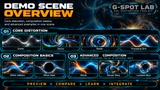
Start immediately with configurable Distortion materials built around four fundamental mechanics and five practical composition workflows.
Core Distortion Mechanics:
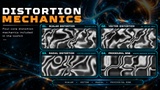
Scalar Distortion — grayscale-driven texture warping with independent directional control.
Vector Distortion — two-dimensional displacement driven by RG vector fields.
Radial Distortion — localized coordinate warping controlled by center, radius, and strength.
Procedural Sine Distortion — animated mathematical distortion without requiring an external distortion texture.
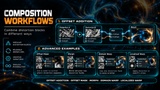
Composition Workflows:
Offset Addition — combine independent distortion offsets into a single result.
Offset Mask — control where distortion appears using a separate mask.
Morph — smoothly blend between different distortion fields.
Domain Warp — use one distortion field to deform another for more complex procedural patterns.
Localized Warp — restrict distortion to a specific area with adjustable center and radius.
Tiling, direction, strength, frequency, speed, center position, radius, colors, and other exposed parameters can be adjusted through Material Instances without rebuilding the underlying materials.
Build Your Own Shaders
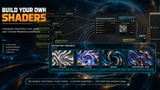
Four reusable Distortion Material Functions are included for developers who want to integrate distortion mechanics into their own Unreal Engine materials:
Scalar Distortion
Vector Distortion
Radial Distortion
Procedural Sine Distortion
Each function processes external coordinates and provides both CoordinatesOut and Offset, allowing distortion behavior to be reused and combined in different ways.
Use these functions to:
Chain compatible coordinate-processing operations.
Combine independent distortion offsets.
Mask or scale distortion influence.
Blend different distortion fields.
Create localized procedural warping.
Build custom animated material effects.
Integrate distortion into existing materials.
Combine distortion mechanics with other compatible shader systems.
The Toolkit is designed around reusable material logic rather than a collection of fixed visual presets, giving you the freedom to experiment, combine mechanics, and create your own effects.
Designed for Flexible Material Workflows
GSL Distortion Toolkit can be adapted to a wide range of materials, visual styles, and procedural effects.
Use the same distortion system for magical surfaces, sci-fi energy, stylized liquids, animated patterns, environmental effects, moving masks, abstract deformation, procedural warping, VFX surfaces, holographic-style effects, and custom shader compositions.
The package includes 4 Material Functions, 9 Ready To Use Materials, 9 Material Instances, example textures, documentation, and a Demo Level presenting the fundamental mechanics and composition workflows.
Unreal Engine Compatibility
Developed with Unreal Engine 5.1.1.
Tested and fully functional in Unreal Engine 5.8.3.
No custom C++ code or third-party plugins are required.
Part of the GSL Shader Toolkit Library
GSL Distortion Toolkit is part of the expanding GSL Shader Toolkit Library — a modular collection of reusable shader tools built around individual fundamental mechanics.
Use each Toolkit independently or combine compatible Flow, Wave, and Distortion mechanics to build more complex procedural material effects.
Experiment. Combine. Create.
Generative AI Disclosure
Generative AI was used only for promotional artwork and listing media. The Unreal Engine materials, Material Functions, documentation, and project content were created manually.