
描述
E3DS Features Plugin adds advanced browser-level control to your Pixel Streamed Unreal Engine applications.
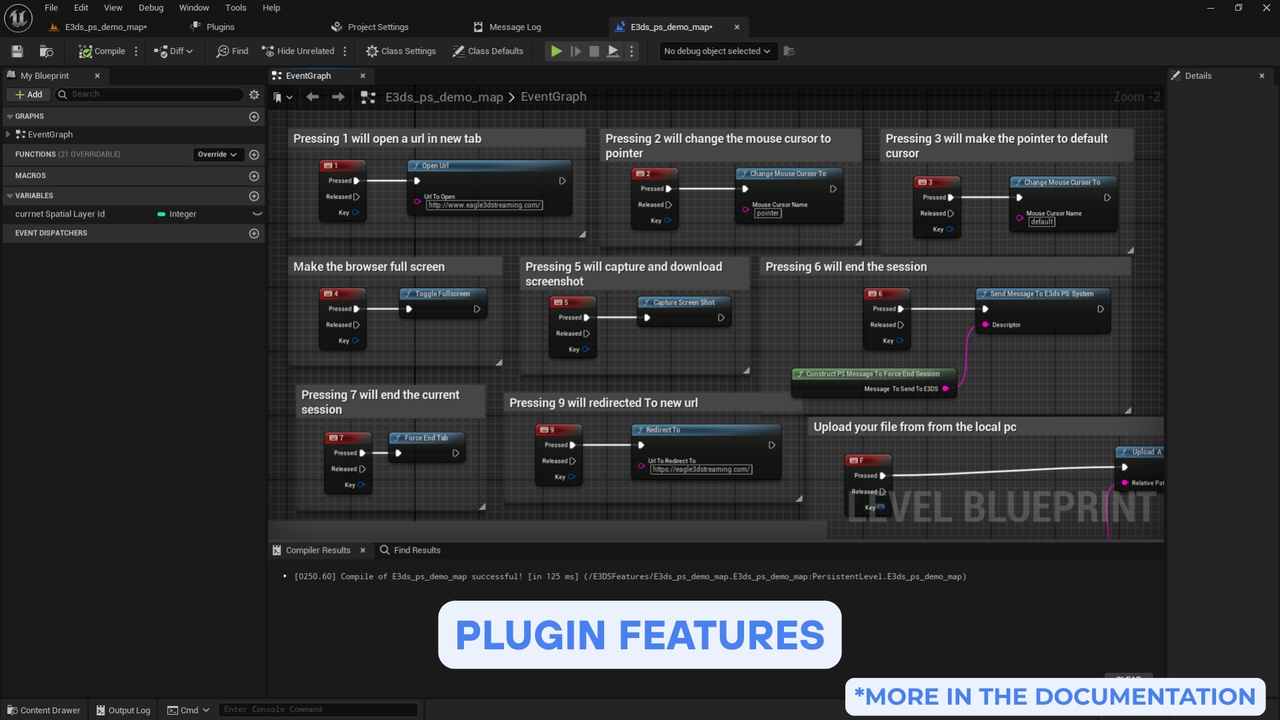
With a set of streamlined, ready-to-use Blueprint nodes, you can open URLs, redirect browser tabs, manage fullscreen mode, capture screenshots, transfer files, detect client devices, and more — all directly from Unreal.
No complex configuration or custom JavaScript required.
Simply install the plugin and immediately extend the capabilities of Pixel Streaming
Why Use This Plugin?
Pixel Streaming alone offers limited browser-level control, and implementing extended features manually requires custom code, multiple nodes, and complex messaging structures that often lead to bugs.
E3DS Features Plugin simplifies everything:
One Blueprint node for each feature
Drag, drop, and use
No C++ knowledge needed
No custom UI or browser scripting
Works out of the box with Pixel Streaming
This significantly reduces development effort and ensures reliable, predictable behavior across browsers and platforms.
Documentation
Complete installation and feature guides:
https://docs.eagle3dstreaming.com/wiki/download-and-install-the-e3ds-features-plugin
Key Features
1. Open URL
Instantly open external web pages in a new browser tab.
2. Redirect to a New URL
Closes the current Pixel Streaming session and redirects the user’s browser to a specified webpage.
3. Toggle Fullscreen
Enables or disables fullscreen mode in the user’s browser.
4. Screenshot Capture & Download
Captures a high-resolution screenshot of the live Pixel Streaming view and triggers an automatic download in the browser.
5. Upload File from Browser → Unreal
Allows users to select and upload files from their local device directly into Unreal Engine during a streaming session.
6. Download File from Unreal → Browser
Sends files generated or stored inside Unreal to the user’s browser for download.
7. End Streaming Session
Gracefully terminates the active Pixel Streaming session through a Blueprint node.
8. Force-End a Client Session
Immediately shuts down a specific client’s streaming session without requiring user confirmation.
9. Mouse Mode Switching
Switches between normal pointer mode and locked/FPS-style mouse mode within the streamed application.
10. Automatic Device Detection
Retrieves detailed information about the user’s platform, operating system, browser, and capability support.
Interactive Demo
Explore all features in action:
https://connector.eagle3dstreaming.com/v5/demo/FeaturesPluginDemo/default
Also available on GitHub:
https://github.com/e3ds-ue4/E3DSFeaturesPlugin/
Community
If you have any questions or need assistance, contact us at: [email protected]
Join our Discord community to share ideas, ask questions, and get support: Join Discord Server