

描述
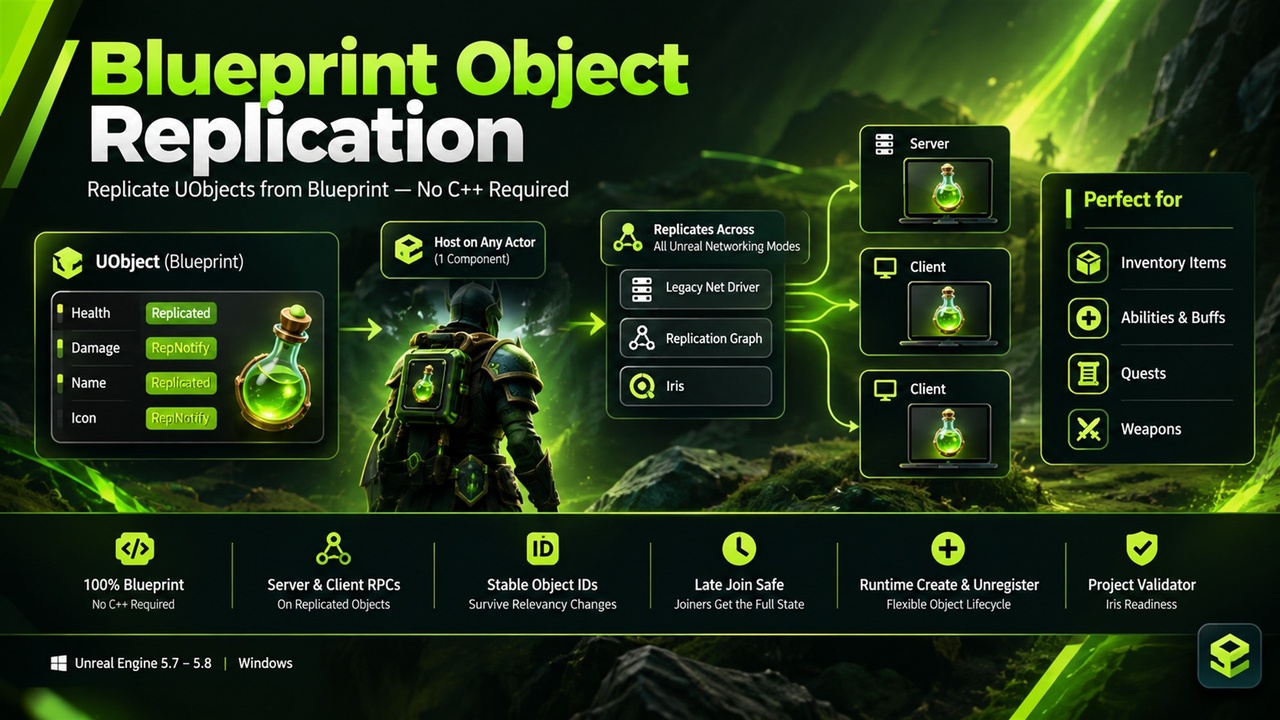
Blueprint Object Replication — a UObject replication plugin for Unreal Engine 5: create plain objects on the server, give them replicated variables and RepNotifies in the graph, and they show up on every client. No C++, and it works with the legacy driver, Replication Graph and, on UE 5.6 and newer, Iris.
Replicating a plain UObject (an inventory item, a weapon, an ability, a quest, a buff) is how Lyra and the Gameplay Ability System keep actors light, but in a Blueprint-only project there is no way to do it. The engine hook that makes it work is C++ only. This plugin supplies it: subclass one base object, add variables, and host the object on any actor with one component.
It also handles the parts that usually break. Objects get a stable ID that survives relevancy changes, clients that join late receive the current objects, RPCs on a replicated object are routed through the owning actor, and Iris is supported from the same code on UE 5.6 and newer. A project validator flags actors that will not replicate correctly under Iris.
Key Features
• Replicate plain UObjects from Blueprint — subclass Blueprint Replicated Object, mark variables Replicated or RepNotify in the normal variable details, and use your own OnRep functions
• One component to host them — add a Replicated Object Component to any replicated actor and call Create Replicated Object on the server; clients receive the objects automatically
• Works with the legacy driver and Replication Graph on UE 5.0 to 5.8, and with Iris on UE 5.6 and newer — one codebase, no replication system to choose, run-tested with a dedicated server and two clients
• RPCs on your objects — Server and Client functions on a replicated object route through the owning actor
• Stable object IDs — Find Replicated Object by ID returns the same object on server and clients, and the ID survives the host actor leaving and re-entering relevancy
• Late join safe — a client that connects after objects were created and removed gets exactly the current set
• Runtime register and unregister — destroy the replica on clients, stop replicating, or let clients keep the last state
• Per-object conditions — Always, Owner Only, Skip Owner, Initial Only, Simulated Only or Autonomous Only
• Blueprint events on the component and on each object for added, removed, registered and replicated
• Project validator (UE 5.6+) — a console command and Message Log listing actors that still use the legacy subobject path, which Iris ignores, plus automatic setup when a Blueprint with the component is compiled
Use Cases
• Inventory and loot — each item is an object with its own count, durability and owner
• Abilities, buffs and status effects — lightweight state without spawning an actor for every effect
• Quests and objectives — shared progress objects the whole party can read
• Weapons and attachments — per-weapon ammo and state without an actor per gun
• Projects moving to Iris — keep Blueprint object replication working after you switch the replication system
Why This Plugin?
Actors and actor components are the only things Blueprint can replicate on its own. Replicating a plain UObject needs a C++ override that registers it with the net driver, and under Iris that registration is mandatory. Blueprint Object Replication is the thin layer that does it for you, tested under all three replication systems, so object replication is a few Blueprint nodes instead of a C++ project.
Get Started in 60 Seconds
• Install the plugin for your engine version (UE 5.0 to 5.8) and enable it under Edit > Plugins
• Create a Blueprint from Blueprint Replicated Object, add a variable, and set Replication to Replicated or RepNotify
• Add a Replicated Object Component to a replicated actor
• On the server call Create Replicated Object with your class; clients get the object and fire your RepNotify
• For Iris (UE 5.6 and newer), add net.SubObjects.DefaultUseSubObjectReplicationList=1 under [SystemSettings] in DefaultEngine.ini (explained in the documentation)
Requirements: Unreal Engine 5.0 to 5.8, Windows (Win64).
Support
Questions or issues? Contact us via the seller page: https://www.fab.com/sellers/HashemGameDevStore
Documentation: https://docs.google.com/document/d/e/2PACX-1vQWCH9og3te-cb0pJebNKczuCVIppkwchPDvDC36MOUtqApWiqZMcKVkpcc7fPHkoifyB9TqvdxGPZL/pub