설명
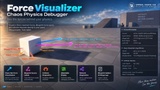
See the forces behind your physics.
Force Visualizer is a physics debugging plugin for Unreal Engine 5.8 that helps you inspect Chaos resultant forces, supported Blueprint force inputs, and collision impulses directly in your scene.
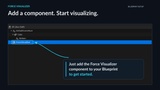
Add a Force Visualizer component to your physics actor and continue using Unreal Engine’s native force nodes.
Key Features
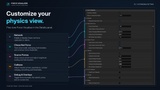
Chaos Net Force Visualization — Display the equivalent resultant force calculated from the body’s velocity changes, including integration and solver effects.
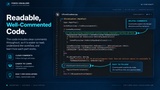
Automatic Blueprint Source Labels — Track supported native Add Force and Add Force at Location nodes in Blueprints containing a Force Visualizer component. Your authored nodes remain unchanged.
Readable Force Information — Source labels display the input vector, magnitude, and Bone Name. Use individual node comments to give forces recognizable names.
Time-Weighted Display Averaging — Reduce rapid changes using impulse-preserving averages, without artificially rotating force directions.
Adjustable Arrow Scaling — Independently enable magnitude-based scaling for Source and Chaos arrows, with lengths bounded relative to the observed component’s size.
Optional Force Breakdown — Inspect Applied, Gravity / Rules, Impulse, and Solver channels.
Collision Diagnostics — Display separate collision impulse markers with configurable persistence and contact merging.
Network Diagnostics — Replicate server-authored snapshots to relevant clients, with clearly labelled local fallback before server samples arrive.
Blueprint Getters and Debug Logs — Access captured values and inspect diagnostic summaries.
Useful For
Vehicle tuning, rigid-body interactions, collision investigation, and understanding unexpected physics motion.
Requirements and Scope
Unreal Engine 5.8 and a valid simulating Chaos rigid body.
One selected physics body per visualizer component.
Automatic source tracking applies to supported Blueprint nodes, not arbitrary C++ force calls.
Chaos resultant forces cannot reconstruct individual force sources or position-only solver corrections.
Gravity / Rules may include custom integration rules.
Network diagnostics use latest-state snapshots, not a lossless physics history.
Intended for development debugging; debug arrows are not a Shipping HUD.
Setup instructions and limitations are included in the plugin’s documentation.