


Description
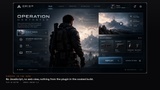
Design your game UI as HTML with Tailwind, by hand or with Claude Code, Cursor, Codex, v0, Lovable or Claude Artifacts, preview it in any browser, and import it as a plain Widget Blueprint built from standard UMG widgets. No web view, no JavaScript runtime, no third-party code. The plugin exists only in the editor; cooked builds contain no trace of it.
Made for the agent workflow:
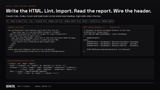
A dependency-free CLI and a commandlet run on a build agent with no GUI. Lint a design in milliseconds. Import and get a JSON report with coded diagnostics and line numbers, a manifest you can diff in code review, and a generated C++ header with BindWidget members and implementable events. Eight Agent Skills cover the loop, including one that turns a supplied screenshot or mockup into importable HTML.
They are served over MCP: your activation code ships in ACTIVATION.txt inside the download, so you paste it at mcp.digitalxbunker.com/activate and get your key instantly — no account, no order number, no waiting. The page then fills that key into a ready-to-paste config for Claude Code, Cursor, Codex CLI or OpenCode, with a copy button. The importer itself needs no key and no network.
Re-import keeps your work:
Change the HTML, re-import, and widgets with the same name and class are reused in place. Event Graph references and designer tweaks on untouched properties survive. The report lists exactly what was added, kept, reclassed and removed. The importer never overwrites a Widget Blueprint it did not create.
Studio hygiene built in:
Every text becomes an FText in a String Table.
Same input produces byte-identical output; provenance is recorded on the asset.
Deterministic naming. Full source included.
Portable-boundary check and 21 automation contracts ship with the plugin.
What converts:
Layout: flex rows and columns with gap, justify, align, grow and wrap; grid with spans; absolute positioning to Canvas anchors, in CSS paint order.
Surfaces: backgrounds, linear and radial gradients through shipped UI materials, frosted-glass blur, borders on any side, radius, opacity, padding, margin.
Transforms: rotate, scale and translate map to the widget render transform; transform-origin sets the pivot. aspect-ratio and capitalize resolved.
Text: size, weight, colour, alignment, tracking, line height, uppercase, ellipsis. Fonts imported from installed families or shipped @font-face files, so text metrics match the browser.
Controls: buttons with hover, pressed and disabled states; progress bars, check boxes, sliders, text inputs, dropdowns. Hidden states stay in the asset as Collapsed.
Images: imported as UI textures. SVG files and inline SVG rasterized into crisp UI textures (shapes, paths, strokes, gradients).
CSS: Tailwind v3 and v4 utilities, variants, arbitrary values and the full palette; inline styles; style blocks with selectors, pseudo-classes and custom properties; local stylesheets and their @import files.
Verify, do not squint:
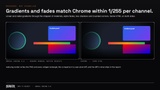
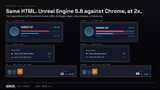
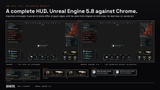
webumg render draws the imported widget to a PNG and writes every widget’s rectangle, so you or your agent compare against the browser by numbers. The shipped demo HUD differs from a Chrome screenshot on 1 percent of pixels (glyph edges); a complete survival HUD of 838 widgets, authored as one HTML file, differs on 6 percent, again at glyph edges; gradients, fades and vignettes match Chrome within 1/255 per channel.
Technical details:
Modules: DBWebUMGCore (parser, cascade, mapper), DBWebUMGEditor (asset emitter, commandlet, menus, render). Both Editor type.
Editor menu: Tools > Web to Widget: Import HTML. Content Browser: Web to Widget: Reimport from HTML.
Commandlet: -run=DBWebUMGImport -Input=<file|dir> -Dest=/Game/UI/Web [-Lint] [-Report=] [-Headers=]
CLI: the webumg command-line script in Tools (import | lint | reimport | render), Python 3, standard library only.
Skills: eight Agent Skills served over MCP at mcp.digitalxbunker.com for Claude Code, Cursor, Codex CLI, OpenCode and any MCP-capable tool. Your activation code is in ACTIVATION.txt at the package root — paste it at mcp.digitalxbunker.com/activate for an instant license key; Tools/setup-mcp.py wires it up. The importer, CLI and commandlet need no key and no network.
Documentation: getting started, authoring guide, support matrix, diagnostics reference, CLI and format reference, worked example, demo content. Online: https://digitalxbunker.com/products/unreal-engine/web-to-widget/
Supported engine version: 5.8. Editor on Windows (Mac and Linux builds to follow). Output runs on every platform UMG supports, because nothing from the plugin ships in your game.
Not supported (by design, documented): JavaScript, @media breakpoints (use --viewport), pseudo-elements, CSS animations, remote stylesheets, SVG text and filters.
Known limitation: the Button OnClicked to generated event wiring in the Blueprint graph is manual in 1.0.
Support: [email protected].
Product page: https://digitalxbunker.com/products/unreal-engine/web-to-widget/