Opis
Kweave Bridge extends what PCG can do on the GPU.
It lets your kernels query the scene, adds GPU nodes that sample and scatter on the meshes already placed in your level, and connects your running editor to Kweave, the free node graph editor for PCG kernels.
What's new in v2 : GPU mesh nodes (UE 5.8), GPU Scene and landscape layer queries, and kernels that only pay for the scene data they call.
---
Scene Queries
Vanilla PCG GPU nodes can't easily reach distance fields, foliage instances or the GPU Scene without custom C++ data interfaces. Bridge ships all of that built in. Its own Custom HLSL node keeps the kernel types, the pin system and the HLSL entry point of the vanilla one as drop-in replacement, and its kernels read the scene through plain HLSL functions:
Global Distance Field ➝ scene-wide signed distance to the nearest surface. Distance queries, normals, snapping, occlusion and ray marching.
Mesh Distance Field ➝ per-object distance fields with higher precision. Smooth blending, gap detection and per-object identification, with an optional spatial grid for scenes with many meshes.
Foliage ➝ spatial queries against foliage instances. Density, nearest-instance lookup, proximity testing.
Atmosphere LUT ➝ sky atmosphere transmittance and irradiance sampling.
Pay for what you call ➝ a data interface is attached only to the kernels that call it, and each one has its own toggle in Editor Preferences.
Works whether you write HLSL by hand or build it visually in Kweave.
---
GPU Mesh Nodes
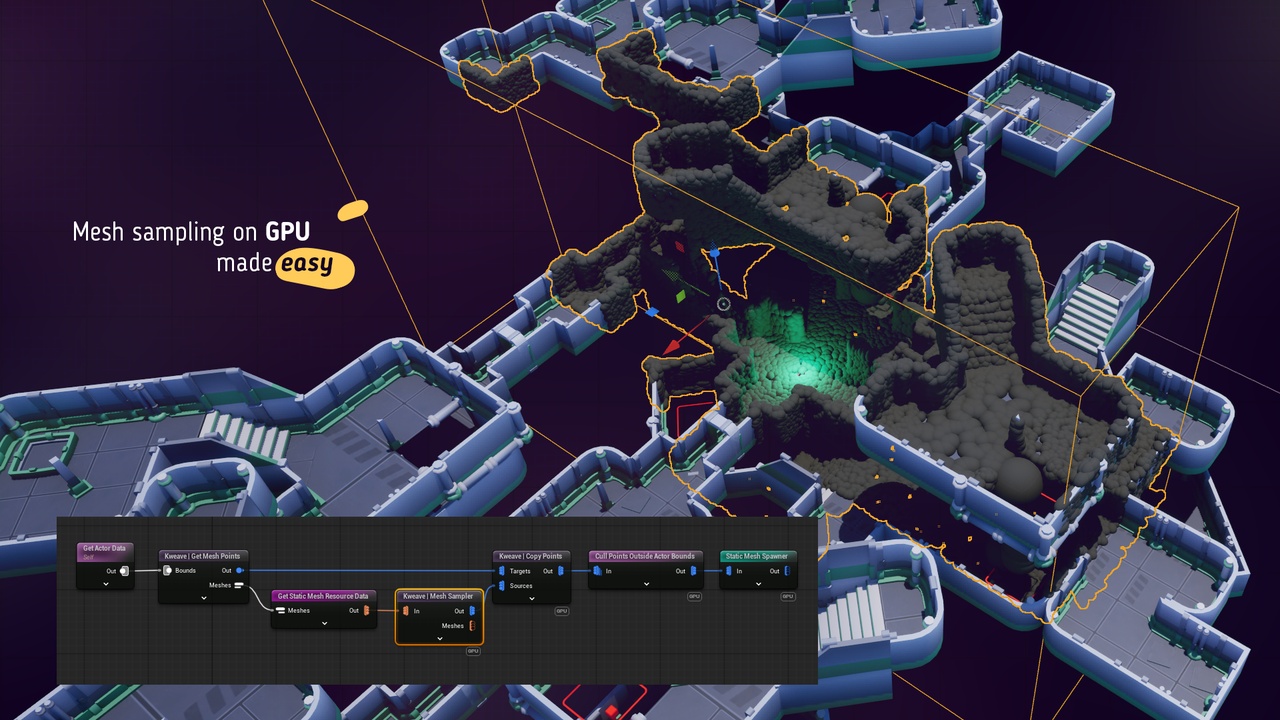
New in v2, on Unreal Engine 5.8. A level already dressed with rocks, walls and props can receive points on the surface of every one of them: each mesh is sampled once, and its points land on every placement of that mesh.
Get Mesh Points ➝ one point per static mesh placed inside a box, each carrying its mesh ID, plus a table of the distinct meshes. Filters by actor class, actor tags and component tags.
Mesh List ➝ makes several static meshes readable by one GPU node, each picked by index: vertices, triangles, normals, UVs, vertex colors, bounds, surface area and area-weighted triangle picking.
Mesh Sampler ➝ samples points on every mesh of a list, on the GPU. Per vertex, per triangle, a fixed count per triangle, or by density with optional blue noise.
Copy Points ➝ copies onto each target point the source data that carries the same key, on the GPU. The vanilla node pairs data with data, this one chooses per point.
Shared geometry cache ➝ a mesh is gathered once for every list that reads it and kept between executions, within a memory budget you set.
And more!
---
Live Editing
Bridge also connects the free Kweave web app to your running editor.
Live Push ➝ graph edits push HLSL, kernel settings and pin configs straight to your GPU node. The kernel recompiles, the viewport updates.
Pull ➝ import existing HLSL and pin config from any GPU node back into Kweave with one click.
Auto-Push ➝ a push follows every change to the generated code. Move a slider, see the viewport change.
Open in Kweave ➝ a button on the node opens the web app with a graph attached to it, and selection sync opens the document bound to the node you select in the editor.
Compute Sources ➝ discover, import, create and push PCG Compute Source assets from inside Kweave. Bridge handles dependency wiring automatically.
Multi-Node Workflow ➝ each Kweave document attaches to a different GPU node. Switch documents, the context follows.
---
What It Is NOT
Not a node editor ➝ that's Kweave, and it's free.
Not required to use Kweave ➝ copy-paste always works.
Not tied to Kweave either ➝ the mesh nodes are regular PCG nodes, and the scene queries work with HLSL written by hand.
---