




Opis
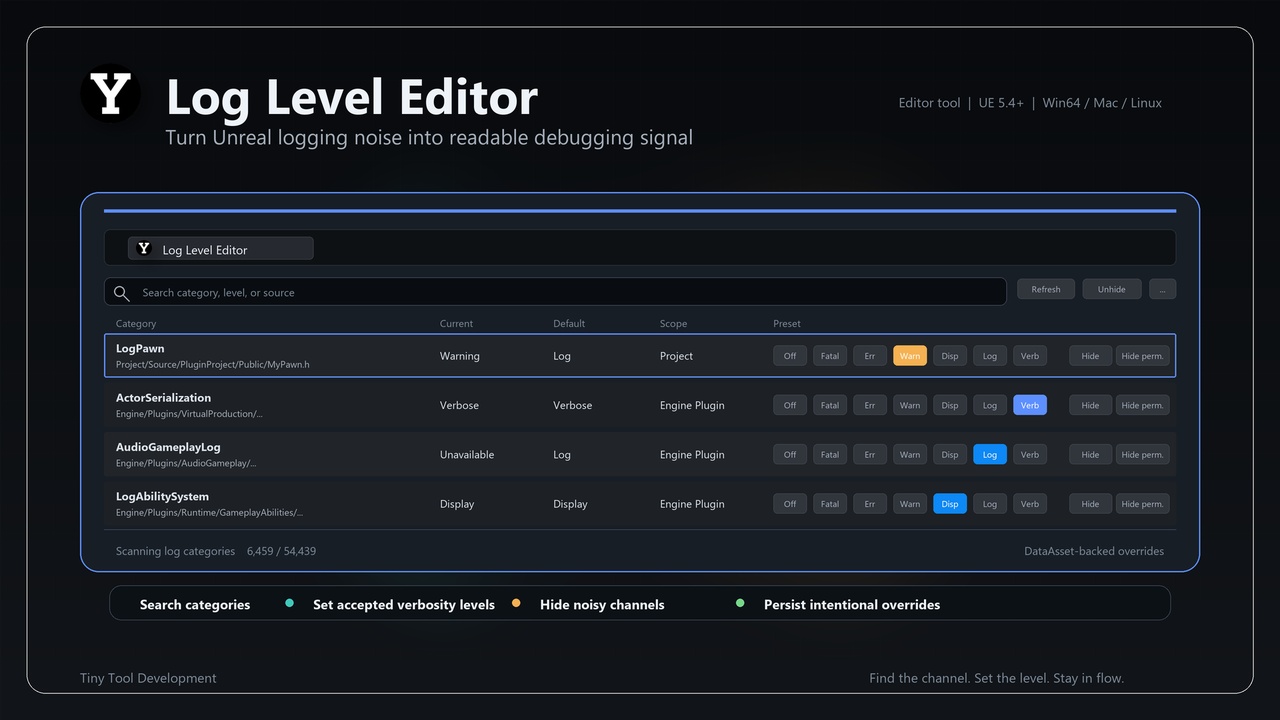
LogLevelEditor is a C++ Unreal Engine code plugin. Its current implementation is centered on this implementation scope: An editor plugin that automatically discovers all custom log categories in your project and plugins and exposes a convenient log level dashboard to quickly adjust verbosity, hide noisy channels, and persist settings in a data asset.
The plugin is implemented through 1 module: LogLevelEditor. The source surface includes implementation concepts such as Log Channel Scanner, Log Category Info, Log Level Editor Commands, MCP Job Record, Log Level Editor String Output Device, Log Level Data Asset, Log Level Widget Data, Log Level Editor MCP Interface.
⭐ What You Get
🔹 An editor plugin that automatically discovers all custom log categories in your project and plugins and exposes a convenient log level dashboard to quickly adjust verbosity, hide noisy channels, and persist settings in a data asset.
🔹 Module layout: LogLevelEditor (Runtime, Default, platforms: Win64, Linux, Mac).
🔹 Implementation footprint: 15 C++/Build.cs files inspected under Source.
🔹 Version: 1.1.4
⭐ Key Features
🔹 Implementation-derived scope: An editor plugin that automatically discovers all custom log categories in your project and plugins and exposes a convenient log level dashboard to quickly adjust verbosity, hide noisy channels, and persist settings in a data asset.
🔹 Module layout: LogLevelEditor (Runtime, Default, platforms: Win64, Linux, Mac).
🔹 Implementation footprint: 15 C++/Build.cs files inspected under Source.
🔹 Source-backed concepts include: Log Channel Scanner, Log Category Info, Log Level Editor Commands, MCP Job Record, Log Level Editor String Output Device, Log Level Data Asset, Log Level Widget Data, Log Level Editor MCP Interface, UI Command List, Log Level Editor Module, S Search Box, S Log Level Editor Widget, Log Ca
🔹 Editor/user commands visible in source include: Log Level Editor, Log Level Editor Settings.
⭐ Typical Use Cases
🔹 Discover project and plugin log categories and adjust verbosity from an editor dashboard.
🔹 Hide noisy channels during focused debugging sessions.
🔹 Persist log-level choices through implementation-backed data assets.
⭐ Included Content
🔹 Version: 1.1.4
🔹 Category: Editor Tools
🔹 Can contain content: Yes
🔹 Module: LogLevelEditor (Runtime, Default, platforms: Win64, Linux, Mac)
🔹 Representative source types: FLogChannelScanner, FLogCategoryInfo, FLogLevelEditorCommands, FMcpJobRecord, FLogLevelEditorStringOutputDevice, ULogLevelDataAsset, FLogLevelWidgetData, ULogLevelEditorMcpInterface, FUICommandList, FLogLevelEditorModule, SSearchBox, SLogLevelEditorWi
🔹 Build.cs dependencies: ApplicationCore, Core, CoreUObject, EditorFramework, EditorInteractiveToolsFramework, EditorStyle, Engine, InputCore, InteractiveToolsFramework, Json, JsonUtilities, LevelEditor, LogLevelEditor, Projects, Settings, Slate, SlateCore, ToolMenus, UnrealEd
⭐ Requirements & Compatibility
🔹 Distribution method: Unreal Engine code plugin
🔹 Engine target from descriptor: 5.4.0
🔹 Platform allow list from descriptor: Win64, Linux, Mac
🔹 Network replication: no explicit replication surface was detected in the inspected source
🔹 Third-party source folder: none detected under Source/ThirdParty
⭐ Notes
🔹 Network replication: no explicit replication surface was detected in the inspected source
🔹 Third-party source folder: none detected under Source/ThirdParty
🔹 Binaries folder in current package tree: not present
⭐ Support
🔹 Support URL from descriptor: mailto:[email protected]
🔹 Discord Channel: #log-level-editor (https://discord.gg/Zvm8k36WB2)