
الوصف
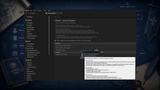
QuestSystem turns quest design into a data-authoring task, not a programming task — for single-player and multiplayer projects, with the exact same workflow.
Drop the plugin into any project and it attaches itself: no custom PlayerState, no custom GameState, no manual replication wiring. Designers build quests as Data Assets; gameplay code fires a handful of typed events; QuestSystem handles progress tracking, party coordination, replication, rewards, and persistence.
Why QuestSystem
Most quest systems force a trade-off: simple and single-player-only, or multiplayer-capable but only if you rebuild your PlayerState/GameState around them.
QuestSystem removes that trade-off.
Zero-config integration
A world subsystem auto-creates a Quest Manager component on the GameState and on every PlayerState as it spawns—covering login, late join, and seamless travel automatically.
Already have custom PlayerState or GameState classes? The subsystem detects manually placed components and steps aside.
One component, two roles
The same manager class hosts different behavior depending on where it lives:
- PlayerState → manages personal quests.
- GameState → manages shared party quests, roster tracking, and player contributions.
No parallel class hierarchies to maintain.
Server-authoritative multiplayer
Every mutating operation automatically routes to a reliable Server RPC when called without authority:
- Start Quest
- Complete Quest
- Fail Quest
- Abandon Quest
- Update Progress
- Notify Events
Call the same API from client or server code—the framework handles the networking.
True data-driven authoring
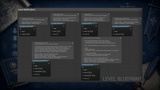
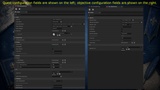
Quests and objectives are implemented as Primary Data
There is no hardcoded quest content anywhere in the framework.
Designers create, edit, and balance quests entirely inside the Unreal Editor without writing C++ or Blueprint logic for standard use
cases.
Three Ways to Share a Quest
Each quest chooses its own sharing model, allowing one project to freely mix solo, cooperative, and competitive-cooperative gameplay.
Personal
A classic single-player quest tracked only on the owning player's PlayerState.
Shared
One collective progress pool tracked on the GameState,ntribution tracking.
Ideal for objectives where the entire party works together.
Individual
Each player receives their own copy of the quest on their PlayerState, while the GameState tracks participation and reports the quest complete only when every party member has finished.
A single function call starts a party quest for everyone currently connected—whether that's one player in standalone mode or a full multiplayer party.
Minimum and maximum party sizes are enforced automatically, and late joiners are enrolled without additional code.
Event-Driven Progress, Not Manual Bookkeeping
Gameplay code never manipulates quest counters directl
Instead, gameplay simply reports events such as:
- Kill
- Pickup
- Reach Location
- Interact
- Custom Event
QuestSystem matches those events against every active them.
Sequential objectives activate one at a time.
Once every required objective is complete, the quest aecomes ready to turn in.
Because matching is centralized, behavior stays consistent across the entire project—including MMO-style behavior where one event can advance multiple active quests sharing the same objective.
Smart World Targets — No Programmer Required
A single component turns almost any actor into a quest target:
- NPCs
- Letters
- Chests
- Bottles
- Doors
- Levers
- Custom interactive objects
Only three things need configuration.
1. What it reports
Configure:
- Event Type
- Identifier
- Count
Optionally link an Objective asset to auto-fill and lock these values, ensuring world objects and quest data can never drift out of sync.
2. How it's triggered
Combine any trigger types:
- Overlap
- Damage
- Interact
- Destroyed
Or invoke it manually from custom gameplay systems.
3. What happens afterward
Choose whether the target:
- Fires once
- Respawns after a delay
- Remains permanently repeatable
Optionally:
- Hide or destroy the owning actor
- Spawn feedback effects
- React through Blueprint events (an NPC flees, a ches
A ready-to-place actor variant provides a mesh-plus-taquest props.
Quest markers automatically appear only when the player has a matching active objective—no visibility scripting required.
No-Code Quest NPCs & Visual Markers
Turn any Character or Actor into a quest giver, a turn-in point, or both — just add the matching component and assign which quests it offers or accepts. No dialogue-tree programming required for standard offer/accept/turn-in flows.
On the player side, one Interactor component plus a single function call wires up "walk up and press a button": it automatically finds
and interacts with the closest relevant thing, in priofinished quest first, then accepting an offered one,then triggering a nearby world target.
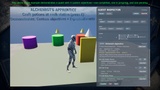
Every quest-relevant actor can also show a floating marker automatically, with three interchangeable visual styles to match any art direction:
- A self-provisioning 3D icon that works out of the box with zero setup
- A world-space UMG widget for a fully custom-designed marker (text, icons, animation — entirely up to your Widget Blueprint)
- A spawned Blueprint actor for a bespoke floating marker (an animated arrow, a custom mesh, anything an Actor can be)
Mix multiple marker types on the same object for more than one visual at once. Markers automatically reflect the live quest state — available, in progress, ready to turn in — and only appear while actually relevant, with zero visibility scripting.
Built for Multiplayer From the Ground Up
- Custom serialization replicates the framework's complex quest-progress data efficiently.
- Personal and Individual quest events automatically forward to the shared party manager whenever appropriate.
- Rewards are protected by an internal one-shot guard, guaranteeing they are granted exactly once—even across replication, reconnects, and edge cases.
Override a single event to plug in your own reward system without modifying framework code.
Persistence That Fits Your Save System
QuestSystem doesn't impose its own save format.
Export and Import functions serialize:
- Quest asset references
- Active progress
- Objective states
- Completed quest snapshots
Finished quest snapshots preserve the final state of completed objectives (for example, displaying 3/3 in a quest journal even after completion).
The serialized data is stored in a plain struct, allowing it to integrate cleanly into any existing save-game system.
Validated, Not Just Trusted
A built-in dependency validator automatically detects :
- Every asset edit in the editor
- World startup in Development builds
- Manual validation through Blueprint
- Manual validation through console commands
Broken quest dependency chains are caught during develrs.
A Full Debugging Toolkit Included
An optional debug module provides:
- An in-game debug overlay written entirely in C++
- Live quest and objective inspection
- One-click Start, Complete, Fail, Abandon, and Reset controls
- Direct shortcuts from a running game to the Quest as
Console commands support:
- Starting quests
- Completing quests
- Listing active quests
- Running validation
All commands transparently forward from clients to the server during multiplayer testing.
What's in the Box
Runtime Core
Includes:
- Quest and Objective Data Assets
- Quest Manager Component
- World Subsystem
- Event Notification API
- Interaction Components
- World Target Components
Optional Debug Module
Includes:
- Cheat console commands
- In-game debug overlay
The debug module is fully isolated so the runtime corey UI framework.
Comprehensive documentation covering:
- Core concepts
- Quest authoring
- Event-driven progression
- Multiplayer replication
- Save/load integration
- Debugging tools