

Açıklama
────────────────────────────────────────
THE PROBLEM THIS SOLVES
────────────────────────────────────────
Before this plugin:
• Delete a folder or parent actor → actors inside are NOT deleted. You manually hunt them down.
• Duplicate a folder or parent actor → children are NOT included. You rebuild the tree.
With this plugin:
• One right-click. The entire tree is handled — folders, sub-folders, and every actor nested inside, in one operation.
────────────────────────────────────────
USAGE
────────────────────────────────────────
Right-click any folder or actor with attached children in the World Outliner.
The Outliner Hierarchy Actions section appears in the context menu.
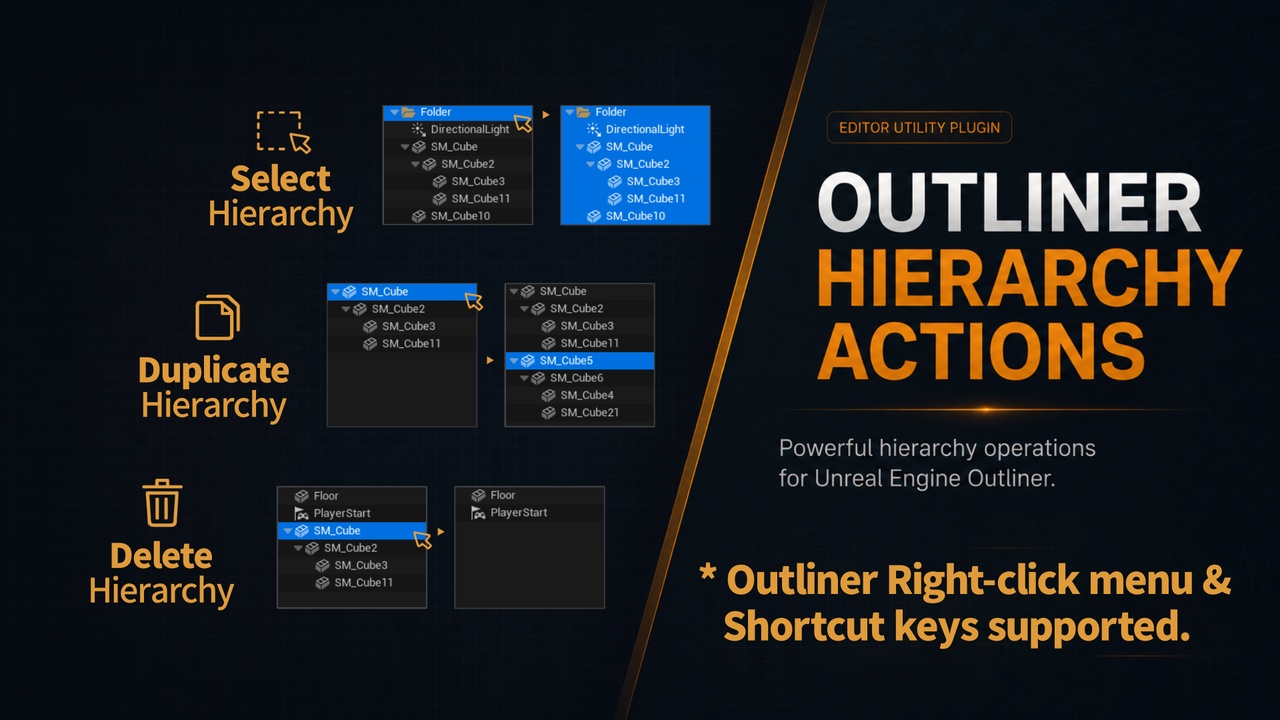
▶ Select Hierarchy
Select the folder or parent actor and every descendant in a single action.
Instantly grab the entire group before moving, inspecting, or operating on it.
▶ Duplicate Hierarchy
Duplicates the complete structure — folder tree and all actors inside.
The new folder hierarchy is re-created alongside the originals, and only the
newly duplicated items are selected when the operation completes.
Works on both folders and actors with attached children.
▶ Delete Hierarchy
Removes every actor inside the selected folders or attached to the selected
parent actors, then deletes the folders themselves.
Fully undoable (Ctrl+Z).
────────────────────────────────────────
KEYBOARD SHORTCUTS
────────────────────────────────────────
All three commands are registered in the editor's keyboard shortcut system.
Assign any hotkey via:
Edit → Editor Preferences → Keyboard Shortcuts → Outliner Hierarchy Actions