
描述
NetOptAnalyzer Pro - Full Technical & Feature Analysis
NetOptAnalyzer Pro is an advanced, fully automated network optimization and profiling plugin built specifically for Unreal Engine 5. It is designed to bridge the gap between complex multiplayer networking concepts and user-friendly, one-click solutions. By combining real-time analysis, static Blueprint scanning, and AI-driven insights, it serves as an indispensable tool for both indie developers and AAA studios building multiplayer games.
1. Core Feature Set🔴 Live Network Profiler (Real-Time Tracking)
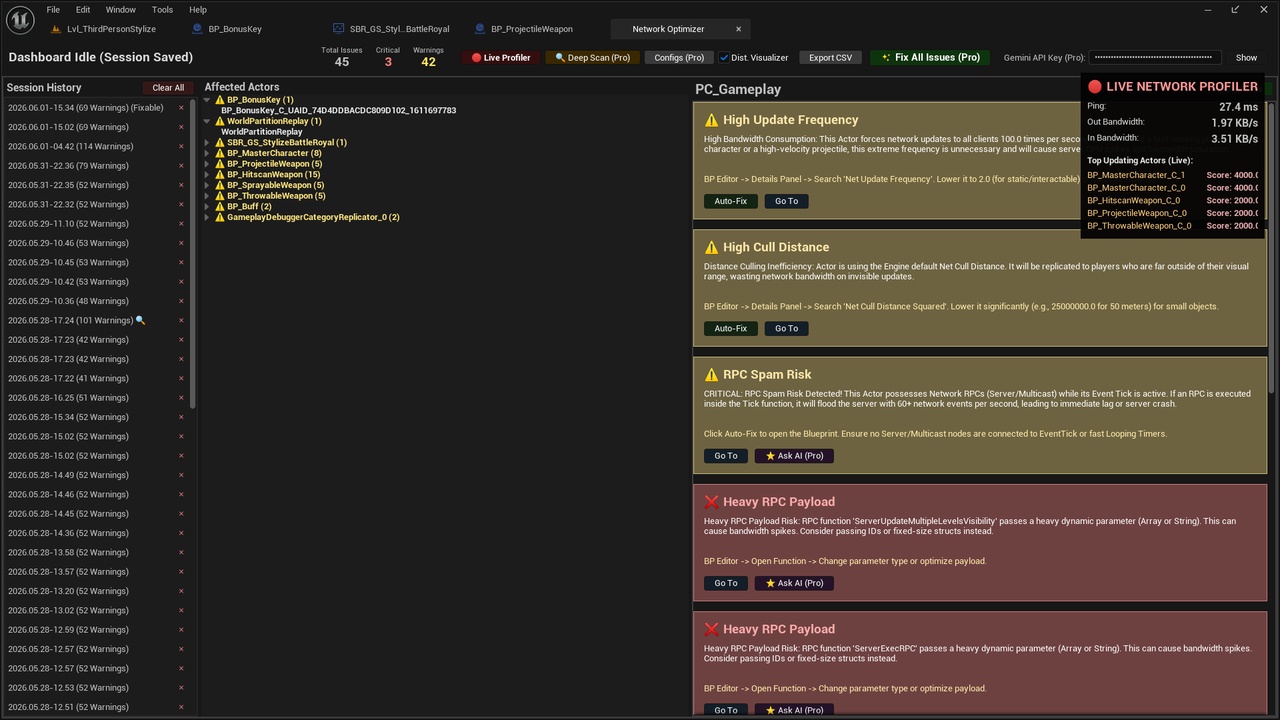
What it does: Slides out dynamically when Play In Editor (PIE) is active, capturing live data from the UNetDriver.
Key Metrics: Displays average Ping, Inbound Bandwidth, and Outbound Bandwidth in real-time.
Top Updating Actors: Dynamically identifies and lists the Top 5 most network-heavy actors currently active in the world, sorting them by a custom-calculated BandwidthScore so developers can instantly spot sudden bandwidth spikes.
🔍 Dynamic Network Tracking (Subsystem)
Runs silently in the background during PIE testing, evaluating every replicated actor against 9 proprietary heuristic rules:
High Update Frequency: Flags actors ticking >30 times per second unnecessarily.
Always Relevant Spam: Detects objects bypassing distance culling.
High Cull Distance: Identifies wasteful rendering over massive distances.
Ghost Replicator: Actors marked to replicate but possessing no replicated properties.
Component Overhead: Actors bloated with too many independent network components.
Inefficient Variable Condition: E.g., UI variables replicating to everyone instead of OwnerOnly.
RPC Spam Risk: Detects Tick functions invoking network RPCs.
Heavy RPC Payload: Identifies massive arrays or strings being passed via RPC.
Phantom Replication: Replicated actors with no physical mesh or collision.
🛠️ Auto-Fix Engine & Bulk Execution
One-Click Solutions: Developers can instantly fix simple issues (like High Cull Distance or Update Frequency) by clicking Auto-Fix. The plugin modifies the Class Default Object (CDO) and saves the Blueprint automatically.
Fix All in Class / Project: Bulk operations allow developers to optimize hundreds of instances or entire actor classes simultaneously with zero manual effort.
EventGraph Navigation: If the issue is inside visual scripting (e.g., RPC Spam), clicking Go To Blueprint doesn't just open the asset. It parses the UEdGraphNodes, focuses the camera on the exact problematic node, and pins a highly visible red/yellow warning bubble (bHasCompilerMessage) to it.
🧠 Gemini 3.5 AI Integration (Context-Aware)
Token-Optimized Queries: Instead of sending massive, expensive log files, the plugin extracts only the essential CDO parameters and FUNC_Net Event Graph node configurations.
Direct Code Generation: Connects securely to the Google Gemini API to return highly technical, step-by-step Blueprint/C++ solutions without conversational filler.
Smart Quota Protection: The AI button intelligently hides itself for basic issues (which the Auto-Fix engine can handle), ensuring API tokens are only spent on complex structural logic.
⚙️ AAA INI Configurator
Analyzes the project's DefaultEngine.ini network configuration.
Compares current settings against industry-standard MMO/Battle Royale configurations (e.g., NetServerMaxTickRate, ConfiguredInternetSpeed).
Applies optimal settings with a single click, flushing the configuration to disk instantly.
2. Technical Architecture & Implementation1. Pure C++ Slate UI (SNetOptAnalyzerDashboard)
The entire interface is built from the ground up using Unreal Engine's proprietary Slate framework. It completely avoids UMG/Widget Blueprints to ensure maximum editor performance and native integration.
Features dynamic STreeView generation for organizing actors and warning groups.
Implements a highly responsive SSplitter layout with an Inspector Panel that updates dynamically based on the selected issue.
2. Static Asset Scanning (FNetOptStaticScanner)
Utilizes the FAssetRegistryModule to inspect project files without needing to run the game.
Extracts UBlueprint graphs and performs Breadth-First Search (BFS) traversals on UbergraphPages to trace execution flows from ReceiveTick events down to specific Network RPC nodes.
3. Session Persistence
Scan results and session logs are not lost when the editor closes.
Everything is serialized via FJsonObjectConverter and saved locally to Project/Saved/NetOptAnalyzerLogs.
Historical sessions can be reloaded via the dashboard, allowing developers to compare network performance before and after applying fixes.
3. Value Proposition (Marketplace Angle)
For a developer looking to purchase NetOptAnalyzer Pro, the value is immediately clear:
Saves Hundreds of Hours: Manually tracking down which of the 5,000 actors in a world is causing server lag is a nightmare. This plugin points exactly to the actor, the specific node, and fixes it for you.
Prevents Server Crashes: By catching ReceiveTick to RPC loops before the game is packaged, it saves live servers from catastrophic DDoS-style self-destruction.
No Network Expertise Required: Solo developers or artists who don't understand NetUpdateFrequency or AlwaysRelevant can achieve AAA-level network optimization simply by clicking "Fix All".
AI Mentorship: The Gemini integration acts as a senior network programmer sitting next to the user, explaining complex custom-logic issues instantly.
Summary
The transition from identifying a problem -> navigating to the problem -> understanding the problem -> fixing the problem is reduced from minutes/hours down to milliseconds. The Pro version is a complete, enterprise-grade tool ready for production environments.
Youtube Presentation Video: https://youtu.be/vm1CqwnrVWw