Opis
RuntimeCoordAxis is a complete in-game runtime transform editing & viewport auxiliary tool built for Unreal Engine 5, fully developed with Blueprints, no editor-only dependencies, fully available in PIE and packaged projects.
Perfect for custom runtime editors, BIM digital twin, industrial simulation, 3D scene browsing and independent viewport interaction systems.
Core Features
1. Four Transform Editing Modes
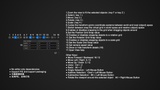
Integrated full-process object transformation logic, switchable by shortcut keys:
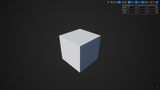
Select Only Mode(Key 1)
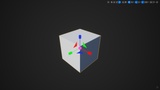
Move Translation Mode(Key 2)
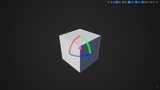
Rotation Mode(Key 3)
Scale Mode(Key 4)
Single Selection:Left Mouse Button
Additive Selection:Ctrul + Left Mouse Button
Subtractive Selection:Alt + Left Mouse Button
2. Space Coordinate System Switch
Support World Space / Local Space switching
Adapt to directional offset and attitude rotation of complex components and models
3. Complete Grid Snap System
Dual space snapping:World Grid / Relative Grid
Support Move Grid Snap, Rotation Angle Snap, and Scale Step Snap
4. Free Flying Camera Control
Standard 3D viewport camera operation:
Move Forward / Backward:W、S
Move Left / Right:A、D
Move Up / Down:E、Q
Adjustable camera movement speed, support fast browsing and fine inspection
5. One-Click Viewport Auto Fit
Shortcut F to auto-fit all selected Actors
Calculate camera safe distance based on FOV perspective formula
6. Runtime Widget Transform Panel
Built-in independent UI widget:
Real-time display Actor Location / Rotation / Scale data
Directly edit transform parameters through UI input
Control selected actors’ transform values visually
7. Undo & Redo Function
Undo:Ctrl + Z
Redo:Alt + Z
Record transform operation stack, realize rollback and recovery of editing behavior
8. High-Performance Runtime Axis Gizmo
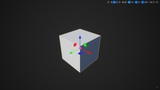
Red/Green/Blue standard three-axis display, dynamic follow selected actors, lightweight rendering, low performance cost, stable operation for long-time use.
9. Orbit Camera Around Selected Actor
When an Actor is selected: Press Alt + Right Mouse Button to orbit the viewport around the selected object, enabling intuitive inspection of the object from all angles.
Application Scenarios
BIM architecture & municipal engineering digital twin
Industrial equipment / mechanical simulation viewing and debugging
Custom in-game runtime level editor
3D independent viewport browsing, component positioning and pose adjustment
Scene auxiliary development and visual inspection tools
RuntimeCoordAxis 是一套基于 UE5 打造的纯运行时三维变换编辑 + 自定义视口操作系统,全程蓝图实现,无编辑器独占依赖,PIE 预览 & 打包成品项目均可正常使用。专为自定义运行时编辑器、BIM 数字孪生、工业仿真、三维场景检视、独立视口交互场景量身打造。
核心功能
四大变换操作模式
1、快捷键快速切换编辑状态:
● 仅选择模式(按键 1)
● 移动变换模式(按键 2)
● 旋转变换模式(按键 3)
● 缩放变换模式(按键 4)
● 单选:鼠标左键、加选:Ctrl + 鼠标左键、减选:Alt + 鼠标左键
2、双坐标系切换支持
● 世界空间 / 本地空间 自由切换,适配异形模型、组合构件、复杂子组件姿态编辑。
3、全类型吸附系统
● 支持「世界网格 / 相对网格」双规则吸附
● 支持移动吸附、角度旋转吸附、缩放步长吸附
4、自由飞行相机操控
标准专业三维视口操控逻辑:
● 前后移动:W / S
● 左右平移:A / D
● 升降高度:E / Q
● 可自定义相机移动速度,兼顾快速漫游与精细查看
5、一键适配选中对象视口
● 快捷键 F 一键聚焦选定的对象
6、可视化变换 UI 面板
内置独立 Widget 界面:
● 实时显示选中物体 位置 / 旋转 / 缩放 数据
● 支持面板直接输入数值修改物体变换参数
● 可视化管理多选 Actor 整体变换
7、操作撤销 / 恢复
● 撤销操作:Ctrl + Z
● 恢复操作:Alt + Z
● 缓存变换操作堆栈,支持编辑动作快速回滚与还原
8、轻量化运行时坐标系 Gizmo
经典红 / 绿 / 蓝三色三轴可视化,动态绑定选中物体,高性能轻量化渲染,长时间运行稳定低耗。
9、环绕选中对象旋转视口
选中任意 Actor 后,按下 Alt + 鼠标右键,可拖动鼠标让视口环绕选中对象旋转,方便从各个角度直观检视物体。
适用场景
● BIM 建筑、市政管网、基建数字孪生项目
● 工业机械、智能制造设备仿真调试
● 游戏内自定义运行时关卡编辑器
● 三维独立视口浏览、构件定位、姿态调整
● 项目开发辅助工具、3D 可视化调试组件