












الوصف
📦 Demo | 🎞️ Screenshots & Videos | 📘 Documentation | 🎮 Discord Support
The demo includes a complete copy of the plugin, so you can try it out and decide whether it’s worth buying.
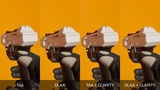
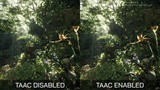
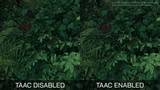
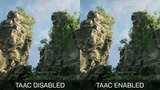
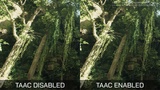
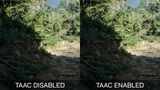
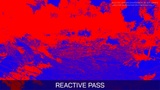
Clarity reduces the blurriness and soapy look often associated with standard TAA. It enhances TAA through adaptive temporal tuning and a custom reactive pass. The reactive pass is compatible with TAA, TSR, DLAA, DLSS, and other AA methods or upscaling solutions. For more details, read the Q&A below.
🍀 If you're happy with your purchase, please consider leaving a ⭐⭐⭐⭐⭐ review. It only takes a moment and would mean a lot to me.
❓ If you have any questions or encounter a bug, please reach out to me on Discord before leaving a review. I’ll do my best to help.
👉 Also, check out my other products. I have some useful assets available for free.
Questions & Answers:
Q: Why should I buy Clarity?
A: Clarity can make standard TAA look clearer and more defined than DLAA while retaining TAA’s lower GPU cost and broad hardware compatibility. Its reactive pass also works with TSR, DLSS, and DLAA, adding clarity regardless of the selected AA or upscaling method.
Q: Is this a new standalone anti-aliasing method like FXAA, TAA, or TSR?
A: No. Clarity is not a separate anti-aliasing method. It works alongside Unreal Engine’s temporal anti-aliasing.
Q: How does Clarity work?
A: The plugin does not implement its own temporal anti-aliasing. It adds two processing layers:
• Adaptive tuning. It measures camera movement and smoothly adjusts TAA CVars, changing how much frame history TAA uses, its filtering, sampling, and sharpening.
• Reactive pass. It uses motion vectors, depth differences, and local image contrast to build a per-pixel mask, then applies local sharpening based on that mask. This processing takes place after tonemapping, allowing the reactive pass to work with any AA method or upscaler.
Q: What is the performance impact of Clarity?
A: Clarity itself has a negligible impact on performance. If you do not need upscaling, switching from TSR to TAA + Clarity at native resolution may save approximately 1–3 ms. Actual results depend on the scene, resolution, hardware, and project settings.
Q: Should I use TAA or TSR?
A: TAA and TSR are designed for different purposes, so comparing them directly is not always meaningful.
Choose based on your project target:
• If you render at native resolution and do not need upscaling, TAA offers a lower GPU cost.
• If you render below native resolution and need upscaling to 1440p or 4K, use TSR.
Clarity’s adaptive tuning primarily targets TAA, while its reactive pass works with any AA method or upscaler.
Q: Does the plugin help with ghosting or flickering?
A: No, not fundamentally. It primarily improves perceived sharpness. It may slightly reduce TAA ghost trails by relying more on the current frame, but it does not fix the underlying causes of ghosting or flickering.
Q: Does Clarity work with Sequencer/MRQ?
A: Yes. Clarity works with Sequencer and Movie Render Queue.
Q: Does Clarity work with DLSS/DLAA?
A: Yes. Because the reactive pass runs after tonemapping, it works with both DLSS and DLAA. When combined with DLAA, Clarity can produce an even cleaner and more detailed image.