









Opis
Save and load the whole world, not just the player. Add the USS Save component to an actor and its position and every variable you mark SaveGame are saved, on the actor and on its components. Load World opens the saved level and puts it all back: actors spawned while playing are recreated, level actors that were destroyed stay destroyed, and references between saved actors reconnect.
There is nothing else to set up: no save classes to write, no lists of actors to maintain, no code per actor. It works from Blueprint and from C++. When a game or a menu already has its own save slots, the world travels inside them as an array of bytes.
Made for RPGs, survival, sandbox, puzzle and adventure games: any game where the player changes the level and expects to find it that way.
Playable Demo | Documentation | Discord Community
──────────────────────────────────
WHAT IS SAVED
──────────────────────────────────
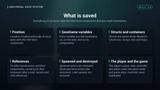
▸ Location, rotation and scale of every actor with the USS Save component
▸ Every SaveGame variable of the actor and of its components
▸ Bool, byte, integer, float, enum, name, string, text, vector, rotator and transform
▸ Structs, saved whole, Blueprint structs included; arrays, sets and maps
▸ References to other saved actors and their components, saved by id so they reconnect after a load
▸ References to assets and classes, soft object and soft class references
▸ Where the player was looking, with the player's pawn
──────────────────────────────────
THE WORLD, AS IT WAS
──────────────────────────────────
▸ Actors placed in the level are found again by level and name
▸ A placed actor that was destroyed (a pickup taken, an enemy killed) stays destroyed
▸ Actors spawned while playing are recreated from their class, in place, with their variables
▸ Actors spawned after the save are removed by the load
▸ The player's pawn, controller and player state, the game mode and the game state are matched, never duplicated or destroyed
▸ Actors in streaming sublevels keep their state while their level is streamed out and get it back as it streams in
──────────────────────────────────
SAVE AND LOAD
──────────────────────────────────
▸ Save World and Load World: one node each
▸ Load World opens the saved level, waits for it to start and restores it, then tells you it is done
▸ Async save and load, with Blueprint nodes: the file is written and read off the game thread
▸ Does Save Exist, Delete Save and Get Save Info (level, time, version, actor count, size) without loading
▸ Named slots; the default slot is "SaveGame"
──────────────────────────────────
SAVES THAT DO NOT BREAK
──────────────────────────────────
▸ A save is never half-written: the new file is written beside the old one, read back, then swapped in. If the game quits or crashes while saving, the old save is still whole
▸ Every save carries a checksum. A damaged or truncated file is refused with a clear log line and the world is left untouched
▸ Add or remove SaveGame variables in a game update: old saves still load
▸ A renamed class is covered by a Core Redirect
▸ A Save Version and an On Migrate event convert old values when a game update needs it
▸ Saves made on Unreal Engine 5.4 load on 5.5 and 5.8
──────────────────────────────────
EVENTS
──────────────────────────────────
▸ On Pre Save: copy anything kept elsewhere into SaveGame variables
▸ On Post Load: apply the loaded values (open the door, hide the taken item). Every saved actor is restored before it fires
▸ On Migrate: the save was made with an older Save Version
▸ Events of the USS Save component, or the USS Save Interface on the actor or any of its components, in Blueprint or C++
▸ On World Saved, On World Loaded and On World Restored on the subsystem
──────────────────────────────────
YOUR OWN SAVE SLOTS
──────────────────────────────────
▸ Capture World returns the world as an array of bytes; Restore World puts it back
▸ Keep the bytes in your own SaveGame object: your menu owns the slots, thumbnails and screens, this owns the world
──────────────────────────────────
TESTED
──────────────────────────────────
▸ An automated test of 370 checks passes on every engine version from 5.4 to 5.8: in a standalone game, across a full quit and relaunch, and in Play In Editor
▸ The same test passes in a packaged game, and the demo's own Blueprint checks pass in the packaged Shipping demo
▸ It covers every point above, missing and damaged files, interrupted writes, old saves after a class change and 1,000 saved actors
▸ 1,000 actors with 28 saved variables each: about a tenth of a second to save and to restore in a development editor build, half that in a packaged game; 3.9 MB on disk
──────────────────────────────────
QUICK START
──────────────────────────────────
▸ Enable the plugin
▸ Add the USS Save component to the actors to keep
▸ Tick SaveGame on the variables to keep (variable Details > Advanced)
▸ Apply the loaded values in On Post Load
▸ Call Save World and Load World on the USS Save Subsystem
──────────────────────────────────
WHAT IT IS NOT
──────────────────────────────────
▸ Not multiplayer: it saves the local world. Server-authoritative saves are planned
▸ Not a menu or a slot screen: it saves and loads, your UI decides when
▸ One level per save: the level being played, with its streaming sublevels. Other levels' state is not kept when the game travels between levels
▸ World Partition levels are not tested
▸ Saves are not compressed or encrypted
▸ An actor attached at runtime comes back in place but not attached; physics bodies come back at rest
▸ Objects created at runtime that are not actors are saved as references only
──────────────────────────────────
REQUIREMENTS
──────────────────────────────────
▸ Unreal Engine 5.4 - 5.8, Windows
▸ No other plugins, no third-party code
▸ Full C++ source included