






الوصف
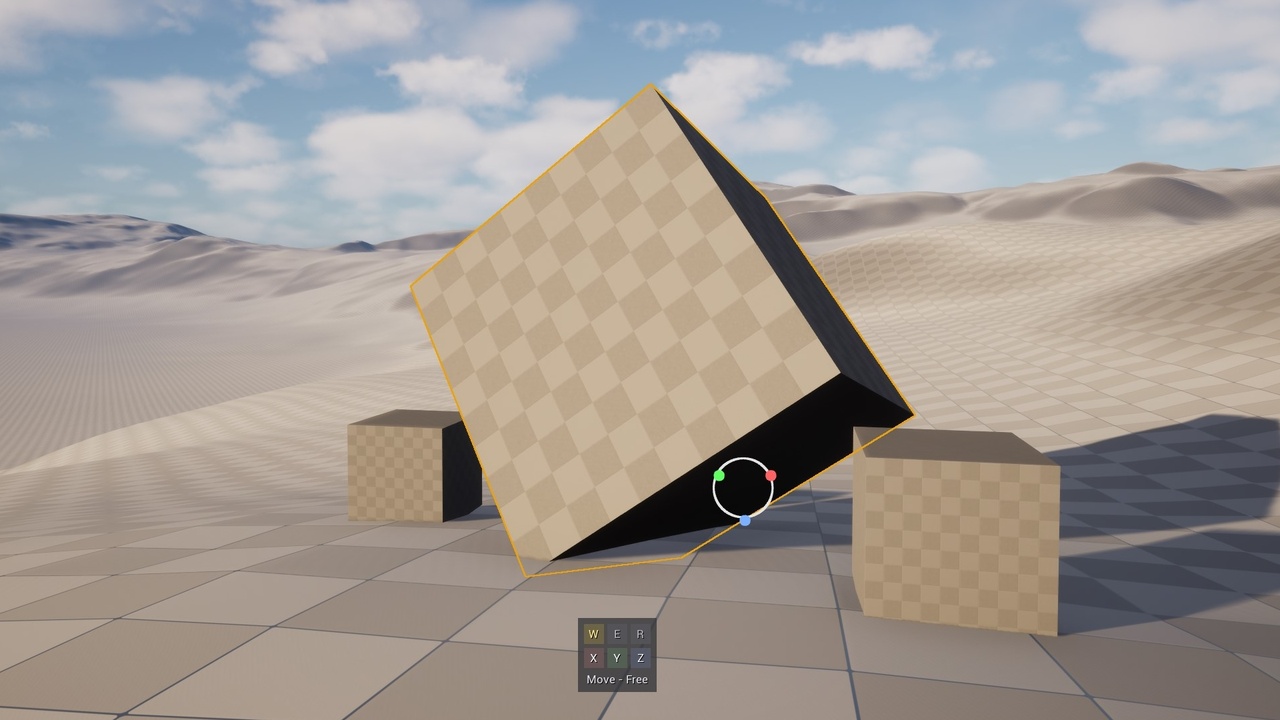
XGizmo is an editor-only transform tool for Unreal Editor. It adds a dedicated Editor Mode with a camera-aware, screen-space gizmo for moving, rotating, and scaling selected actors, along with fast keyboard control over transform mode, axis constraints, and pivot placement.
Instead of relying only on the default viewport widget, XGizmo provides a more readable transform workflow with a screen-stable ring, RGB axis feedback, and a compact bottom-center in-viewport HUD that keeps the active tool and constraint state visible at a glance. The HUD shows W / E / R, X / Y / Z, and the current status line, and can be toggled on or off at any time with Alt + S.
Features
Three transform modes
Move
Rotate
Scale
Screen-space gizmo
Camera-aware ring designed to stay readable and usable across zoom levels and field of view changes
Axis-colored visual feedback tied to the current constraint state
Fast axis constraints
Toggle X / Y / Z on or off to switch between free movement, plane constraints, and single-axis constraints
Free screen-plane movement when all axes are enabled
Plane constraints when one axis is disabled
Axis-only constraints when two axes are disabled
Quick axis isolation
Hold Alt and press X / Y / Z to isolate a single axis or restore all axes, depending on the current state
Keyboard-first workflow
W / E / R for Move, Rotate, and Scale
Tab to switch between World and Local transform space
Optional C alias for Y on QWERTY keyboards
Rotation Direction
Directional arrows around the active axis visualize actor rotation in real time
Default Rotation and Scale
Alt + D defaults the Rotation and scale when in each respective modes
Custom pivot placement
Alt + Middle Mouse Button places a custom pivot on geometry so you can reposition the transform origin where needed
In-viewport Transform values
Delta transformation info is now displayed near gizmo with option to switch off (Alt + N)
In-viewport HUD
Compact bottom-center overlay for transform mode, axis toggles, and current constraint status
HUD buttons toggle placement mode and active axis in a single click
Alt + S toggles the HUD on and off
Who it’s for
Artists and designers who want faster transform and constraint switching in the Level Editor
Users who prefer a dedicated transform mode with clear visual feedback and keyboard-driven controls
HELP
XGizmo_Help_pdf
XGizmo Video Overview
Other Products:
XPLACER
Advanced Mesh Placement & Scattering Tool
X-DECALPAINTER
Paint decals like foliage, with spray, paths, and region fill for total control!
X-DECALTri-planar Decal Projection (with mesh selecting-not including in Extile Plus bonus version)
Advanced non-repetitive tiling material
Search & locate actors around you
Base non-repetitive tiling material
Landscape non-repetitive tiling material
Procedural generated material shapes
Non-repetitive environment toolset
Non-repetitive prop materials