설명
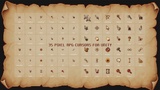
A complete pixel-art cursor pack for RPG interfaces, exploration, combat, dialogue, gathering, crafting, and other gameplay interactions.
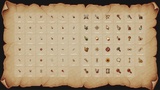
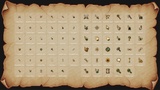
The package includes an engine-independent PNG collection together with Unity-ready runtime and Editor tools. Every cursor follows a consistent visual style and is supplied in two color sets and two carefully refined resolutions.
Main Features35 cursor types — 15 System / 2 Hand / 18 RPG Action
Two color sets — Gold & Burgundy / Gold & Deep Teal
32 px and 64 px versions — individually refined for clear pixel display at both sizes
25 Pressed variants — matching click states for responsive interaction feedback
Four animated cursors — Wait (4 frames), HandGrab, Talk, and Enter (3 frames each)
Preconfigured hotspots — click positions are already measured for every cursor
276 transparent PNG files — RGBA format with hard-edged alpha
Engine-independent resources — suitable for Unity, Unreal Engine, Godot, GameMaker, web projects, and other engines
System: Default, Text, Wait, Not Allowed, Crosshair, Move, Resize H, Resize V, Resize NESW, Resize NWSE, Help, Settings, Zoom In, Zoom Out, and Enter
Hands: HandPoint and HandGrab
RPG Actions: Attack, Attack Melee, Attack Ranged, Defend, Cast Spell, Heal, Talk, Trade, Inspect, Loot, Use Item, Unlock, Gather, Chop Wood, Fish, Cook, Craft, and Repair
Unity-Ready FeaturesCursorManager — centrally manages the default cursor, active cursor, size selection, Pressed states, and animations
CursorTrigger — attach it to a UI element or Collider for automatic hover switching
Automatic Pressed states — displays the matching Pressed variant while the mouse button is held
Built-in animation playback — automatically plays Wait, HandGrab, Talk, and Enter
Unscaled Time support — cursor animations continue during loading screens and paused gameplay
Pixel-exact software cursor — displays each cursor at its original texture size
Automatic size selection — switches between the 32 px and 64 px sets based on display scaling
Multi-monitor support — updates the cursor size when the game window moves between displays with different scaling
Cursor Preview — inspect every cursor, switch sizes, and preview animations at up to 8× zoom
Hotspot crosshair — visually verify the exact click position in the Editor
Generate From Folder — creates CursorData assets from your own prepared PNG cursor files
Automatic file grouping — connects numbered animation frames and matching Pressed variants
Reference-safe updates — updates existing CursorData assets without breaking scene references
Setup Triggers On Selection — quickly configures CursorTrigger components under a selected UI object
Demo scene included — test all 35 cursors directly with your mouse