


Description
NPC Optimizer Pro is a production-ready runtime optimization system for NPC-heavy Unreal Engine games. It assigns supported NPCs to distance or significance tiers and uses those tiers to control animation update rate, bone refresh, actor tick, CharacterMovement, AI brain/perception cost and network update frequency.
Unlike simple distance throttling, it is built around gameplay correctness. Montages, notifies, root motion, socket traces and nearby combat interactions can remain exact where your policy requires them - on clients, listen servers and dedicated servers.
Documentation: Download
WHY NPC OPTIMIZER PRO?
Large crowds and open-world NPCs can become expensive long before they disappear from view. NPC Optimizer Pro reduces work where full-frequency updates are unnecessary while preserving quality where it matters.
Add the NPC Optimizer component to a Pawn or Character, press Play, and tiering starts automatically.
Choose significance by:
nearest viewpoint
nearest player pawn
your own custom significance value
Animation tiers are configured in Hz and converted per world into frame intervals using that world's measured frame rate. One preset can therefore behave sensibly on both a 30 Hz dedicated server and a high-refresh client.
Hysteresis, minimum dwell time and a transition budget prevent tier flapping and prioritize NPCs moving closer before distant demotions.
SERVER-SAFE OPTIMIZATION
Dedicated servers do not render, but animation can still affect gameplay, root motion, notifies and bone-dependent traces.
Server animation can use:
Unreal's native Update Rate Optimization per tier
the same external tick-rate driver used by clients
Correctness safeguards include:
networked root-motion montages update every frame
gameplay montages can be forced to full-rate authority updates
Notify Critical NPCs can remain exact
NPCs returning to view are force-updated immediately
nearby combat NPCs can refresh bones regardless of tier
The default Combat Radius is 60 m, helping melee, hit-box and socket traces read current bone positions instead of stale poses.
SEE WHAT THE OPTIMIZER IS DOING
The dockable Budget Dashboard shows:
configured tier Hz
derived per-world update rates
animation and bone-refresh update counts
maximum and p95 pose age
configured network Hz
estimated bandwidth share
measured server bandwidth
A world selector lets you inspect running servers and clients in multiplayer PIE. Replication status is shown as applied, static or advisory depending on the active driver.
The NPC table can be filtered and sorted by tier, compatibility, foreign writes and animation age. NPCs can also be selected, focused or pinned.
BUILT-IN A/B PERFORMANCE CAPTURE
Measure your own project instead of relying on generic claims.
The A/B capture tool runs a baseline phase and comparison phase in the same session, then reports median and p95 actor-tick time plus server bandwidth with a confidence note. Results export as CSV or JSON.
A Development-only overlay (npo.Overlay 1) and Gameplay Debugger category provide runtime visibility outside the editor, including the server's real tiers and pose ages.
WORKS WITH COMPLEX ANIMATION SETUPS
NPC Optimizer Pro detects:
Motion Matching Anim Blueprints
Root Motion From Everything
Animation Budget Allocator ownership
leader-pose / Animation Sharing-style setups
Motion Matching receives a minimum update floor.
Root Motion From Everything can use a reduced alpha-scaled rate instead of being forced to full frequency forever, or be placed in a URO-only Compatibility tier.
Meshes controlled by Animation Budget Allocator or a leader pose are skipped instead of overwritten. The Gameplay Ability System ability component is permanently excluded from Tick throttling.
HONEST REPLICATION SUPPORT
Net update frequency tiers are applied with the default legacy replication driver and with Iris when dynamic net update frequency is enabled.
With Iris dynamic frequency disabled, or ReplicationGraph where frequency comes from class defaults, the dashboard reports the Net pillar as static or advisory instead of pretending a dynamic tier was applied.
Dormancy is opt-in per tier and disabled in all four built-in presets. It never applies to actors using Never or Initial dormancy and wakes automatically before important activity such as montages, movement, resumed AI or damage.
Iris and ReplicationGraph interaction with the Net pillar is Beta scope. Automated network tests use the default driver; Iris and ReplicationGraph were additionally exercised in UE 5.8 dedicated-server demo sessions.
SAFE BY DEFAULT
Every engine value modified by the plugin is snapshotted before the first write.
Before later writes or restoration, NPC Optimizer Pro compares the current value with the value it last applied. If your own game code changed it, that property is marked foreign and the plugin stops modifying it for that NPC.
Your code remains in control.
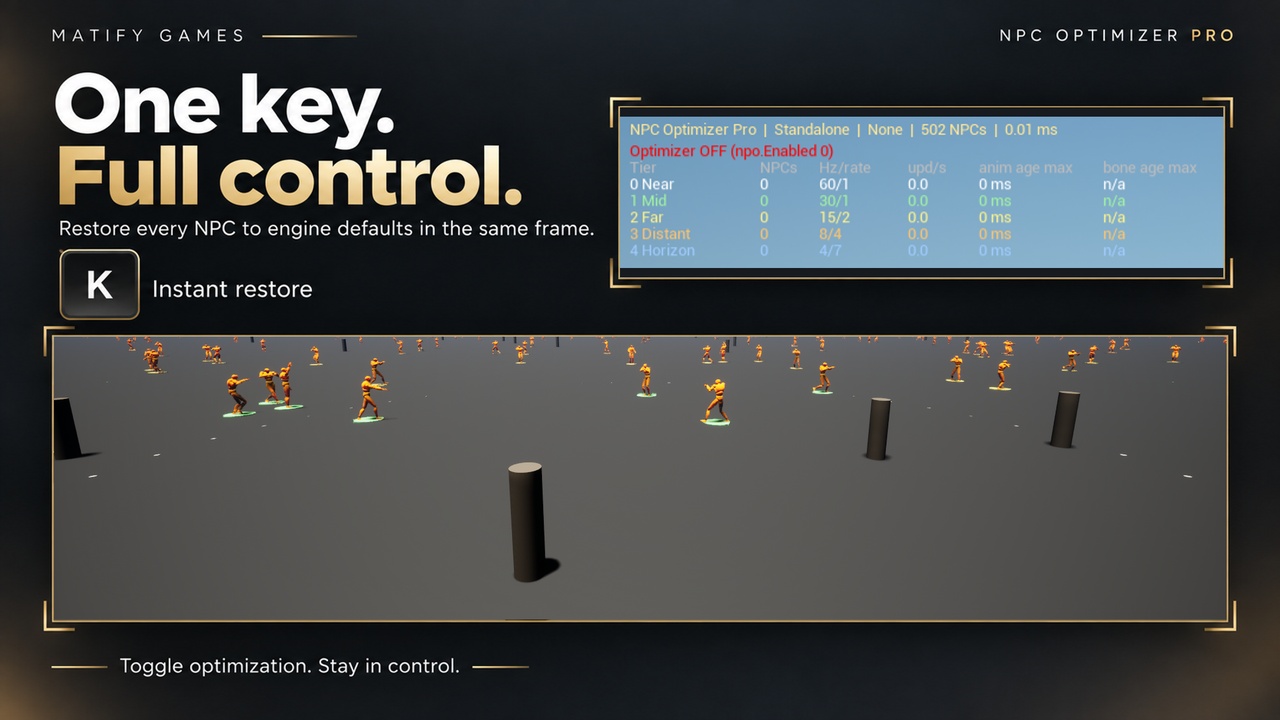
The master switch npo.Enabled and all seven npo.Pillar.* switches are available in every build configuration, including Shipping. Disabling them restores affected NPCs synchronously, even while paused.
FOUR BUILT-IN PRESETS
No preset asset is required.
Included C++ templates:
Open World: 5 tiers, 15-150 m
Horde: 4 tighter tiers for wave-based games
RPG Town: 3 tiers with generous near range and distant AI pausing
Dedicated-Server Shooter: tiers by nearest player pawn, with combat-focused bone refresh and montage correctness
Create your own preset through:
Content Browser > Add > Miscellaneous > NPC Optimizer Preset
Tune animation Hz, montage policy, tick interval, movement interval, AI behaviour, network frequency, physics and audio flags per tier. Presets are validated on save.
BLUEPRINT + C++ READY
One runtime module using Core, CoreUObject, Engine, DeveloperSettings and AIModule. No required engine-plugin dependencies.
Animation Budget Allocator, PoseSearch, ReplicationGraph, Iris and GameplayTasks/GAS are detected dynamically rather than linked as dependencies.
No Content folder. No binary asset dependency.
Includes:
Blueprint component functions and events
world-subsystem API
Blueprint function library
two Blueprint interfaces
five native C++ delegates
four virtual extension hooks
TESTED UE 5.5-5.8
Tested on Windows Win64 with Unreal Engine 5.5, 5.6, 5.7 and 5.8 across:
Editor
PIE Standalone
Listen Server
Client
Dedicated Server sessions
automated logic, preset, integration and network tests
The runtime allow-list also declares Linux, LinuxArm64, Mac, Android and iOS. These platforms were not compiled or tested for this release.
Packaged dedicated-server builds were not tested because they require a source-built engine. Dedicated-server behaviour was verified through PIE sessions and the editor running as a server.
MEASURED DEMO RESULT
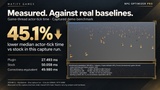
500 NPCs, packaged Win64 Shipping, Core i9-12900K:
Median actor-tick time:
NPC Optimizer Pro: 39.5 ms
Stock: 59.4 ms
Correctness-equivalent baseline: 59.9 ms
Approximately 34% lower median actor-tick time in this demo benchmark.
Performance depends on hardware, project architecture, AI complexity and preset configuration. The documentation includes the benchmark sessions and baseline methodology.
WHAT'S INCLUDED
A separate PDF documentation download covers installation, quick start, presets, validation rules, multiplayer and dedicated-server correctness, compatibility, Blueprint/C++ API, console commands, troubleshooting and FAQ.
NPC Optimizer Pro is built for developers who want more NPCs on screen and in simulation without treating animation, AI, networking and gameplay correctness as separate optimization problems.