



Descrizione
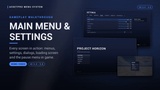
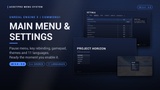
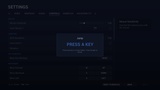
A complete menu system for Unreal Engine, built on CommonUI and ready the moment you enable it. Main menu, pause menu, a full settings screen, credits, confirmation dialogs, a press start screen and a loading screen, with mouse, keyboard and gamepad support out of the box.
Every screen is built in C++ from two data assets: a Theme for the look and a Menu Config for the content. There is no widget wiring to follow and no CommonUI input data to set up. Restyle everything from one asset, or design any screen yourself in UMG and keep all of its behavior.
Use it as the front end for any game that needs finished menus without building them: a shooter, an RPG, a survival or horror game, a racer or a simulator. It is the main menu, pause menu and options screen you would otherwise rebuild every project.
Playable Demo | Documentation | Discord Community
──────────────────────────────────
THE SCREENS
──────────────────────────────────
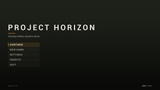
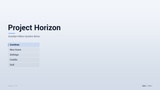
▸ Main menu with your title or logo, a subtitle, version text and your own entries
▸ Continue that stays greyed out until a save exists, then enables itself
▸ Pause menu with Resume, Settings, Restart, Main Menu and Quit. It pauses the game while open
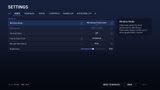
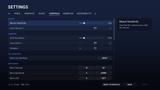
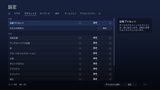
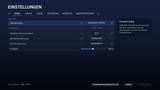
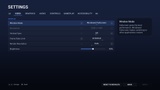
▸ Tabbed settings screen with a description panel for the focused setting
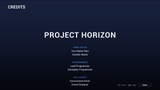
▸ Auto-scrolling credits built from headings and names
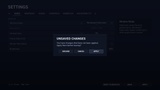
▸ Confirmation dialogs with one, two or three buttons and an optional countdown
▸ Optional press start screen
▸ Themed loading screen with a random tip
▸ Every entry, title and tab is data: add, remove, rename or reorder them without code
──────────────────────────────────
SETTINGS THAT APPLY AND SAVE
──────────────────────────────────
▸ Video: window mode, resolution, vertical sync, frame rate limit, render resolution, brightness
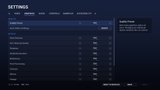
▸ Graphics: quality preset, auto-detect, and every scalability group (view distance, anti-aliasing, shadows, global illumination, reflections, post processing, textures, effects, foliage, shading), plus anti-aliasing method (Off, FXAA, TAA, TSR) and motion blur
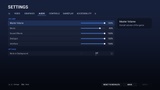
▸ Audio: master, music, sound effects, dialogue and interface volume, mute in background
▸ Controls: mouse and stick sensitivity, invert Y, vibration, key bindings
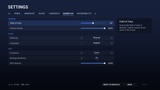
▸ Gameplay: field of view, camera shake, difficulty, language
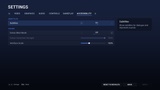
▸ Accessibility: subtitles, colour blind modes (protanopia, deuteranopia, tritanopia) with a strength slider, interface scale
▸ Everything is saved to GameUserSettings.ini and restored on the next launch
▸ Field of view reaches your pawn's camera, zoom effects included, and leaves cutscene cameras alone
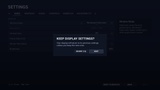
▸ Resolution and window mode changes ask "Keep display settings?" and revert by themselves after 15 seconds
▸ Leaving with unapplied changes asks to Apply, Discard or Cancel
▸ Reset to Defaults for each tab
▸ Hide any built-in setting or tab from the Menu Config
▸ Add your own toggles, option lists and sliders with no code. They are saved with the rest and read with one Blueprint node
──────────────────────────────────
KEY REBINDING
──────────────────────────────────
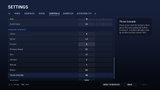
▸ Built on Enhanced Input player mappable keys
▸ Primary and secondary keyboard and mouse slots per action, plus a separate Gamepad Bindings section
▸ Rows are grouped by your actions' Display Category
▸ Binding a key that is already in use moves it, so keys never double up
▸ Clear a slot with Delete, Backspace or gamepad X, or reset every binding with one button
▸ Bindings are saved, and a cleared or moved binding stays that way in game
──────────────────────────────────
MOUSE, KEYBOARD AND GAMEPAD
──────────────────────────────────
▸ Full navigation with all three. Hovering moves focus, so exactly one item is ever highlighted
▸ Keyboard: arrows to navigate, Enter to select, Escape to go back, Left and Right to change values, Q and E to switch tabs
▸ Gamepad: D-pad or stick to navigate, A to select, B to go back, LB and RB to switch tabs, Y to apply, Start for the pause menu
▸ Footer hints switch between keyboard and gamepad labels as the player changes device
▸ Xbox, PlayStation or Nintendo button names, detected from the controller in use or set by you
──────────────────────────────────
RE-SKIN FROM ONE ASSET
──────────────────────────────────
▸ One Theme data asset holds every colour, font, corner radius, size, spacing, background, animation speed and sound
▸ Four presets to start from: Midnight, Tactical, Ember and Arctic
▸ Editing the theme while playing in the editor restyles open menus live
▸ Swap themes at runtime with one node
▸ Show your menu level behind the main menu for a 3D backdrop
▸ Screens fade and slide in, buttons animate on hover, with optional hover, click, back and open sounds
──────────────────────────────────
YOUR OWN DESIGNS
──────────────────────────────────
▸ Adjust a generated layout: make a Blueprint child of any screen and change it in On Default Layout Built
▸ Replace a layout completely: design a Widget Blueprint child in UMG and give its widgets the documented names. Navigation, input hints and theming keep working
▸ Every widget name is optional, so a design only needs the parts it uses
──────────────────────────────────
11 LANGUAGES
──────────────────────────────────
▸ English, German, Spanish, French, Italian, Japanese, Korean, Polish, Portuguese (Brazil), Russian and Simplified Chinese
▸ All of the plugin's own text is translated: menus, settings, descriptions, dialogs, key names and controller buttons
▸ Language setting on the Gameplay tab. It switches at once, open screens included, and is remembered
▸ Numbers follow the language, such as "50 %" in German
▸ Your own text lives in your Menu Config, so the Localization Dashboard gathers it with the rest of your project
▸ Standard .po files, so you can edit the translations or add languages
──────────────────────────────────
LOADING SCREEN
──────────────────────────────────
▸ Themed loading indicator and a random tip from your list
▸ Drawn on its own thread, so it keeps moving while the game thread is busy
▸ Minimum display time, so it never flickers
▸ Steps aside if your game already sets up its own loading screen
──────────────────────────────────
BLUEPRINT AND C++ API
──────────────────────────────────
One subsystem opens and closes everything: Show Main Menu, Toggle Pause Menu, Open Settings, Show Confirm Dialog, Push Screen, Return To Main Menu, Quit Game and more. On Menu Action fires with the entry Id for every menu entry, so custom entries such as Load Game need no subclassing. Game code reads settings from the settings subsystem (Get Mouse Sensitivity, Get Field Of View, Get Difficulty, Get Custom Setting Value) and listens to On Setting Changed. A look input modifier applies sensitivity and invert Y to your Look action.
──────────────────────────────────
QUICK START
──────────────────────────────────
▸ Enable the plugin. It enables CommonUI and Enhanced Input for you
▸ Set your main menu level's GameMode to AMSMainMenuGameMode
▸ Use AMSPlayerController in gameplay levels for the pause menu, or call Toggle Pause Menu from your own input
▸ Create a Menu Config data asset with your levels, assign it in Project Settings and press Play
──────────────────────────────────
WHAT IT IS NOT
──────────────────────────────────
Stated plainly, so nobody buys the wrong thing.
▸ Not a save system - Continue only checks whether a save exists; saving and loading stay your game's job
▸ Not multiplayer - the menus and settings are local, with no lobby, server browser or online features
▸ Not an in-game HUD - this is the front end, the pause menu and the options screen
▸ No Widget Blueprint assets ship with it - screens are generated in C++, and you customize them with Blueprint children or your own UMG designs
──────────────────────────────────
REQUIREMENTS
──────────────────────────────────
▸ Unreal Engine 5.4 - 5.8
▸ Windows, Mac, Linux
▸ CommonUI and Enhanced Input engine plugins (enabled automatically)
▸ Full C++ source included