

Descrizione
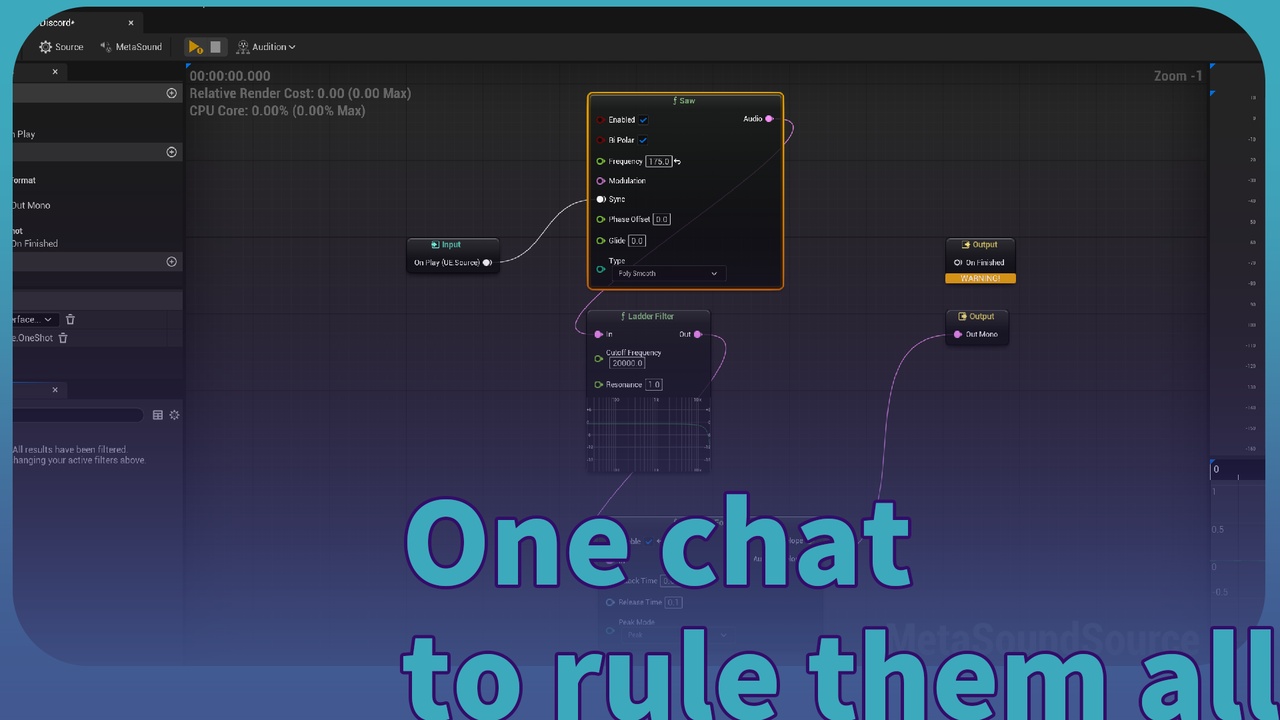
🎯 One chat generated MetaSound.
"Use llm-metasound to generate a [laser / explosion / footstep / ambient] sound for [your SFX]."
🤖 Or via Agent Online — if you have LLMEasyShell / LLMEasyShellLite installed, invoke the auto-registered C++ ability llmms to drive this end-to-end from any LLM agent. MetaSound skill + Agent skill are online in the skill repo.
📚 Tutorial: LLM MetaSound - DSL Schema Guide · 🛠 Skill Repo: github.com/ituiyuio/Yomin-Fab-LLM-Unreal-Plugin
Features:
✅ One JSON, Complete Audio Graph - Inputs, outputs, nodes, and edges generated from a single .llmmetasound file
✅ LLM-First Design - AI outputs JSON directly, no MetaSound editor knowledge required
✅ Bidirectional Conversion - JSON ↔ UMetaSoundSource / UMetaSoundPatch, perfect roundtrip
✅ Robust Edge Handling - UE5 Builder Subsystem + auto-connect OnPlay + vertex type validation on every wire
✅ Full Node Coverage - MetasoundFrontend registry with autocomplete + graph-level Inputs / Outputs
✅ Two Asset Types - UMetaSoundSource (transport + audio playback) and UMetaSoundPatch (pure DSP)
✅ Editor Panel - Slate-based panel for one-click generation and re-export
✅ Type-Safe Pin Wiring - Edges that mismatch vertex types are rejected before the asset is saved
📦 File Formats:
.llmmetasound (JSON), .llmmetasoundschema (Schema), UMetaSoundSource / UMetaSoundPatch (UAsset)
Technical Information
Version: Unreal Engine 5.8.0
Dependencies: Metasound (engine plugin, enabled by default in UE5)
Modules: LLMMetaSoundEditor (Editor)
Number of Blueprints: 0
Number of C++ Classes: ~12
Network Replicated: No
Documentation Link: LLM MetaSound DSL Schema Guide
Example Project: Config/Examples/ folder contains .llmmetasound example files
Supported Platforms: Windows, Mac, Linux
Overview
The Problem
Traditional UE MetaSound development is tedious:
Navigate the node browser manually for every operator
Set properties one by one in the details panel
Connect pins by hand with no type validation
No AI integration for generative or batch-authored audio
Hard to version control audio graphs
The Solution
LLMMetaSound changes everything. One JSON file defines:
Asset type (Source or Patch)
Graph interface members (Inputs and Outputs)
All nodes with their class names and locations
All edges connecting node pins (type-safe)
LLM outputs the JSON. Plugin generates the MetaSound asset. Done.
Example
{ "Metadata": { "NodeName": "SimpleSynth", "NodeType": "MetasoundSource", "MetasoundDescription": "Sine oscillator with gain and frequency inputs" }, "Inputs": [ { "Name": "Gain", "TypeName": "Primitive:Float" }, { "Name": "Frequency", "TypeName": "Primitive:Float" } ], "Nodes": [ { "NodeID": 1, "ClassName": "Oscillator", "Name": "Osc1", "Location": { "X": 0, "Y": 0 } }, { "NodeID": 2, "ClassName": "Output", "Name": "Output1", "Location": { "X": 400, "Y": 0 } } ], "Edges": [ { "FromNodeID": 1, "FromPinName": "Frequency","ToNodeID": 3, "ToPinName": "Frequency" }, { "FromNodeID": 3, "FromPinName": "Audio","ToNodeID": 4, "ToPinName": "PrimaryOperand" }, { "FromNodeID": 2, "FromPinName": "Gain","ToNodeID": 4, "ToPinName": "AdditionalOperands" }, { "FromNodeID": 4, "FromPinName": "Out","ToNodeID": 5, "ToPinName": "In" } ] }
Import this JSON → Get a fully functional MetaSound asset with auto-connected nodes. The OnPlay trigger and final audio output are wired automatically — you only describe the graph nodes and edges (no manual ClassName: "Output" node needed; the plugin auto-routes audio to the engine's audio output pin).
Important naming conventions:
Each ClassName: "Input" node in Nodes[] must have Name identical to the corresponding Inputs[] entry. The plugin uses the interface name to bind the JSON NodeID to the engine's auto-created interface node — mismatched names produce a warning and silently drop edges that reference them.
Edges use pin names, not vertex indices. FromPinName / ToPinName are resolved against the engine's live node interface at build time, so they stay stable across UE versions and self-document intent. The legacy FromVertexID / ToVertexID fields still work as a fallback for existing .llmmetasound files but are deprecated for new authoring.
Overloaded operation nodes (Multiply, Add, Subtract, ...) share a ClassName across variants. Use the ClassPath field with the engine's full path (visible in the exported schema's classPath field, e.g. UE.Multiply.Audio by Float) to disambiguate. When ClassPath is omitted, the plugin falls back to ClassName short-name matching.
Workflow
LLM generates .llmmetasound - AI outputs JSON with your audio graph definition
Open Panel - Window → LLMMetaSound
Generate - One click creates the MetaSound asset
Iterate - Modify JSON, regenerate, or export existing MetaSound back to JSON
Supported MetaSound Types
TypeDescriptionUMetaSoundSourceAudio playback graph with transport (auto-connected OnPlay trigger)UMetaSoundPatchPure DSP patch without transport
Supported Node Classes
Oscillator · Output · Delay · Gain · Envelope · Filter · LFO · Mixer · Split · Merge · MonoToStereo · StereoToMono · and all MetasoundStandardNodes discovered from the engine registry.
Schema Quick Reference
FieldDescriptionAssetType"Source" or "Patch"Metadata.NodeNameAsset display nameInputs[]Graph-level input interface membersOutputs[]Graph-level output interface membersNodes[]Graph nodes (external nodes, not Input/Output nodes)Edges[]Connections between node pins (type-validated)Node.NodeIDInteger ID referenced by edgesNode.ClassNameMetaSound node class from the schema (e.g., "Sine", "Ladder Filter")Node.ClassPathOptional exact engine class path (e.g., "UE.Multiply.Audio by Float"). Disambiguates overloaded operation nodes.Node.InputDefaultsOptional default values for input pins (e.g., "Frequency": { "LiteralType": "Float", "AsFloat": 440.0 })Edge.FromPinName / Edge.ToPinNamePin name to connect from/to. Resolved against the engine's live vertex list.Edge.FromVertexID / Edge.ToVertexIDLegacy integer index of the pin. Used only when the corresponding *PinName is empty.
For the full list of 401 supported class names and their ports, see Config/Schemas/LLMMetaSoundSchema.llmmetasoundschema. For working examples, see Examples/.
Successful development to you!
LLMMetaSound v1.1.1 | YominUnreal