
Description
Transform Any Unreal Engine Scene Into a Gaussian Splat Dataset
Convert Unreal Engine scenes, products, interiors, environments, and huge maps into COLMAP-ready Gaussian Splatting datasets directly inside the Unreal Editor.
🌍 See What Users Are Creating
Want to see real results before purchasing?
Visit the official 🌐 UnrealToColmap website to explore dozens of Gaussian Splats created by users of the plugin.
💬 Community & Support
Need help, want to share your results, or just want to talk Gaussian Splatting?
💬 Join the UnrealToColmap Discord Server
Read the documentation here https://walhargohar.com/UnrealToColmap/Documentation for setup instructions, capture-rig parameters, recommended workflows, and troubleshooting.
No manual camera alignment.
No external COLMAP reconstruction.
No command-line dataset setup.
Just position your capture cameras, choose your settings, and let UnrealToColmap build the dataset for you.
🚀 Simple Three-Step Workflow
1️⃣ Set Up Your Camera Rigs
Position and configure purpose-built capture rigs across your scene until you are happy with the coverage.
Choose the capture method that best fits your scene — whether you're capturing a product, room, road, landscape, building, or huge environment.
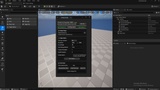
2️⃣ Choose Your Settings
Configure the dataset before generating:
✅ Output resolution
✅ PNG or JPG image format
✅ Lumen or Path Tracing
✅ Point-cloud density
✅ Capture and quality settings
🎬 Optional Movie Render Queue Configuration
UnrealToColmap works out of the box without requiring you to create or configure your own Movie Render Queue preset.
However, advanced users can optionally select their own MRQ Config file for complete control over the rendering pipeline and Movie Render Queue settings.
3️⃣ Generate Dataset — One Click
Once everything is ready, press Generate.
The plugin automatically handles the complete background pipeline, including:
📸 Multi-view RGB image capture
🎯 Complex-collision raycasting
☁️ Point-cloud generation and coloring
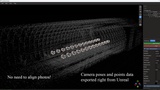
📁 COLMAP camera files and dataset export
The result is a ready-to-train COLMAP dataset that can be taken directly into your preferred Gaussian Splatting trainer.
🎯 Key Features
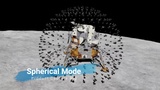
📦 Product Capture Mode
Create object-focused datasets using:
✅ Spherical camera layouts
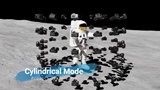
✅ Cylindrical camera layouts
✅ Half-sphere and half-cylinder layouts
✅ Rectangular layouts
✅ Actor Center, Actor Forward Axis, and bounds-aware aiming
Perfect for furniture, props, vehicles, products, statues, facades, and isolated marketplace assets.
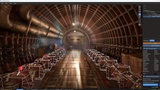
🛣️ Path Capture Mode
Generate overlapping camera locations along an editable spline for:
✅ Roads
✅ Streets
✅ Corridors
✅ Tunnels
✅ Trails
✅ Walkthrough routes
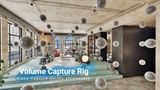
🏠 Volume Capture Mode
Fill rooms or three-dimensional spaces with capture locations.
Use exclusion volumes and mesh-clearance filtering to help prevent invalid cameras from being generated inside walls or objects.
🚁 Oblique Aerial Capture
Cover landscapes, cities, campuses, industrial sites, and large exterior maps with a configurable aerial capture route.
✅ Smart Ortho 3-View
✅ Smart Oblique 5-View
✅ Adjustable capture area
✅ Adjustable altitude
✅ Lane and shot spacing
✅ Configurable course direction
✅ Adjustable oblique angle
✅ Optional straight-down nadir views
🎥 Manual Camera Control
Need complete control?
Search U2C in Place Actors to access the included rigs and manual capture tools, including:
✅ U2C_CapturePoint
✅ U2C_SingleCamera
✅ U2C Oblique Camera
Place cameras exactly where you need them and combine manual capture points with the automated capture systems.
⚡ Easy Iteration
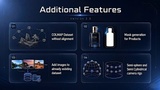
✅ Add more cameras to a compatible existing dataset
✅ Preview captured and pending views
✅ Inspect RGB images
✅ Adjust capture coverage before generating
✅ Choose point-cloud density to suit your scene
✅ Generate an optional colored .ply point cloud
The .ply export is available when you want a portable colored point cloud, but it is not required for Gaussian Splat training.
🎭 Masks and Difficult Surfaces
Export optional object masks for product-isolation workflows.
Mirrors, glass, water, and other difficult surfaces can remain visible in the rendered RGB images while being excluded from point generation when required.
🌐 Compatible With Popular 3DGS Tools
Use the exported COLMAP dataset with:
✅ Postshot
✅ LichtFeld Studio
✅ Other COLMAP-compatible Gaussian Splatting and NeRF trainers
🏎️ Why UnrealToColmap?
Unreal Engine already gives you beautiful lighting, detailed materials, Nanite geometry, huge environments, and high-quality virtual scenes.
UnrealToColmap turns those scenes into trainable Gaussian Splatting datasets without the usual technical setup.
✅ Unreal Scene → COLMAP Dataset
✅ No manual camera alignment
✅ No external COLMAP reconstruction
✅ No command-line dataset setup
✅ Automatic Movie Render Queue workflow
✅ Optional custom MRQ configuration for advanced users
✅ Fast testing and iteration
✅ Designed specifically for Gaussian Splatting workflows
🎯 Perfect For
✅ Arch-viz artists
✅ Product visualizers
✅ Game developers
✅ Technical artists
✅ Researchers
✅ 3DGS / NeRF creators
✅ Anyone converting Unreal Engine scenes into interactive Gaussian Splats
⚠️ Important Notes
UnrealToColmap is an editor-only dataset generation tool. It does not render Gaussian Splats at runtime inside Unreal Engine.
Required Plugins:
✅ Python Editor Script Plugin
✅ Editor Scripting Utilities
✅ Movie Render Queue
Supported Platform: Windows
Supported Unreal Engine Versions:
5.5, 5.6, 5.7, and 5.8
Capture quality and speed depend on scene lighting, Lumen/Nanite/streaming settings, post-processing, resolution, sampling, storage speed, scene complexity, and hardware.