Описание
🎨 CUSTOM TOON SHADERS STUDIO
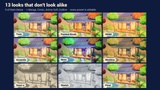
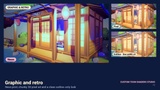
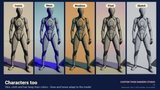
One actor. 13 toon styles you can customize — and they don't look alike.
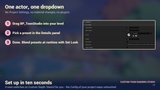
Drop BP_ToonStudio into your level, pick a preset in a dropdown and your whole scene changes style: toon, anime, manga, comic, Ghibli, watercolor, oil paint, sumi-e, sketch, neon, Moebius and pixel. No material changes. No plugins. No C++.
▶️ Video: https://youtu.be/42v-rcnMulc
━━━━━━━━━━━━━━━━━━━━
WHY THIS ONE
━━━━━━━━━━━━━━━━━━━━
• 13 presets that really look different — not 13 variations of the same cel shader.
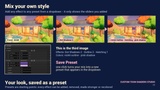
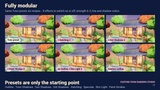
• Fully modular: add any effect to any preset (paint strokes on Toon, halftone dots on Ghibli, hatching on Outline), from 0 to 2 strength.
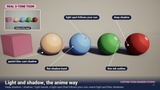
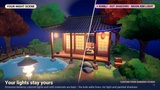
• Outline Color and Shadow Color on every preset, live in the editor and in game.
• "Save Preset" turns your mix into a new preset that works in any level, Play, Sequencer and builds.
• Change look at runtime with Set Look (Index, Blend Time): flashbacks, dream sequences, photo mode, settings menu.
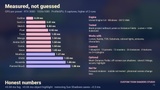
• Measured GPU cost, published per preset — no guessing.
━━━━━━━━━━━━━━━━━━━━
THE 13 PRESETS
━━━━━━━━━━━━━━━━━━━━
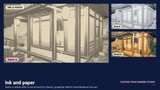
01 Toon · 02 Anime Soft · 03 Manga · 04 Comic · 05 Ghibli · 06 Watercolor · 07 Painted Brush (oil) · 08 Neon · 09 Moebius · 10 Sumi-e · 11 Sketch · 12 Pixel · 13 Outline (outline only, your art untouched)
━━━━━━━━━━━━━━━━━━━━
FEATURES
━━━━━━━━━━━━━━━━━━━━
• Toon bands that follow your Directional Light (found automatically)
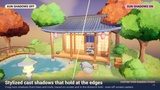
• Stylized sun shadows, traced on screen and in the Global Distance Field, so off-screen trees and roofs still cast them
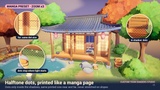
• Halftone dots and hatching with constant printed size: they never stretch on slopes and only appear inside real shadow bands
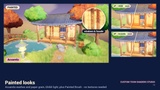
• Paint and oil strokes anchored to the world, stable in motion (computed before TSR/TAA, flicker measured)
• Outlines in any color, with width control
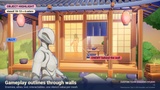
• Per-object highlight outlines through walls for gameplay (Custom Depth Stencil values 10-13: enemies, allies, loot, interactables)
• Foliage and color-accent masks by stencil (values 2 and 3)
• Emissive and unlit materials are kept; stylized gradient fog (Fog Amount 0 = free)
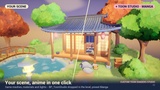
• Split Compare slider for before/after, Look Amount, Saturation / Contrast / Brightness
• Quality switch (1 = best, 0 = faster)
• Demo keys: press ← / → in Play to cycle all 13 looks with a smooth blend
• Works with Lumen, TSR, Nanite and Substrate. Renders the same in Movie Render Queue (one console variable, explained in the guide)
━━━━━━━━━━━━━━━━━━━━
HOW TO USE (30 seconds)
━━━━━━━━━━━━━━━━━━━━
1. Add the pack to your project. It lands in Content/ToonStudio.
2. Drag BP_ToonStudio into your level.
3. Details → Toon Studio → Preset → pick a look. Done.
You don't need a Post Process Volume: the actor carries its own, set to affect the whole level.
━━━━━━━━━━━━━━━━━━━━
PERFORMANCE
━━━━━━━━━━━━━━━━━━━━
Measured on an RTX 3080 at 1920x1080: 0.3 – 1.9 ms per preset (Outline is the lightest; the painted looks are the heaviest). The full table is in the gallery. Quality 0 lowers the cost of the painted looks.
━━━━━━━━━━━━━━━━━━━━
HONEST LIMITS
━━━━━━━━━━━━━━━━━━━━
• Deferred renderer required (the Unreal default). Forward rendering does not expose the G-Buffer to post process.
• Made for stylized and low-poly scenes. On photoreal assets the change is subtler.
• Stylized sun shadows from off-screen objects need Generate Mesh Distance Fields (on by default with Lumen). Without it, shadows come only from what is on screen.
• Unreal measures exposure after post process, so adding any post-process material can shift auto exposure slightly. Use Split Compare to compare fairly.
• Movie Render Queue: add the console variable r.GeneralPurposeTweak2 = 3 in your job so the finished looks match the viewport.
• UE 5.8 only. Not for UEFN, not for the Path Tracer.
━━━━━━━━━━━━━━━━━━━━
WHAT'S INCLUDED
━━━━━━━━━━━━━━━━━━━━
• BP_ToonStudio (one actor) + Editor Utility Blueprint to save your own presets
• 13 preset data assets
• 13 post-process master materials, 24 material instances, 1 Material Parameter Collection
• Demo level L_ToonStudio_Demo (stylized tea-house diorama; demo content is for presentation only)
• Quick Start guide (Docs/QuickStart.md)
• No textures required for the looks. No third-party assets. Epic's mannequin shown in some screenshots is NOT included.
━━━━━━━━━━━━━━━━━━━━
SUPPORT
━━━━━━━━━━━━━━━━━━━━
Questions or bugs: the Questions tab on this listing, or [email protected]. I reply within 24-48 h. No Discord required.
Made by RafaSC.