

Açıklama
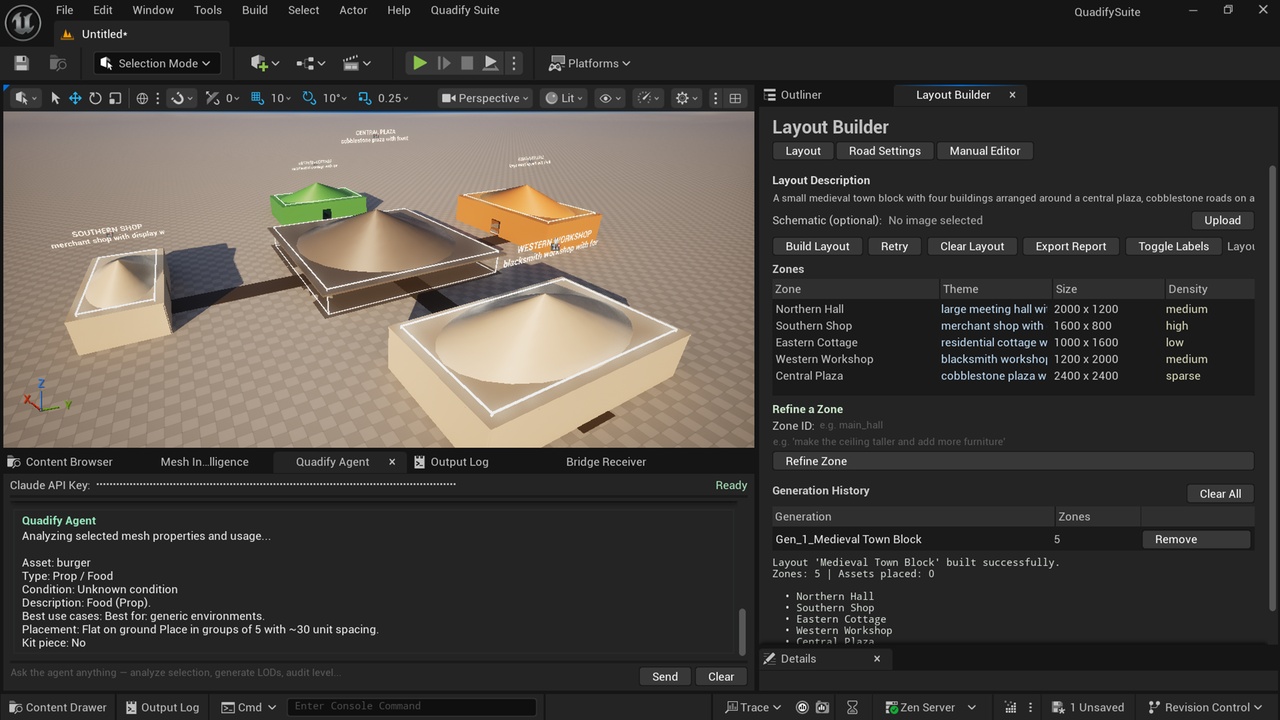
Quadify Suite is a professional UE5 editor plugin for rapid world layout design. Describe a scene in plain English and Claude AI instantly generates a full 3D blockout — buildings, roads, walls, lighting, and zone labels — directly in your level. Refine it zone by zone, or take full manual control with the built-in canvas editor.
Key Features
Layout Builder (AI Mode)
Type a description like "medieval village with a tavern, blacksmith, two houses and a market square" and Quadify Suite generates the full layout automatically. Upload a schematic image and it parses the spatial arrangement visually. Refine individual zones after generation without rebuilding the whole scene.
Manual Editor
A 2D canvas editor for hand-crafting layouts with precision. Place, move, resize, rotate, and duplicate building zones. Multi-select with drag-box or Shift+Click to move groups. Three zone types — Building, Wall, and Road — each with correct auto-defaults. Full undo stack, grid snap, and build history navigation.
Road Builder
Place road nodes on the canvas in Road mode and connect them with Bezier curves. Builds as flat cobblestone geometry in 3D with junction pads at intersections. Works alongside zone-type roads for complete street networks.
Prefab Override
Replace any blockout zone with your own Static Mesh or Blueprint actor from the content browser. The prefab is placed at the exact position and rotation of the original blockout and scaled to fit the zone footprint. Combine AI-generated layouts with your own custom assets.
Demo Layout
Load a pre-built urban demo scene from the toolbar with one click. Three townhouses, a corner shop, a cobblestone main street, and a perimeter wall — ready to build and customise.
Additional Tools
- Mesh Intelligence panel for semantic mesh analysis
- LOD Forge for LOD generation
- Scene Classifier for zone painting
- Bridge Receiver for external pipeline connections
Requirements
- Unreal Engine 5.4 or later
- Anthropic API key required for AI layout generation (Manual Editor and all other tools work without one)
- API key stored locally in your project's Saved folder
Getting Started
1. Install the plugin and enable it in your project
2. Open the Layout Builder from the Quadify Suite menu
3. Click