

Description
Classic Asteroids-style screen wrapping for 2D, 2.5D, and 3D games with smooth ghost visuals, physics-aware collision forwarding, and a zero-friction Blueprint setup.
Advanced Screen Wrap and Ghosting Plugin
The Advanced Screen Wrap and Ghosting Plugin is a C++ plugin built for Unreal Engine 5 that delivers Asteroids-style screen-edge wrapping and ghost visual transitions for your creative projects and games. Drop one Screen Wrap Manager actor into your level, implement a lightweight interface (or tags) on your actors, and wrapping is live! No custom actor base class required, no game-mode changes.
Videos:
Documentation:
How Screen Wrapping and Ghosting Work!
Advanced Screen Wrap and Ghosting Plugin README
Key Features
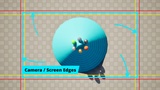
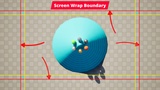
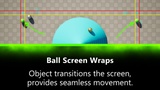
Edge Wrapping: When an actor crosses a screen boundary, it teleports seamlessly to the opposite side. Works on any 2D plane (XY top-down, XZ side-scrolling, YZ front-view).
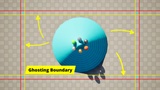
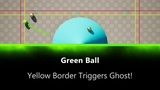
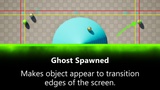
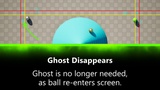
Ghost Visuals: A mirrored copy of the actor appears on the opposite edge before the wrap fires, creating the illusion of a continuous world. Ghost offset and detection depth are independently tunable.
Physics-Aware Ghost Collision: Physics objects (rolling balls, debris) physically collide with ghost copies. Hit impulses are forwarded to the parent actor using accurate elastic two-body collision math. Equal-mass objects behave like pool balls: no energy lost, no phantom bounces.
Ghost Actor Pooling: Pre-spawn ghost instances at BeginPlay and reuse them via a built-in ghost pool. Eliminates per-frame SpawnActor/Destroy overhead for busy scenes.
Dual Opt-In System: Actors opt into wrapping and ghosting via the IScreenWrappable C++ interface (used in both C++ and BP projects) or lightweight Actor tags (ScreenWrap.CanWrap, ScreenWrap.IsGhostable). Mix both in the same project.
Blueprint-First Workflow: Every setting is exposed to the Details panel with clear categories and tooltips. All interface callbacks (OnBeforeWrap, OnAfterWrap, OnGhostHit) are Blueprint-implementable events.
Consistent Debug Visualization: Both components expose bShowDebugBoundaries, DebugLineThickness, and boundary color. Toggle boundary outlines and ghost position spheres in-editor without touching code.
Stationary Camera Optimization: An optional bOnlyUpdateOnCameraMove flag skips bounds recalculation when the camera hasn't moved, reducing per-tick overhead for fixed-camera games.
Fully Independent Components: Wrap without ghosting, ghost without wrapping, or use both. The ScreenWrapComponent and ScreenWrapGhostComponent share no internal state.
What's Included
UScreenWrapComponent: Manages the 4 wrap trigger boxes and actor teleportation
UScreenWrapGhostComponent: Manages ghost detection boxes, ghost lifecycle, pool, and physics forwarding
AScreenWrapManager: Ready-to-place actor with both components pre-wired; auto-finds the player camera
IScreenWrappable: Blueprint-implementable interface for full lifecycle control
Full C++ source code
README documentation with Blueprint and C++ setup walkthroughs
Compatibility
Engine Versions: UE 5.3, 5.4, 5.5, 5.6, 5.7
Platforms: Windows, Mac, Linux (console untested)
Physics: Chaos Physics (UE 5.x default)
Dependencies: None. No third-party plugins required
Multiplayer: Not replicated; designed for local/single-player 2D games
Ideal Use Cases
Perfect for:
Arcade-style space shooters (Asteroids, Geometry Wars)
Top-down 2D games with edge wrapping (bullets, enemies, player ship)
Side-scrolling games with wrap-around worlds
Physics-based 2D puzzle games where objects interact across screen edges
Rapid prototyping of any game loop without building custom wrap logic
Technical Details
Network Replicated: No
Blueprint Exposed: Yes, all settings, all callbacks
C++ Source Included: Yes (full source)
Documentation: Included (README.md), inline Doxygen comments throughout
Collision Profile Required: ScreenWrapTrigger (setup instructions in README)
Support: GitHub Issues
Additional Notes
Ghost collision physics note: Ghost copies are kinematic (position-driven). Chaos treats kinematic bodies as infinite mass, so there is an inherent one-tick (~16ms at 60fps) latency between Chaos resolving a bounce and the plugin correcting the velocity. This is generally imperceptible in practice and is a fundamental Chaos engine constraint, not a plugin limitation.
Offset tuning tip: Without ghosting, set BoundaryOffset to a small value (e.g. 10) so wrapping fires right at the screen edge. With ghosting enabled, match GhostThreshold to BoundaryOffset (e.g. both 250) so ghosts appear before the wrap triggers — creating a seamless visual transition.
Documentation: Included in plugin (README.md)