
Opis
Scar Achievement System
Add Steam, Epic Online Services (EOS), and offline achievements plus persistent stats to your Unreal Engine game in minutes.
One dropdown selects the backend. One Blueprint node handles every unlock.
No manual INI editing. No platform-specific setup headaches.
Compatible with Unreal Engine 4.27, 5.0, 5.1, 5.2, 5.3, 5.4, 5.5, 5.6, and 5.7.
Features
Achievements
Steam, EOS, and Local SaveGame support
Automatic Steam Achievement_N_Id generation
Automatic EOS Artifact and ClientEncryptionKey generation
Queues unlocks until the platform is ready
Local offline backup persistence
Stats System
Int and Float stat support
Automatic Steam Stats sync
Automatic EOS Stats sync
SaveGame persistence
Live stat update delegates for UI systems
Diagnostics
Detects common OnlineSubsystem configuration issues
On-screen debug notifications
Steam App ID mismatch detection
SaveGame failure warnings
Verbose logging support
Editor Tools
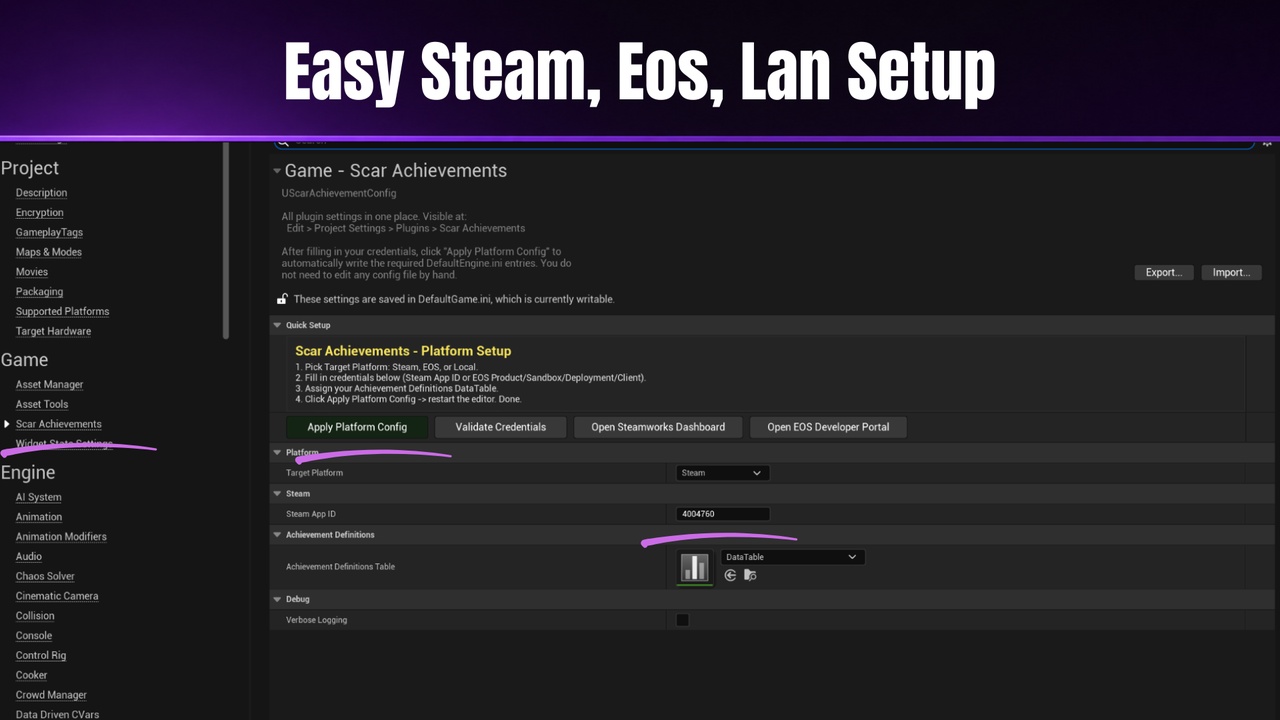
Dedicated Project Settings panel
Apply Platform Config button
Validate Credentials tool
Achievement Trigger Component
Ready-to-use GameInstance subclass
Quick Setup
Select your backend in Project Settings
Create a DataTable using ScarAchievementDefinitionRow
Paste credentials and assign the DataTable
Click Apply Platform Config
Use the Award Achievement Blueprint node
Run in Standalone Game and test
Supported Backends
Steam
Epic Online Services (EOS)
Local SaveGame
Included Content
Full C++ source code
Runtime module
Editor module
Blueprint function library
Trigger component
Setup documentation
User Guide PDF
Notes
Uses Unreal Engine’s built-in OnlineSubsystemSteam and OnlineSubsystemEOS integrations.
No external SDKs or DLLs included.
Steam and EOS plugins must be enabled manually inside your project.
Documentation
User Guide:
https://drive.google.com/file/d/1haBWISPlEZnNhtFSZtTgiByQ8R-kZhHm/view?usp=sharing
Video Guide:
https://youtu.be/tdN9A4GNiHE?si=j5U4HF4TfTOn955K
Discord Support:
https://discord.gg/sAQ5FdMXJn