描述
Blueprint-friendly console variable management
fully exposed CVAR Blueprint Library
register
get
set
watch CVARs from any Blueprint
live change callbacks and cross-session persistence
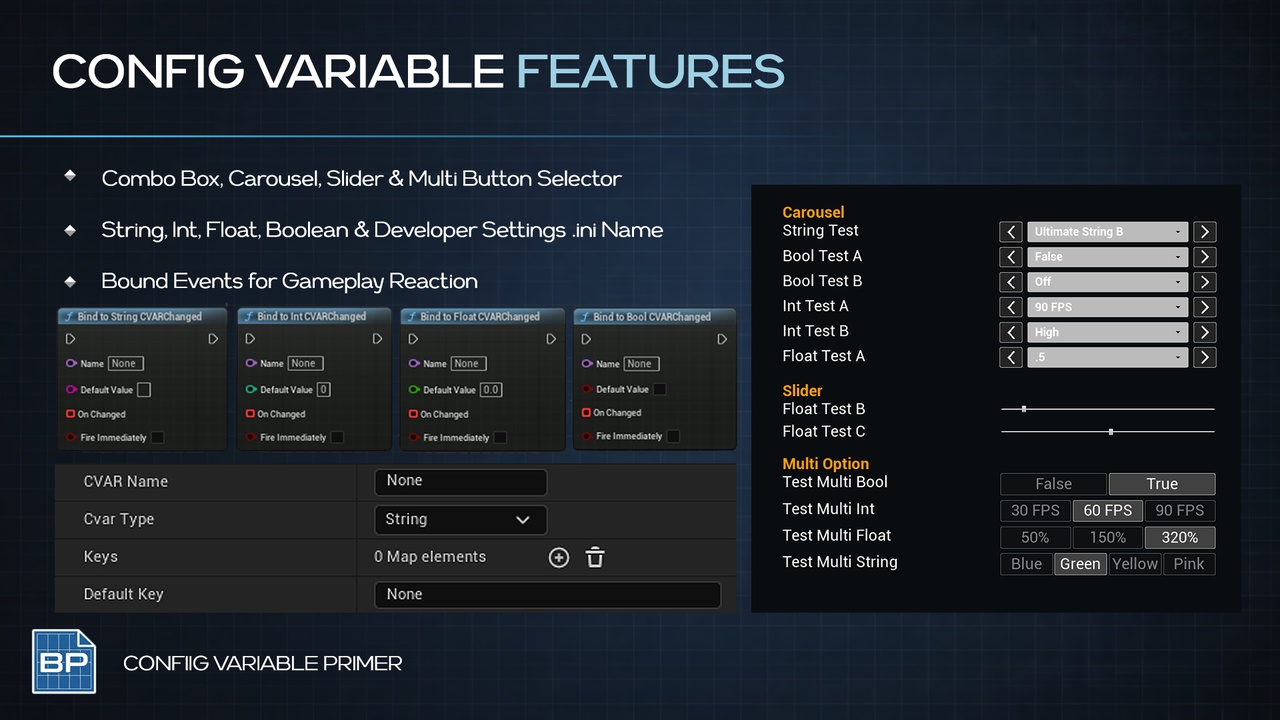
The CVAR Primer exposes UE5's console variable system directly to Blueprints. Register Int, Bool, Float, and String CVARs at runtime, read or write them from anywhere, and bind delegates that fire whenever a value changes. All values persist automatically to .ini across sessions.
Pre-Built Widgets
Drop-in UMG widgets wired directly to CVARs — no boilerplate required:
Slider continuous float/int control
Carousel x Combo Box left/right step through a list of options with drop down Combo option
Multi-Button Select discrete button row for enum-style choices
Blueprint Function Library
Register, Get, Set, and Bind - all four types (Int, Bool, Float, String)
Listen to CVAR Changes anywhere
Bind a Blueprint event to any CVAR - fires on change, with optional immediate fire on bind
Cross-Session Persistence
Registered CVARs automatically save to Saved/Config/PrimerCVAR.ini
Change CVAR name via Project Settings > Primer CVAR
How To
Drop a pre-built widget (Slider, Carousel, or Multi-Button) into your UI
Point it at a CVAR name and default value
Optionally bind change events for reactive logic
Or create your own with the fully exposed CVAR Blueprint Library.
USE CASES
In-game settings menus (graphics quality, audio levels, feature toggles)
Developer/debug panels surfacing engine or gameplay CVARs
Runtime tuning of gameplay variables without recompiling
PRIMERS
Part of the Primer series, this plugin prioritizes clarity, control, and practical workflows.