
설명
RedirectCheck is a focused Unreal Engine editor plugin that helps you find, understand, and clean redirectors before they become a project mess.
When assets are moved or renamed in Unreal Engine, redirectors are created to keep old references working. That is useful in the short term, but over time redirectors can pile up across your Content folder, plugin folders, test maps, and old asset paths. For solo developers, teams, and marketplace sellers, this can make a project feel harder to manage and more stressful before packaging or submission.
Unreal already includes a built-in way to fix redirectors, but it is easy to miss and does not give you a project-wide overview, health score, severity breakdown, search, filtering, or a clean report you can keep.
RedirectCheck turns redirector cleanup into a clear, visual, and safer workflow.
Open the tool from:
Tools > ECal Studios > RedirectCheck
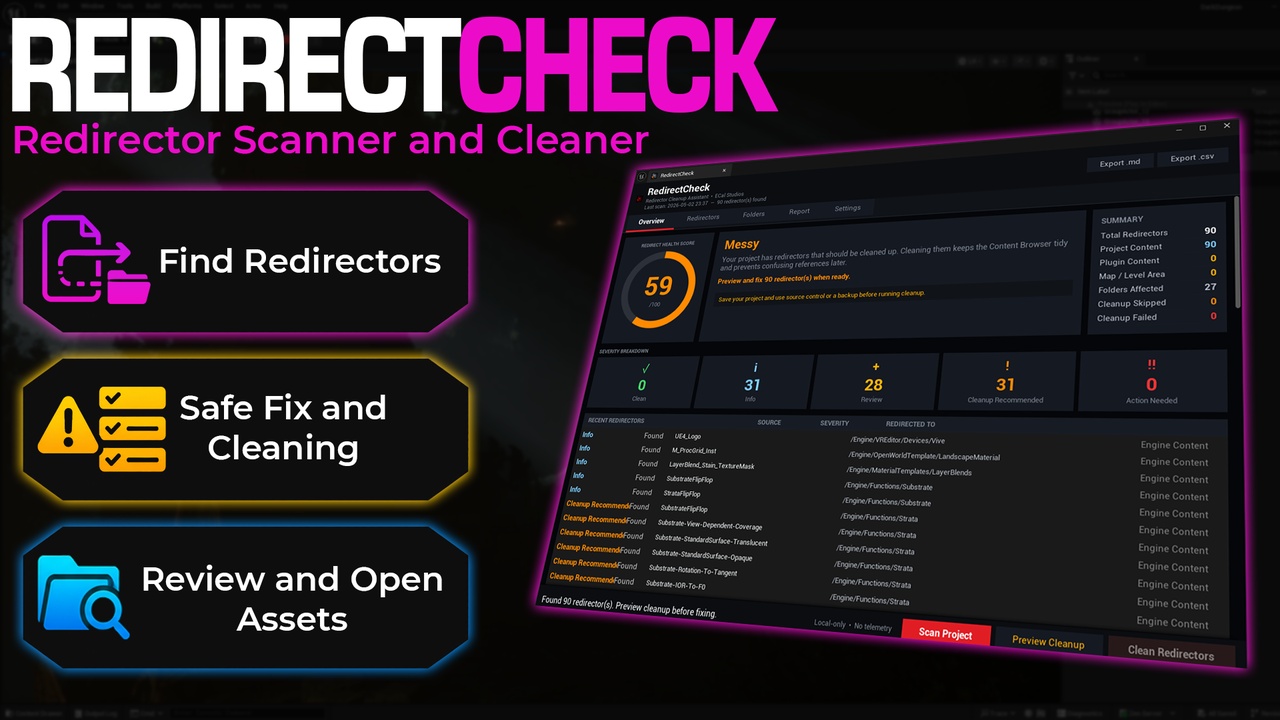
Run a scan and RedirectCheck shows your project’s Redirect Health Score from 0 to 100. The dashboard uses clear severity colors, a circular score gauge, and a quick recommendation so you immediately know whether your project is clean, needs review, or should be cleaned before packaging.
Every redirector is listed with a severity badge and a short explanation. You can filter by project content, plugin content, map folders, or unfixed items. You can also search by asset name or path, double-click a redirector to find it in the Content Browser, and review folder-level results before taking action.
Cleanup is designed to be intentional. RedirectCheck includes a required Preview Cleanup step before anything changes. The confirmation reminds you to save your work and use source control. When you continue, the plugin uses Unreal Engine’s supported redirector cleanup workflow, then automatically rescans the project so you can compare the before and after result.
You can export the results as Markdown or CSV to keep a local cleanup record, share it with a teammate, or include it in your own release checklist.
RedirectCheck is local-only. It does not use accounts, telemetry, analytics, or network calls.
Key Features
Project-wide redirector scan using Unreal Engine’s Asset Registry
0 to 100 Redirect Health Score
Premium dashboard with circular score gauge and severity colors
Severity levels for clean projects, normal redirectors, items to review, cleanup recommendations, and cleanup failures
Per-redirector explanation text so beginners understand what they are seeing
Search redirectors by name or path
Filter results by All, Project Content, Plugin Content, Map Folders, and Unfixed Only
Double-click any redirector to sync the Content Browser to that asset
Folder-level results to quickly find messy areas of the project
Required preview step before cleanup
Confirmation dialog with save and source control reminder
Cleanup through Unreal Engine’s supported IAssetTools::FixupReferencers workflow
Automatic rescan after cleanup
Before and after cleanup summary
Markdown and CSV report export
Reports saved locally to [Project]/Saved/RedirectCheckReports/
Configurable report path
Editor-only C++ plugin
No runtime impact
No external dependencies
No network use
No telemetry
Who RedirectCheck Is For?
Unreal Engine beginners who move and rename assets often
Solo developers who want a cleaner project before packaging
Marketplace and Fab sellers preparing content for review
Small teams that want a simple redirector cleanup report
Developers who want an easier alternative to hunting for redirectors manually
Teams that include project hygiene checks in their release process
Why Redirectors Matter
Redirectors are not automatically bad. They exist for a reason and help old references continue working after assets are moved or renamed.
The problem starts when they are forgotten.
A project with many old redirectors can become harder to understand, harder to review, and more annoying to clean before a release. RedirectCheck helps you see where the redirectors are, how serious the situation is, and what changed after cleanup.
Safety Notes
RedirectCheck is built around a safe and clear cleanup flow.
Scanning is read-only
Cleanup does not start without preview and confirmation
The plugin reminds users to save and use source control before cleanup
Reports are saved locally
No data leaves the machine
No account is required
No telemetry is used
Recommended workflow:
Save your project.
Make sure source control is active or create a backup.
Run a scan.
Review the redirectors and folder results.
Use Preview Cleanup.
Confirm cleanup only when you are ready.
Export a report if you want a local record.
Documentation