

Beschreibung
GET HELP WITH AUTO DRAPE:
WRITTEN DOCUMENTATION (PDF)
STEP-BY-STEP VIDEO TUTORIAL
FULL VIDEO WALKTHROUGH
DISCORD SUPPORT CHANNEL
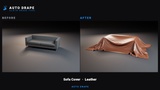
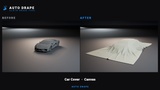
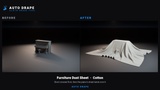
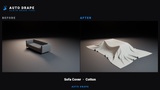
Drop a sheet over a car, a sofa, a hospital bed, a statue or a stack of crates - over several objects at once if you need to. Auto Drape builds the cloth, simulates it until it settles, and bakes the result to an asset. No manual cloth setup, no hand-painted weight maps.
Key features
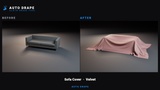
Covers what you already have. A cover fitted to your sofa, car or statue, sized automatically from its bounds - not a pre-made draped asset.
Several objects, one cloth. A patient and the bed under them, a machine and its pallet. Targets become one collision surface in memory; nothing is merged on disk.
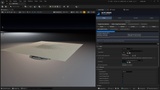
Watch it drape. The cloth falls and settles live in your viewport, in the material it will bake with, while the editor stays fully usable.
Cover a whole room in one click. Select every prop, press Drape Each Selected, and each one gets its own cloth, cut to fit.
Three output formats. Static Mesh (UVs, materials and vertex colours kept), Skeletal Mesh with clothing already created and weighted, or a GeometryCache of the whole fall.
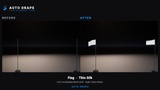
Flags that fly. Bake a flag as a live Skeletal Mesh and a wind source is placed for you, so it flies the moment you press Play.
Eleven ready-made setups and nine fabrics. Car covers, tablecloths, sofa and bed covers, dust sheets, shrouds, curtains, flags, crate and machine covers - with 2K fabric textures tiled to real-world size.
Curtains that hang right. Cut from the rail to the floor, with real pleats.
Reads live poses. Skeletal targets are sampled in their current pose, MetaHumans included.
Your textures stay true. UVs survive the whole process - a grid stays a grid, a logo stays a logo.
Batch queue and full Blueprint / Python API. Every button in the panel is also a function call.
Quick start
Tools > Auto Drape
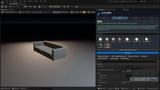
Select what you want covered and press Targets from Selection
Pick a setup and press Make me a cloth that fits this target
Press Auto Drape
A few seconds on Fast quality, about half a minute on Production. The baked asset is saved and placed in your level automatically.
Good to know
Uses its own built-in cloth solver, which collides against the target's real triangles (not Chaos Cloth). Every image on this page was made with it.
Baked drapes are ordinary Static Mesh, Skeletal Mesh or GeometryCache assets. The built-in fabric materials live in the plugin's content, so keep the plugin enabled when packaging, or assign your own materials.
Dropped Garment (draping your own garment mesh) is in Beta.
Requirements
Unreal Engine 5.6, 5.7 and 5.8 - Windows. Works in Blueprint and C++ projects.
Plugins required: Chaos Cloth (runs the clothing of a Skeletal Mesh bake) and Geometry Cache (the GeometryCache output). Both ship with Unreal and are enabled automatically. No other plugins are needed.
Support
Documentation: Auto Drape User Guide (PDF) - the same guide is included in the download (Docs folder).
Discord: discord.gg/C4MFUnJDr
Email: [email protected] - include the LogAutoDrape lines from your Output Log; the plugin explains what it decided and why.