
الوصف
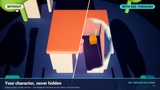
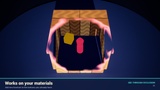
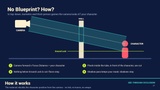
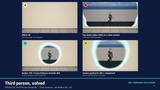
See your character through walls, roofs, trees and props - with ONE Material Function. No actor tags. No traces. No C++. No runtime material swaps. The material knows where the camera is looking, so with top-down and isometric-style perspective cameras it opens a clean hole between the camera and your character by itself - no Blueprint required. Orthographic camera? Untick Auto Calculate Ortho Planes or add the included component. Zooming camera, third person or a party of 4? Drop the included component on your characters. Floors are never cut, and cut walls keep casting their shadows.
━━━━━━━━━━━━━━━━━━━━━━━━━━━━━━━━━━━━━━━━
FEATURES
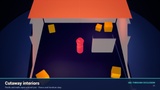
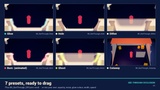
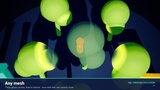
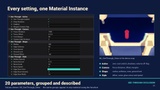
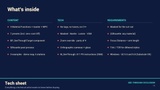
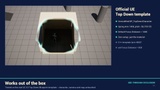
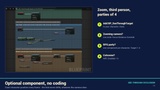
• Works out of the box with the UE Top Down Blueprint template (Focus Distance 1400 is the default) • Drop MF_SeeThrough_Apply into your material and connect 2 pins - or use the ready master / presets • Ground Lock: floors, rugs and low props are never cut - also on stairs and upper floors • Shadows stay (switchable): the shadow pass keeps your original mask • Per-pixel: no popping, no darker overlaps, no actor lists • 7 presets: Hole, Dither, Glow, Burn (animated), Ghost, Cutaway, Off • Optional BP_SeeThroughTarget component: exact position, zoom-proof, third person, party of up to 4 • Global controls in one MPC: on/off, zoom override, radius scale • Silhouette post process: see the character through ANY material (Opaque, glass, bought assets) • Translucent output for glass (smooth fade, no dither) • Material Attributes / layered materials function • Orthographic / isometric cameras: untick "Auto Calculate Ortho Planes" on the camera, or use the included component • Zero-cost Off preset + Nanite Pixel Programmable Distance support for big levels • Editor-friendly: turn it off with one Post Process Volume while you build levels • Every parameter grouped, described and shown in the Material Instance
━━━━━━━━━━━━━━━━━━━━━━━━━━━━━━━━━━━━━━━━
HOW TO USE
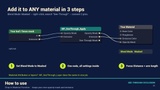
1. Set your material Blend Mode to Masked. 2. Right-click in the graph, search "See-Through", add MF_SeeThrough_Apply. 3. Connect Opacity Mask and Emissive. Done for the Top Down template. 4. Other camera? Set Focus Distance to your Spring Arm length - or add BP_SeeThroughTarget to your character. Illustrated step-by-step guide included.
━━━━━━━━━━━━━━━━━━━━━━━━━━━━━━━━━━━━━━━━
REQUIREMENTS
- please read • The cut-out needs Masked materials. Can't use Masked? Use the included Silhouette post process instead. • Masked costs more than Opaque, especially with Nanite: use it on meshes that block the view, not the whole level. Tips to keep it cheap (Off preset, Pixel Programmable Distance) in the guide. • Click-to-move games: set roof/wall collision to ignore the Visibility channel so clicks go through the hole. • Dithered styles need TSR or TAA (UE5 default). The clean Hole style works without. • Not for the Path Tracer. Mobile not tested. • Tested on Windows, DX12 SM6, Nanite + Lumen + Virtual Shadow Maps: UE 5.5 and UE 5.8 (also with Substrate enabled). ━━━━━━━━━━━━━━━━━━━━━━━━━━━━━━━━━━━━━━━━
WHAT'S INCLUDED
/SeeThrough/Materials M_SeeThrough, MPC_SeeThrough, 3 Material Functions, 7 presets, Silhouette post process /SeeThrough/Blueprints BP_SeeThroughTarget (optional component) /SeeThrough/Examples texture, Material Attributes and translucent examples /SeeThrough/Maps Overview demo map: 6 stations (press Play and fly around) /SeeThrough/Demo demo-only meshes, materials, sky and post process (safe to delete)
━━━━━━━━━━━━━━━━━━━━━━━━━━━━━━━━━━━━━━━━
Q&A
Q: Do I need Blueprints or to tag my actors?
A: No tags ever. No Blueprint for a fixed top-down / isometric-style perspective camera. For zoom, third person, orthographic cameras or several characters, add the included component (no programming).
Q: Does it work with my existing materials?
A: Yes. Add one node and set Blend Mode to Masked. Material Attributes: MF_SeeThrough_Layer. Can't change them?
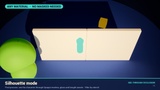
Silhouette mode. Q: My camera zooms. A: One node: set "Focus Distance Override" in MPC_SeeThrough, or add BP_SeeThroughTarget to the character.
Q: My RPG has 4 characters.
A: Add BP_SeeThroughTarget to each one and pick Target, Target 2, 3 or 4.
Q: Does it work with Nanite, Lumen and foliage?
A: Yes, including instanced foliage. Use Pixel Programmable Distance on Nanite meshes to keep far meshes on the cheap Opaque path.
Q: How expensive is it?
A: One small function in the pixel shader of the materials that use it (411 PS instructions for the full master). The real cost is Masked vs Opaque, so use it on the meshes that can block the view; the Off preset compiles the effect out. No tick, no traces, no material swaps.
Q: Can I use it commercially?
A: Yes, under the Fab license you choose.
━━━━━━━━━━━━━━━━━━━━━━━━━━━━━━━━━━━━━━━━
SUPPORT Ask in the Questions tab before leaving a review - I answer within 24 h and I fix things. If it helps your game, a quick review means a lot to a small creator. Also by RafaSC: Painted Edges (free stylized edge shader).