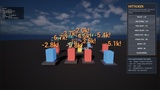
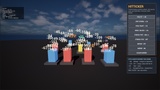
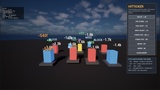
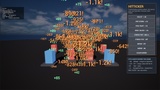
Descripción
The usual way to show a damage number is one UUserWidget per hit. Per hit, that means: construct an object, build a Slate tree, run a layout pass, touch the font atlas — and hand the whole thing to the garbage collector a second later. At thirty hits a second, which is an ordinary Tuesday in a bullet-heaven, a tower defence or an ARPG with area damage, that is a measurable hitch. It is exactly why studios end up writing their own.
HitTicker is that rewrite, done once, properly.
A ring buffer of fixed size is allocated when the world comes up and never grows. Numbers live in it as plain structs — no UObject, no widget, no shared pointer. Once a frame, one pass projects them, sorts them by importance, cuts everything past your budget and draws them. Nothing on that path allocates, formatting included.
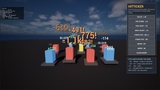
And because thirty numbers a second on one enemy are unreadable no matter how cheaply you draw them, repeat hits on the same target fold into one number that counts up — so what a player sees is a growing total, not a wall of digits.
KEY FEATURES
Fixed-size ring buffer. Allocated once, never grows. Full means the oldest number is overwritten, never the newest dropped — the freshest hit is the one the player is looking for.
Hard per-frame budget. MaxDrawnPerFrame is a real ceiling. Past it, numbers are cut by importance: near before far, crit before normal, young before old.
Same-target merging. Thirty hits a second become one number counting up, with the pop replayed on every hit. Per style, globally, or off.
Screen-space overlap avoidance. A coarse occupancy grid pushes colliding numbers apart — upwards first. Not an n² comparison, so twice the numbers is not four times the cost.
Styles are data assets. Font, colour over life, pop curve, arc, outline, prefix and suffix, lifetime, damage-scaling, importance. Change every crit in the game by editing one asset.
Two ways in, both one line. Set AHitTickerHUD as your HUD class, or — if you already have your own HUD — add the component and call DrawNumbers(Canvas) from your DrawHUD. Nobody has to replace their HUD class.
Draws in the editor viewport without PIE. Numbers fly while you set up a shot, so screenshots need no Play session. (Shipping uses the HUD path; the editor path is compiled out.)
Measurable, not hand-waved. Live, drawn this frame, merged, dropped by budget, culled, draw milliseconds and buffer high water — on screen with one console command, and readable from Blueprint.
Stress command built in. HitTicker.Stress 600 puts six hundred numbers a second on screen so you can watch the budget hold instead of taking our word for it.
Blueprint-first API. Add Damage Number, Add Crit Number, Add Heal Number, Add Combat Text, stats, clear, budget — no C++ required.
Cooked-build clean. One runtime module, no editor module, no third-party code, no UMG dependency.
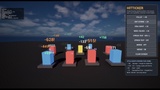
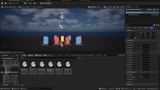
Demo included. A map with target dummies, a click-driven HUD (volley, crit storm, heal wave, miss/block, stress test, merge on/off, clear) and six style assets.
WHO IT IS FOR
Bullet-heaven, survivor-like and horde shooters, where the hit count per second is the design.
Tower defence, idle and incremental games, where a hundred sources tick at once.
ARPGs and MMO-likes with area damage, damage over time and crit tiers.
Anyone who has already profiled their damage numbers and found the widget spawn.
HONEST LIMITS — READ THIS BEFORE BUYING
HitTicker is not a combat system. No damage calculation, no hit detection, no health bars. It shows what your game has already worked out. The Fab products for the other half of that chain are Miss No Hit and Stable Hit Detection; HitTicker sits next to them, not against them.
No UMG widgets. Drawing is on UCanvas. If your plan is damage numbers built from animated widget Blueprints, this is the wrong plugin and you will be unhappy with it.
No 3D text in the world. No TextRenderComponent, no number you can walk around. Numbers stand in screen space above the world point that was hit.
No network replication. Every client displays what its own game code reports to it.
No font is included, for licensing reasons. The styles use the engine's default font; bring your own and set it on the style.
No screen-space blood, no hit reactions, no editor utility widget. Numbers, and nothing but.
Windows. Win64 is built and verified for this release. macOS and Linux are allow-listed in the .uplugin and the code contains nothing platform-specific, but they were not built here and are not claimed as supported.
Free UE5 snippet pack (10 C++ and Blueprint snippets): https://teufel-engineering.com/snippets