Beschreibung
Kiosk Lockdown Toolkit — a kiosk mode plugin for Unreal Engine 5: lock a Windows build down so visitors cannot leave it, with Project Settings and Blueprint nodes and zero C++.
A packaged Unreal game on a public screen is one Windows key away from the desktop. Visitors hit Alt+Tab, open the Start menu, click the taskbar, or close the window, and the exhibit is gone. Kiosk Lockdown Toolkit puts the pieces installers normally script by hand into one plugin: a keyboard filter, cursor confinement, taskbar hiding, sleep prevention, focus recovery, idle detection and automatic relaunch after a crash.
Tick the options in Project Settings and the lockdown applies when the game starts, no nodes needed. Or drive every feature from Blueprint at runtime. A safe emergency key combo and a command-line switch let you get back into the machine while you build.
KEY FEATURES
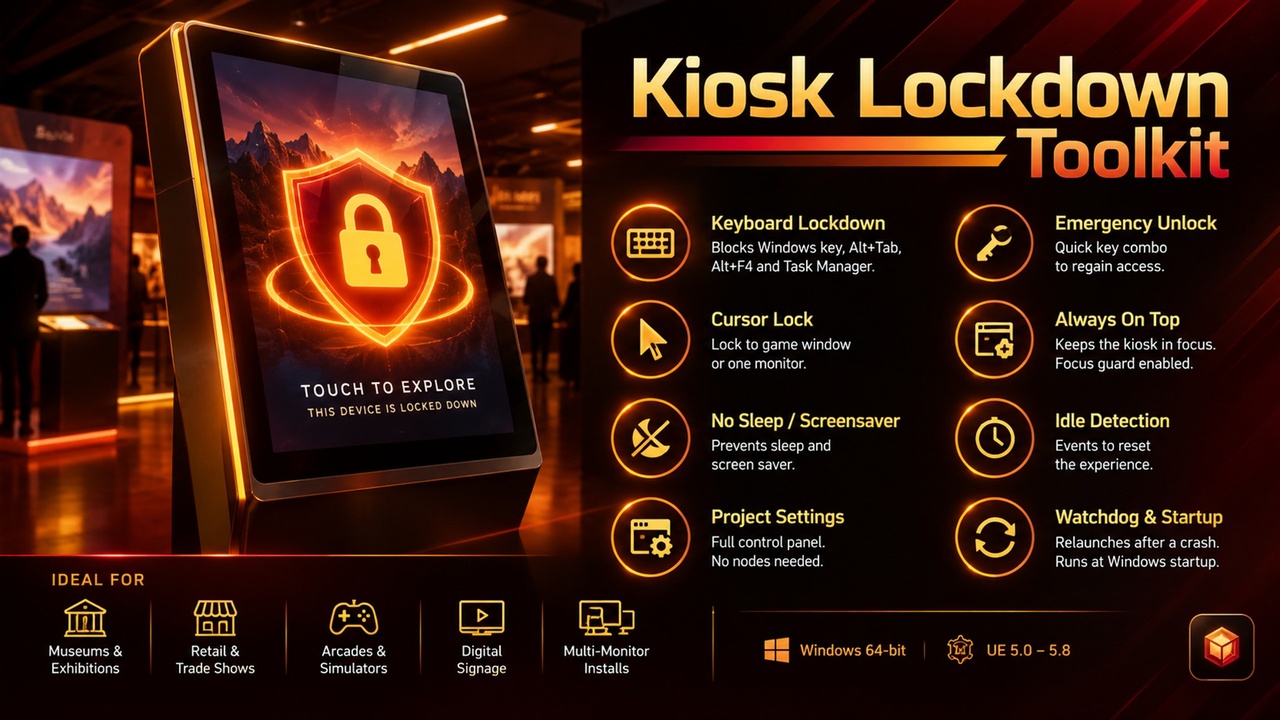
• Keyboard lockdown — swallows the Windows keys, Alt+Tab, Alt+Esc, Ctrl+Esc, Alt+F4 and the Task Manager shortcut (Ctrl+Shift+Esc), each switchable, optionally only while your game has focus
• Emergency unlock — Ctrl+Shift+Alt plus a key you choose (F12 by default) releases every lockdown at once, with an On Emergency Unlock event
• Cursor lock — confine the mouse to the game window or to one monitor of a multi-screen setup
• Hide the taskbar — hides every Windows taskbar and brings it back when the game ends
• Stay awake — blocks the screen saver, display sleep and system sleep
• Always on top and Focus Guard — keeps the window in front and takes the foreground back when another app steals it
• Idle detection — On Idle Started and On Idle Ended events with a timeout you set, to reset the experience for the next visitor; Notify Activity covers serial, OSC or network buttons the engine cannot see
• Watchdog relaunch — a hidden helper restarts the application after a crash or kill, with a delay, a maximum restart count and extra command-line arguments; a normal Quit Game does not relaunch
• Run at Windows startup — add or remove the application from the current user's startup list from a node
• Project Settings panel — configure everything in Project Settings > Plugins > Kiosk Lockdown Toolkit; nothing is applied until you turn on Apply On Startup
• -NoKiosk switch — start the application with -NoKiosk to skip every automatic lockdown for maintenance
USE CASES
• Museums and exhibitions — interactive displays that must stay in your app for months
• Retail and trade-show stands — product configurators and demos on public touch screens
• Arcades and simulators — cabinets and motion rigs that boot straight into the game
• Digital signage and wall displays — unattended screens that recover on their own
• Multi-monitor installs — keep the cursor on the right screen
WHY THIS PLUGIN?
The Windows pieces that make a real kiosk (a low-level keyboard hook, window and taskbar control, power requests, a process watcher) are not reachable from Blueprints and are fiddly to get right. This plugin is a thin layer over them with safe defaults: a fresh install locks nothing, there is always an emergency exit, and everything is undone when the game shuts down. Ctrl+Alt+Del is handled by Windows itself and cannot be blocked by any application, so combine the plugin with a Windows policy if you need that closed too.
GET STARTED IN 60 SECONDS
Step 1: Install the plugin for your engine version (5.8 first; other versions follow) and enable it
Step 2: Open Project Settings > Plugins > Kiosk Lockdown Toolkit, tick Apply On Startup and choose what to lock
Step 3: Optional: call nodes from the Kiosk Lockdown category (Enable Keyboard Lockdown, Lock Cursor To Monitor, Enable Watchdog) and bind On Idle Started
Lockdown is off in the editor unless you turn on Apply In Editor. Keep the emergency unlock enabled while you test.
SUPPORT
Questions or issues? Contact us via the seller page: https://www.fab.com/sellers/HashemGameDevStore
Include your engine version, Windows version and which options you enabled.
Documentation: https://docs.google.com/document/d/e/2PACX-1vQsCs6qK-lsEBJ5BR-9ETNcyPVsxx0sHeVm4aJ8izeYpNdaDODk5hp2quwgmlRtxL6azXjvf7VQzqjY/pub