Opis
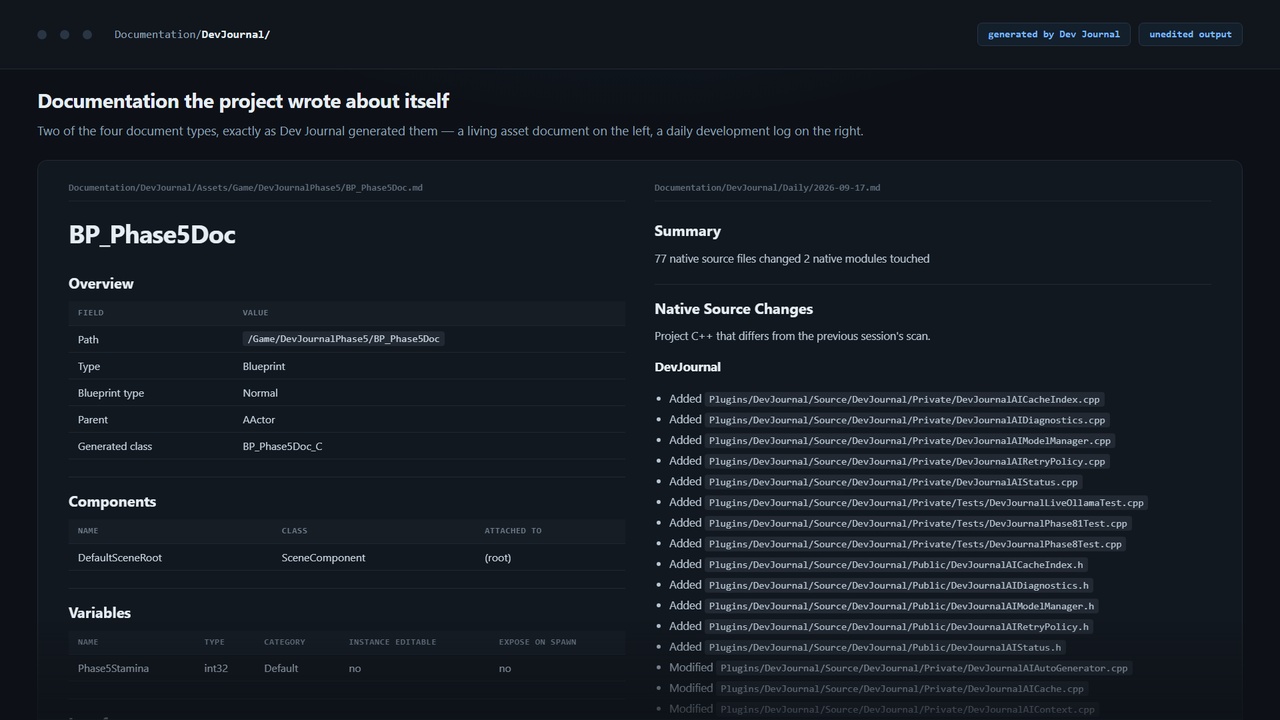
Dev Journal watches the Unreal Editor for meaningful development activity and turns it into documentation: daily logs, living asset documents, system overviews and per-asset histories.
It records Blueprint structure and graph logic changes, dependencies, renames, C++ edits and commits, then writes that history into Markdown files.
Everything it writes comes from observed facts. It records what changed and where; it does not guess purpose, intent or code quality.
0.2.0 adds Blueprint contracts, potential breaking changes, developer notes, feature sessions, handoffs, coverage reports, range reports, release documentation and session reports.
Dev Journal is editor-only and never ships with a packaged game. It does not modify assets, source files or your working copy.
FeaturesBlueprint change tracking — components, variables, functions, macros, interfaces, parent class and graph-level logic changes.
Variable identity by GUID — renames are reported as renames.
Living asset documentation — one Markdown document per tracked asset.
Per-asset history — append-only change history.
System documentation — related assets and native classes clustered from recorded relationships.
Daily reports — sessions, grouped changes, counts, source control state and timeline.
Native source tracking — C++ changes grouped by file and module and cross-referenced with related Blueprints.
Read-only Git and Perforce context — branch, revision, working-copy state and commits.
Incremental rebuilds — only affected documents are regenerated.
Dockable editor panel — activity, assets, systems, source control and source changes.
Optional fact-bound AI summaries — off by default.
Blueprint Contract — public functions and macros, Blueprint-visible variables, interfaces, components and event dispatchers.
Potential Breaking Changes — twelve contract-change categories covering removed, withdrawn or reshaped callables, variables, interfaces, components, dispatchers and parent-class changes. They are reported as potential because Dev Journal cannot know whether anything used them.
Migration Notes — changed members shown before and after.
Developer Notes — attributed, timestamped and immutable notes explaining why a change was made.
Feature Sessions — explicitly name a piece of work and subsequent changes carry that name across sessions and days.
Team Handoffs — immutable transfer records containing changes, notes, potential breakage and migration notes.
Historical impact — references captured at the time of the change rather than recomputed later.
Documentation Coverage — shows what Dev Journal has recorded and which documents are stale.
Range Reports — deterministic history aggregation between two dates, rolled up by asset.
Release / Version Documentation — captured state for observed Git tags and comparisons between captured releases.
Session Reports — one document per editor sitting, including sessions crossing midnight.
Release / Version Documentation. Dev Journal captures documentation state when it first observes a Git tag. It cannot reconstruct arbitrary historical tags. If a usable snapshot was never captured, comparison is unavailable and the document explains why. Tags are read-only.
Documentation Coverage is not a project quality score. Untouched assets may simply have no recorded history. Stale documents are listed separately.
Range Reports are not source-control diffs. They aggregate only what Dev Journal recorded.
Handoffs report membership, not intent. Intent appears only in developer-authored notes. Dev Journal does not infer unfinished work, remaining tasks or developer intent.
Deterministic AccuracyDev Journal documentation is deterministic: the same recorded facts produce the same document.
Structural hashes exclude timestamps and identity. Systems are clustered only from recorded dependencies, parent and component classes, calls, casts and spawn targets.
Dev Journal records structure, not meaning. It does not interpret game logic.
Optional AIDev Journal is not a chatbot, coding assistant or copilot. There is no conversation or prompt box, and every core feature works with AI disabled.
When enabled, AI adds a clearly marked summary generated only from recorded facts:
## AI Summary > AI-generated > Provider: Ollama > Model: qwen3:4b > > Generated from the deterministic facts above. Verify before relying on it.
Every fact passed to the model has an identifier, and generated sentences must cite their supporting facts.
AI output never becomes authoritative project state.
Uncited or invalid citations are rejected.
Evaluative and causal claims are rejected.
Stale summaries stop rendering when facts change.
Sparse context produces a declined answer instead of invented prose.
AI does not guarantee correctness; accepted sentences remain traceable to recorded facts.
Local Ollama SupportDev Journal supports local Ollama, with qwen3:4b as the default model.
Ollama is optional, not bundled and never installed automatically. Dev Journal uses its HTTP API.
Nothing is downloaded when enabling AI, testing the connection, refreshing models or selecting a missing model. Downloads happen only when you explicitly press install, with progress and cancellation support.
Local Ollama support has been tested for discovery, install, cancellation, generation, generation cancellation and model unload.
Optional OpenAI and Anthropic integrations are also available.
Source ControlGit and Perforce are detected automatically and accessed read-only. Dev Journal reports branch, revision, working-copy state and commits, and includes commits in the daily timeline.
Git tags are also read for release capture.
There are no commit, push, checkout, revert, sync or tag-modification actions. Without source control, those sections are omitted.
PrivacyNothing leaves your machine unless you explicitly allow it.
AI is off by default.
Cloud providers require explicit consent.
Remote Ollama is treated as external.
API keys are stored in Windows Credential Manager.
Source code is never included in AI context.
Generated documentation contains no secrets, endpoints or machine paths.
When cloud AI is enabled, Dev Journal sends only the recorded facts needed for the document — such as asset and symbol names, header filenames, counts, structural changes and diff statistics — plus the framing prompt.
It sends no file contents, credentials, full project tree, telemetry or analytics. Supported external hosts are your configured Ollama endpoint, api.openai.com and api.anthropic.com. Turning external AI off stops that traffic.