
Описание
STOP CLICKING RECOMPILE ON ONE ASSET AT A TIME.
Every Unreal team eventually hits it. Packaging fails, the log points at a Blueprint struct that "needs to be recompiled", and the only documented fix is to open each asset and press Compile by hand. On a project with hundreds of structs, enums and Blueprints that is an afternoon lost, and it comes back every time an asset is renamed, moved or reparented. This plugin turns that afternoon into one button.
ORDER IS THE WHOLE POINT
Manual one-by-one recompiling is not just slow, it is unreliable. Compile order matters: a struct that contains another struct has to be compiled after the one it contains, and a child Blueprint after its parent. Click them in the wrong order and the stale assets stay stale — which is exactly why the errors so often survive a manual pass and reappear at cook time.
Bulk Recompile builds a dependency graph from the Asset Registry and compiles in topological order, so one run is enough. The ordering is computed from package dependencies without loading a single asset to work it out. Circular references, which are legal between Blueprints, fall back to alphabetical rather than being dropped.
WHAT YOU GET
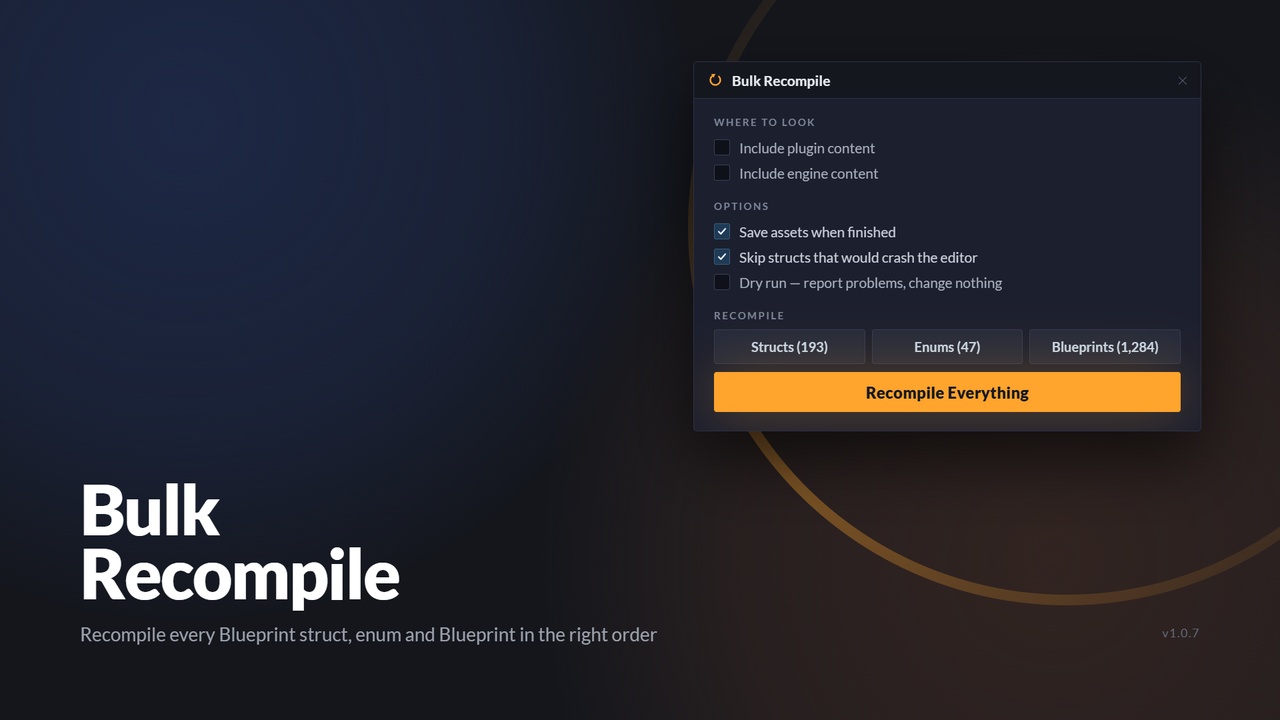
- One dockable panel, reachable from Tools, Bulk Recompile or the Recompile button in the Level Editor toolbar.
- Recompile all User Defined Structs, ordered so contained structs and enums compile first.
- Repair all User Defined Enums, re-syncing enumerator names to the current asset path and restoring missing display names.
- Recompile all Blueprints, ordered so parents and dependencies compile first.
- One Recompile Everything button that runs all three in the order that actually works: enums, then structs, then Blueprints.
- A dry-run mode that reports what is broken before you change a single asset.
- A filterable results list with per-asset status and an explanation of what happened.
- Double-click any result to jump straight to that asset, or right-click for Open Asset, Show in Content Browser, Copy Asset Path and Copy Result.
- Copy the results to the clipboard as tab-separated text for a bug report or a build log.
- Cancellable progress, batched saving and controlled garbage collection for large projects.
- Blueprint-callable nodes so Editor Utility Widgets can drive the same operations.
WHAT IT PROCESSES
- User Defined Struct - full recompile, ordered so contained structs and enums compile first.
- User Defined Enum - enumerator names re-synced to the current asset path, missing display names restored.
- Blueprint - full recompile, ordered so parents and dependencies compile first.
C++ structs and enums are compiled by your build and are never the cause of these errors, so they are deliberately left alone. Level Script Blueprints are skipped because they compile with their level, and touching them here would dirty every map in the project for no benefit.
THE OPTIONS
Where to look:
- Include plugin content (off by default) - also process assets in plugin Content folders.
- Include engine content (off by default) - you almost never want this.
Project content is always included, so by default a run touches only your own assets.
Options:
- Save assets when finished (on) - writes the repaired assets to disk. Turn this off and the fix only lasts until you close the editor.
- Force-save every asset, even unchanged ones (off) - the fallback when packaging still complains after a normal run. Expect a large source control diff.
- Skip structs that would crash the editor (on) - see the known limitation below.
- Only recompile assets that are out of date (off) - inspects everything but recompiles only what needs it. Close to instant on a healthy project, and no source control diff.
- Collect garbage after every asset (off) - much slower, but it cleans up after every single asset exactly as the editor does when you compile one at a time. Turn it on if a normal run is unstable.
- Dry run, report problems and change nothing (off) - the right first move on an unfamiliar project.
The action buttons show live counts for the current scope, so you can see the effect of each
checkbox before running anything.
READING THE RESULTS
Every processed asset gets a row: status, type, name, and what happened.
- OK - recompiled with no complaints.
- Warning - recompiled, but the compiler reported warnings.
- Error - the asset is genuinely broken. This is what fails your cook, and it needs a human.
- Skipped - deliberately not touched.
- Load failed - the asset could not even be loaded.
The panel switches to the Problems only filter automatically when a run finds problems. Above the
list you get counts, elapsed time, and how many packages were saved - and if any package failed to
save, the summary says so and reminds you that read-only files are the usual cause.
KNOWN LIMITATION, STATED UP FRONT
On some projects, compiling a User Defined Struct asserts inside UE 5.5 itself. This is an engine bug, not a bulk-operation one: it was reproduced and narrowed down against a real 39,000-asset project, where compiling a single affected struct on its own, in an otherwise untouched editor, asserts in exactly the same way. Pressing Compile on that asset by hand does it too. Compiling a struct reinstances every Blueprint that uses it, which deliberately leaves superseded classes inconsistent, and the same engine call then walks every loaded class including those. There is no point in between where a plugin can intervene.
Two things mitigate it. "Skip structs that would crash the editor", on by default, detects the parent-and-subclass pattern that causes it from Asset Registry metadata before anything is loaded and reports those structs instead of compiling them. On the project this was built against, that turned an immediate crash into a full run: 193 structs processed, 140 compiled, 53 flagged. It is a euristic, not a proof. The resave route described above avoids the whole class of problem, because it never compiles a struct at all.
BEST FIT
- Blueprint-heavy and Blueprint-only projects
- Teams that package frequently or run automated builds
- Projects with a lot of designer-authored structs and enums
- Anyone who has just renamed, moved or reorganised a folder of data assets
- Migrating a project between engine versions
- Diagnosing a cook failure that points at a struct or enum
GOOD TO KNOW
- Editor-only. Nothing from this plugin ships in a cooked build.
- Works in Blueprint-only projects
- Saving is optional but recommended. Without it the fix only lasts until you close the editor.
- Assets already dirty in your editor are written out too, so commit or back up first. The confirmation dialog says so.
- Read-only files under Perforce or SVN are reported as save failures rather than failing silently.
- The run is cancellable. Cancelling stops cleanly and already-processed assets keep their results.
REQUIREMENTS
- Windows, Mac or Linux
- Editor-only. Nothing ships in a packaged build.
- No other plugins required.