Descrizione
MetaSound Playground
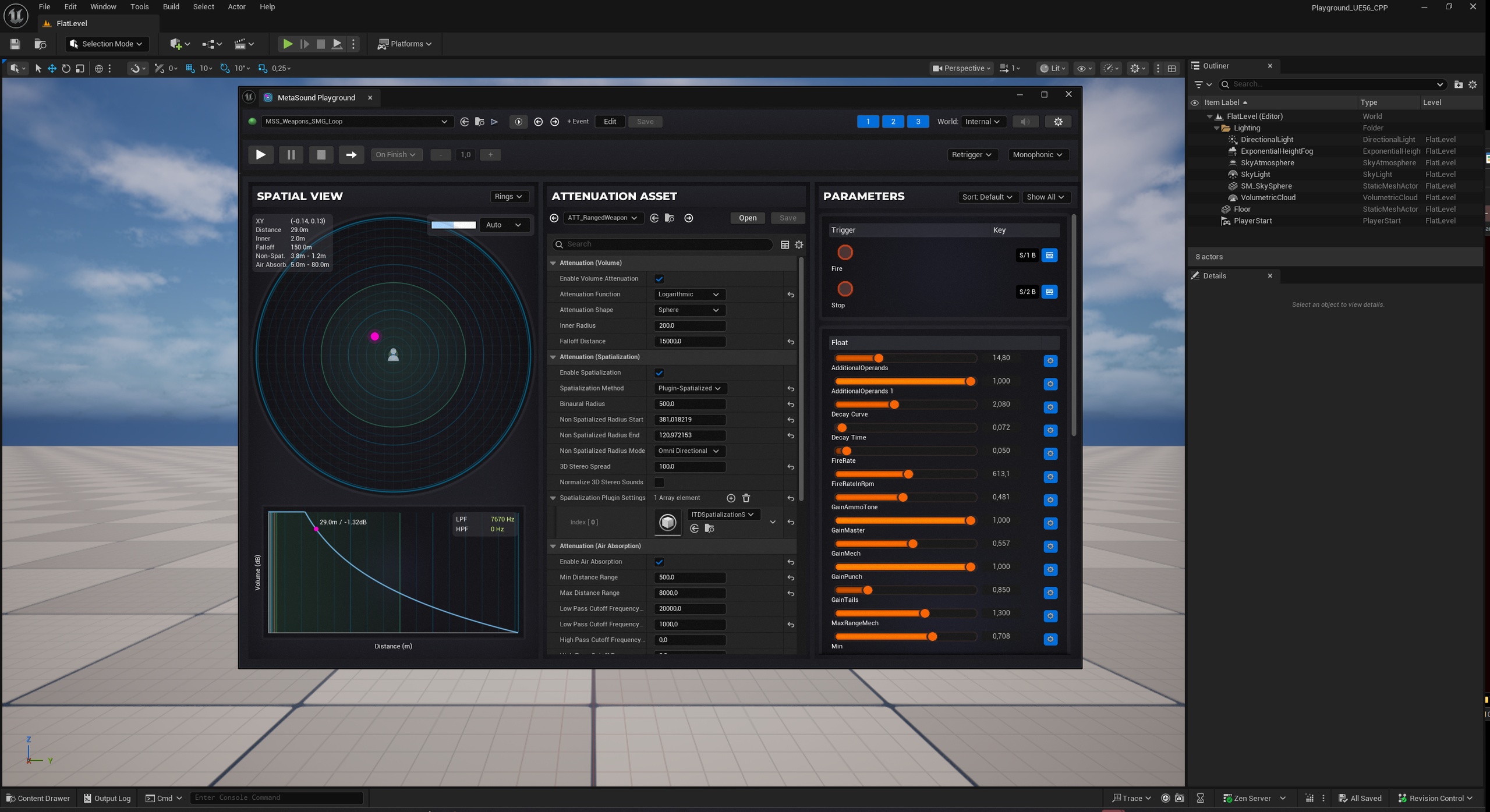
Metasound Playground is a dockable editor plugin that gives your MetaSounds the listening room Unreal Engine never shipped - audition them spatially, with real attenuation and live parameters, without ever entering PIE.
🎥 Watch the Showcase | 📄 Documentation
Unreal's native preview plays every MetaSound flat and centered - spatialization disabled. Hearing a sound in space means tweak, enter PIE, walk to the emitter, listen, exit, repeat: 30–60 seconds per pass, or a throwaway test level.
The engine gives you MetaSounds.
MetaSound Playground gives you a place to hear them: real positioned audio in one dockable window, spatialization and attenuation fully active, listener synced to your viewport camera. Drag the emitter across the XY pad and hear it sweep through its attenuation rings live - panning shifts, volume falls away, air absorption rolls in. The minute-long loop becomes a knob turn.
Spatial Audition
XY pad with attenuation rings - inner radius, falloff, and air-absorption zones drawn to scale; zoom presets from 10 m to 2000 m.
Live curve graph - dB-vs-distance plot with a position marker and real-time LPF/HPF readout.
Embedded attenuation editor - edit any SoundAttenuation property; rings, curve, and audio update instantly.
Inline config warnings - mistakes like an inner radius larger than its falloff are flagged before they ship.
Live Parameter Control
Every input auto-exposed - knobs, sliders, toggles, trigger buttons, dropdowns; grouped, sortable, filterable.
Intelligent ranges - frequency gets 20 Hz–20 kHz logarithmic, ADSR times get 0–5 s; override any range per asset.
Playback vs Edit Mode - experiment without touching the asset, or write tuned values back as new defaults (UE 5.5+), undo-aware.
Transport & Workflow
DAW-style transport - play/pause/stop/loop, monophonic retrigger or polyphonic overlap; Space to play.
Playground Events - data-asset sequences that spawn, move (with easing), re-parameterize, and stop sounds; prototype whoosh-bys and ambient beds with no code and no PIE.
Three audio worlds - a self-contained preview scene, the current editor level, or live PIE (switches automatically when you press Play).
Who It's For
Sound designers auditioning assets in space instead of guessing from a flat preview.
Technical sound designers tuning attenuation against a visible curve.
Audio programmers verifying event sequences before gameplay code exists.
Teams reviewing audio without booting the game.
Safe by Design
Editor-only - adds nothing to packaged builds.
Non-destructive - Playback Mode never writes to assets; Edit Mode writes only when you choose, with full undo/redo. Live refresh on external asset changes.
No level pollution - preview indicators are transient and hidden from the outliner.
Get Started
Enable the plugin.
Open Tools → MetaSound Playground.
Pick any MetaSound and press Space.
Requirements
Unreal Engine 5.2-5.8 (Edit Mode requires 5.5+), Windows / Mac. MetaSound Playground is an audition and tuning tool - not a MetaSound authoring tool or runtime playback system, and it includes no sound content.
Support & Updates
Current version 1.0.5 - August 2026. Documentation - Questions before you buy? Ask - happy to help.