Description
Game Feature Navigator is an Unreal Engine editor plugin designed to help developers organize game features, not just files.
As projects grow, a single feature often spreads across multiple Blueprints, widgets, textures, sounds, functions, and custom events. A throwable item, for example, may involve the player Blueprint, inventory system, projectile Blueprint, UI widget, sound effects, enemy AI, and multiplayer logic.
This plugin lets you manage those scattered elements as Feature Cards.
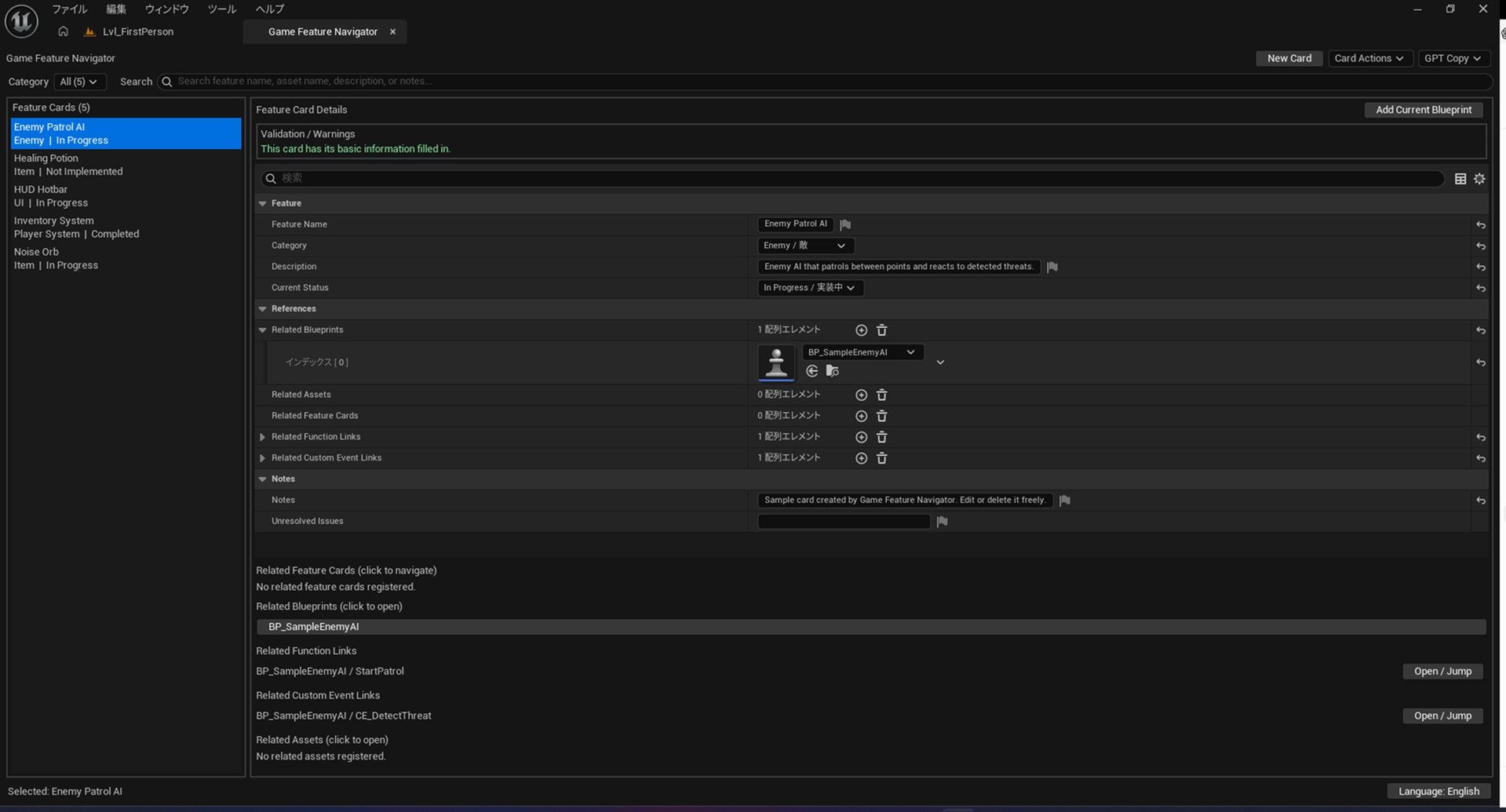
Each card can store a feature name, category, description, status, related Blueprints, related assets, related feature cards, function links, custom event links, notes, and unresolved issues. From the card, you can open or jump directly to the related implementation points.
Instead of searching through folders or large Event Graphs, you can open a feature card and immediately see where that feature lives in your project.
Typical Use Cases
Useful when one gameplay feature is spread across multiple assets.
Example:
Noise Orb
Item Blueprint
Player Blueprint
Projectile Blueprint
HUD Widget
Icon Texture
Function graph
Custom event
All can be managed from one feature card.
Navigate large Blueprints fasterIf your Player Character, Player Controller, Game Mode, or AI Controller contains many systems, you can register the important functions and custom events on a feature card and jump to them directly.
No more searching through large Event Graphs by memory.
Keep project structure flexibleYou do not need to force every asset into deep feature-specific folders.
Assets can stay in normal folders such as:
Blueprints
UI
Sounds
Textures
Animations
DataTables
The Feature Card becomes the cross-reference hub for the actual game feature.
Prepare clean AI contextThe plugin can copy a structured text summary of the selected feature card.
This is useful when asking AI assistants for help with implementation, debugging, or refactoring.
The AI context copy feature only copies text to your clipboard.
It does not require an API key and does not connect to any external AI service.
The plugin includes sample cards to help you understand the workflow quickly.
Sample examples:
Noise Orb
Healing Potion
Enemy Patrol AI
Inventory System
HUD Hotbar
These samples demonstrate related Blueprints, related assets, function links, and custom event links.
InstallationChoose the package that matches your Unreal Engine version.
Copy the plugin folder to:
<YourProject>/Plugins/GameFeatureNavigator/
Open your Unreal Engine project.
Enable the plugin if needed.
Restart the editor.
Open:
Window > Tools > Game Feature Navigator
Important Version NoticeSeparate packages are provided for different Unreal Engine versions.
Use the UE5.7 package for UE5.7 projects.
Use the UE5.8 package for UE5.8 projects.
Do not mix Binaries between versions.
When rebuilding from source, deleting Binaries and Intermediate may help resolve build issues.
NotesThis is an Editor-only plugin.
It does not affect packaged game runtime.
It is designed for project organization, feature navigation, and development workflow support.
Generated sample cards can be edited or deleted freely.
Function and custom event jumps depend on valid Blueprint references and matching function/event names.
Blueprint Editor Tool Productivity Project Organization Game Design Navigation Utility AI Workflow Data Asset Unreal Engine