










Descrição
- Runtime Mesh Slicing with Native UE5 Geometry -
Slice Static Meshes along any world-space plane at runtime.
Whether you are building a physics-based combat game, a detailed cooking simulator, surgical training tools, or destructible environments, Cleave provides a scalable slicing pipeline that integrates directly with Unreal Engine.
Cleave is a runtime mesh slicing plugin for Unreal Engine 5 built entirely on UDynamicMeshComponent and the GeometryFramework, Offering synchronous and asynchronous slicing directly from Blueprint or C++.
Instead of placing complex, heavy setups, Cleave operates on a clean plane-intersection model. It generates precise, triangulated caps and maintains material data, allowing objects to fall apart naturally on impact, sword swings, or custom gameplay triggers.
"Built with clean, production-ready C++ and backed by 49 automated tests, Cleave is designed to serve as a robust runtime framework—not a restrictive black box."
What Makes Cleave Different
Most runtime slicing solutions still rely on the legacy ProceduralMeshComponent workflow. Cleave is built from the ground up on UE5's UDynamicMeshComponent and GeometryFramework. This architectural choice provides several practical advantages:
Heavy meshes (such as 50,000+ triangle assets) can be dispatched to background worker threads, mitigating frame hitches on the game thread. Similarly, convex hull collisions are cooked asynchronously, allowing sliced halves to drop into the world instantly without physics stutters.
Cleave also respects your original artwork. Multi-material assets retain all of their original material slots across the cut, while the newly generated cap geometry is assigned to a dedicated material slot of your choice.
Quick Setup Guide
Cleave is designed to be highly accessible. To help you test the demo content immediately:
Sword Swing Configuration: Inside the Class Defaults of BP_PlayerSword (found in Cleave/Sword/Swing), assign your desired sword swipe animation to the Swing Montage variable.
Cut Plane Alignment: Adjust the Cut Plane Normal Axis settings within your gameplay blueprint to align the slice direction with the angle of your specific swing animation.
Instant Integration: Utilize the included ACleaveSliceableActor base class or attach the UCleaveComponent to your own actors to enable slicing in a few clicks.
Key Features
Runtime Slicing Engine
Perform clean, one-shot slicing of any UStaticMesh or UDynamicMesh along any world-space FPlane. The algorithm produces cleanly triangulated caps on the sliced interior surfaces.
Recursive Slicing Support
Sliced halves can be fed back into the slicing function repeatedly. This allows for deep, multi-stage destruction or continuous slicing of the same object down to small fragments with no artificial quality degradation.
Attribute Interpolation
UV channels (UV0 through UV7), per-corner normals, tangents, and vertex colors are accurately interpolated and preserved across the slice, maintaining visual consistency near the cut edge.
Asynchronous Execution
Heavy slicing operations can be run off the game thread. Blueprint users can utilize latent nodes, while C++ developers can leverage TFuture for non-blocking asynchronous dispatches.
Automatic Collision Generation
Every spawned half automatically generates an auto-fitted convex hull collision. This process is cooked asynchronously by default to avoid performance drops during intense gameplay moments.
Component & Actor Architecture
Use the ACleaveSliceableActor to quickly drop sliceable objects into your levels, or attach the UCleaveComponent to your existing actors for complex in-place destruction and repeated slicing of props.
Demo Map
The plugin ships with one demo map showcasing every entry point
with complete C++ source you can subclass or copy:
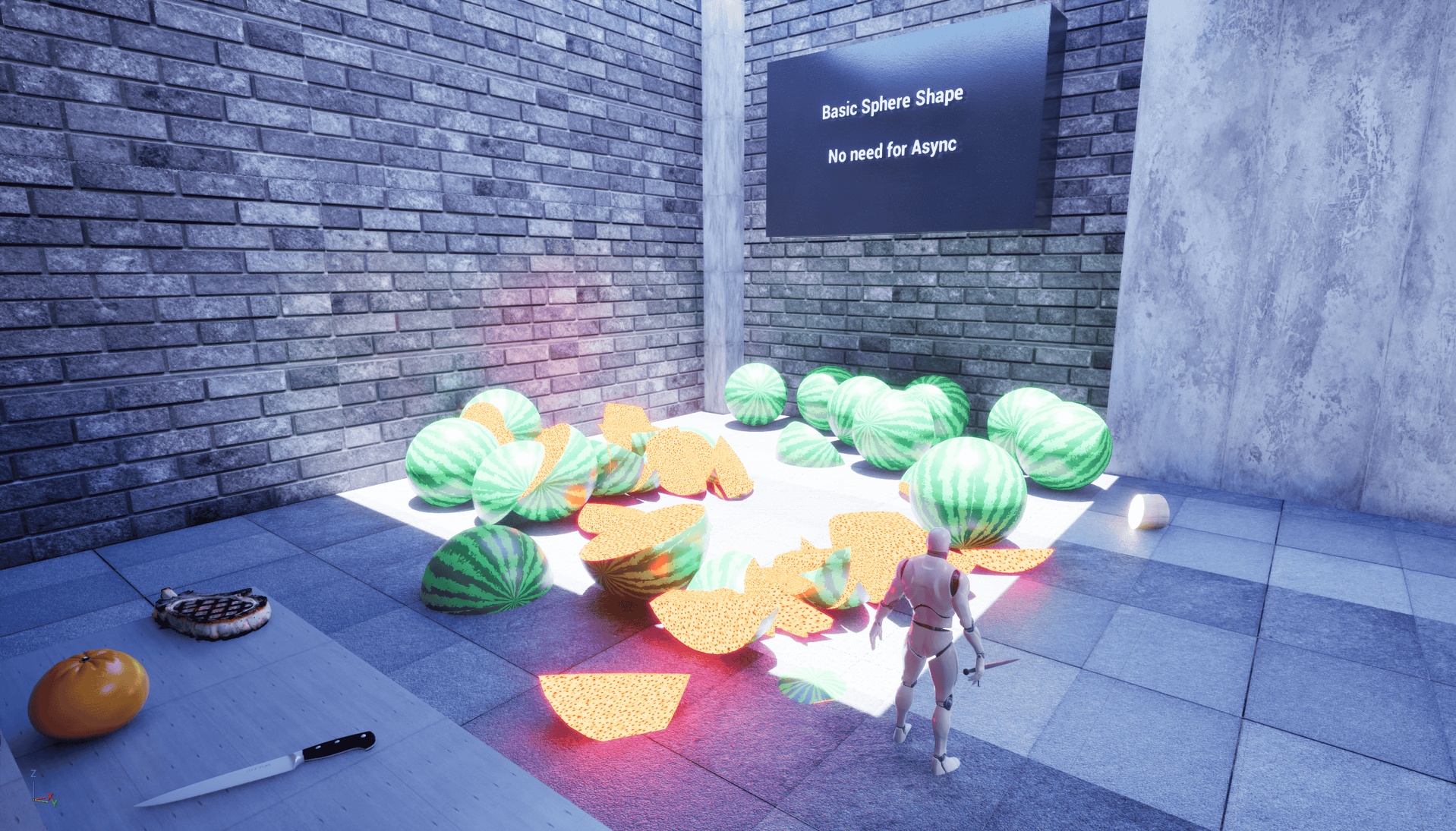
Basic shapes zone — watermelons sliced with a sword swing, demonstrates synchronous slicing.
High-poly zone — 50,000-triangle character dummies sliced cleanly, demonstrates async dispatch on heavy assets.
Cooking station — kitchen counter, knife, food queue, slide the cut plane with mouse X, slice with Space — demonstrates the Component workflow.
RMB — aim and throw a saw blade that slices everything it flies through.
LMB — sword attack (animation-montage driven) slices the single nearest target in front of you.
Performance
Cleave's slicing system is designed with optimization in mind:
Thread Offloading: Slicing computations and collision cooking can be offloaded to worker threads, mitigating game-thread performance drops on detailed assets.
High-Poly Slicing: Demonstrates stable slicing on 50,000+ triangle character meshes using the asynchronous dispatch pipeline.
Memory Management: Utilizes modern memory layouts within the GeometryFramework to minimize allocation overhead during runtime geometric changes.
Ideal For
Combat Games: Precise sword cuts, axe swings, or projectile-based slicing.
Cooking Simulators: Interactive food prep, slicing vegetables, bread, or meats.
Medical & Surgical Simulations: Clean organic cuts with dedicated interior cap materials.
Destructible Environments: Fragmenting pillars, walls, or dynamic debris.
VR Sandboxes: Interactive object physics and precise, hands-on slicing mechanics.
DEPENDENCIES
To use this plugin, you must ensure that Unreal Engine's built-in Geometry Processing plugin is enabled in your project:
1. Go to Edit -> Plugins.
2. Search for "Geometry Processing".
3. Check the "Enabled" box.
4. Restart the editor.
CREDITS
Demo sword animation: Melee Combat free pack by Uisco (https://uisco.itch.io/melee-combat). Demo content only — the Cleave
slicing runtime does not depend on it.
Documentation & Support
In-Editor Tooltips: Public C++ classes, functions, and properties are documented to provide descriptions directly on hover within the Unreal Editor.
Setup Guides: The online folder contains three introductory guides:
README.md — Buyer overview, API summary, and demo map walkthrough.
Cleave_Blueprint_User_Setup_Guide.txt — Blueprint step-by-step setup (~5 minutes).
Cleave_C++_User_Setup_Guide.txt — C++ setup and Build.cs configuration steps.
Support: For setup assistance, feature inquiries, or bug reporting, please contact the support email below.
CONNECT