
Description
Additional Documentation (complete setup guide): https://www.dropbox.com/scl/fi/xxjwr9dnhnwepifcp0rb4/StepAnimator_Setup_Guide.docx?rlkey=uvkokocx41ftyujcp3xbkur8h&st=4z12q1nj&dl=0
Stepped Hold (On 2's) for Unreal Engine 5.8 — hand-drawn-style animation holds, layered on top of any mocap, Control Rig, or Sequencer performance.
Step Animator adds one AnimGraph node — Stepped Hold — that makes full-rate animation read like classic hand-drawn work held on 2's, 3's, or 4's, without touching your capture rate, playback speed, or project frame rate. The engine keeps ticking and rendering at full 60fps; only the pose holds.
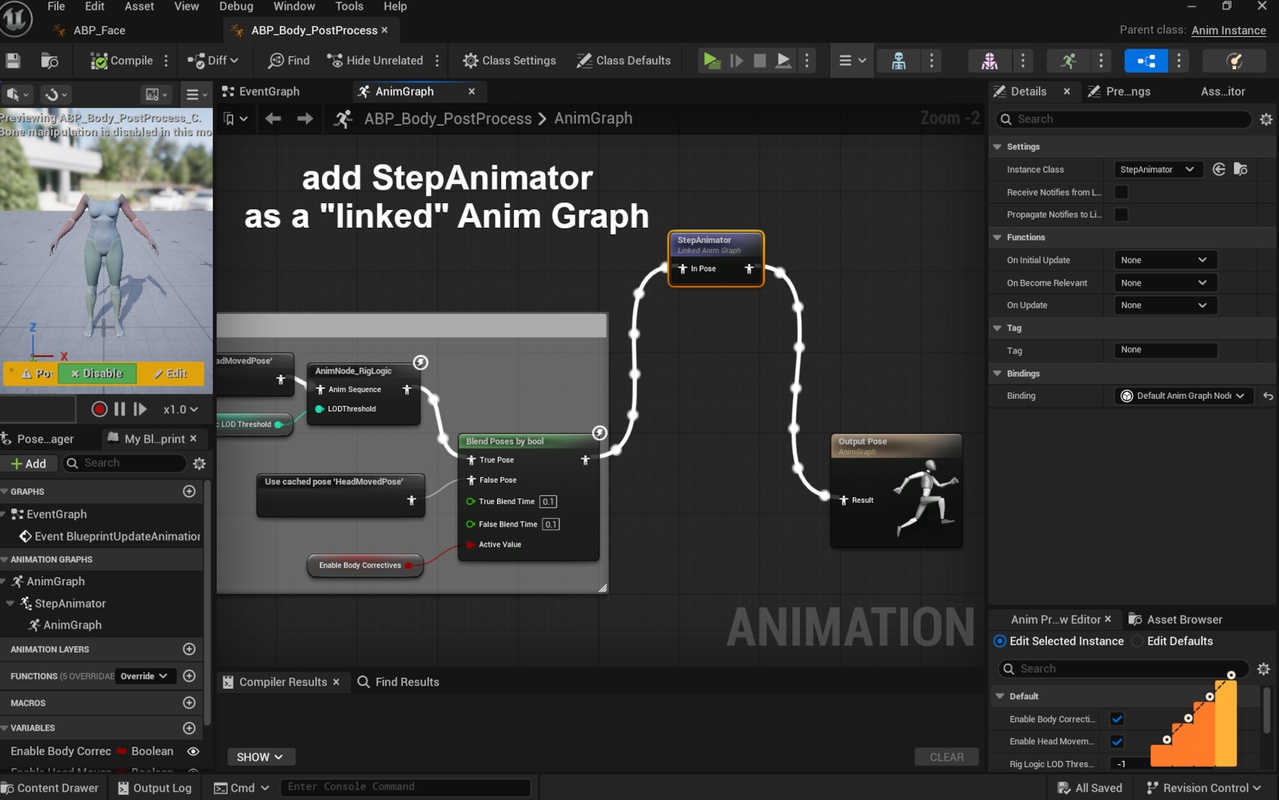
Step Animator is a lightweight C++ AnimGraph plugin built around a single node: Stepped Hold. Drop it into a Post-Process Animation Blueprint and it stylizes whatever pose Sequencer, mocap, or Control Rig already produced for that frame, so it layers cleanly on top of your existing animation setup instead of replacing any of it.
It's built for real production use, not just a flat global hold. Stagger different body parts onto their own offset timing so limbs settle on different frames the way a traditional animator would, add directional smear for snappier pops on fast-moving limbs, and let Auto Economy pick a faster or slower hold rate automatically based on how fast each part is actually moving — crisp during a big swing, lazily held once things slow down — all without hand-keying the rate over time.
Everything is exposed through a native, per-instance-editable, Sequencer-keyable Settings component, so animators can dial in the look directly on a character instance without touching the AnimGraph. Ships as full C++ source with no precompiled binaries, so it builds cleanly against your exact engine version.
Key features
Stepped Hold core — adjustable Steps Per Second, Hold Sharpness (instant pop through to an eased "moving hold"), and multiple ease modes including an anticipation-style Ease Out Back.
Bone Groups — stagger individual body parts onto their own offset timing; tag any group with a Smear Role, an Instant Snap override, or its own Auto Economy tiers.
Curve Groups — the same staggered-hold treatment for morph target and material curves, built with MetaHuman faces (almost entirely curve-driven) in mind.
Directional Smear — a lightweight, volume-preserving stretch-and-squash accent on fast-moving limbs, fully opt-in per Bone Group.
Auto Economy — measures each group's real speed and automatically resolves a hold rate from your own speed-to-rate tiers, so pacing feels hand-animated instead of mechanically fixed.
Auto Economy Sync & Stability — an optional Synced Rate keeps multiple Auto Economy domains switching and stepping in lockstep instead of drifting apart, and a one-dial Economy Stability setting (Off/Light/Medium/Strong) auto-tunes anti-jitter behavior instead of hand-setting three raw sliders.
Step Animator Settings component — an optional Actor Component that mirrors every slider as a native, per-instance, Sequencer-keyable property, with no manual Blueprint variable wiring required.
One-Click Presets & Diagnose Setup — jump-start the look with ready-made Steps Per Second/Hold Sharpness/Smear presets, then run Diagnose Setup any time something looks off for an instant, plain-English report of the most common setup mistakes.
Bake Animations widget — a one-click Window > Step Animator > Bake Animations panel that auto-detects every character in your shot, matches Capture FPS to your mocap’s own frame rate, and checks that Stepped Hold is actually active and won’t overwrite an existing asset before it exports — no console commands or Blueprint wiring required.
Non-destructive — only changes the evaluated pose at runtime, never the source animation asset. Sequencer’s own Export FBX, Bake Animation Sequence, and Take Recorder tools do not capture Post-Process Animation Blueprint output, so use the plugin’s own Bake tool (the Bake Animations widget above, or the Blueprint/console API it is built on) to export a correctly stepped Animation Sequence or FBX.
Technical details
• Requires Unreal Engine 5.8.
• Requires the engine's built-in "Level Sequence Editor" plugin to be enabled — this is declared as a Plugin dependency in StepAnimator.uplugin, and is needed for the Bake subsystem's Sequencer-driven (non-PIE) capture path (StartSequencerBake / PlaySequencerAndAutoBake).
• No third-party code, libraries, or external dependencies of any kind.
• No other plugins need to be enabled beyond the above — Step Animator does not depend on MetaHuman-specific plugins, though it is commonly used with MetaHuman characters.
Features:
Stepped Hold AnimGraph node — holds incoming 60fps mocap to a reduced, adjustable effective frame rate ("on 2's/3's/4's") with configurable Steps Per Second, Hold Sharpness, Ease Mode, and Overshoot.
Independent timing domains: Global (whole skeleton), Bone Groups (per body part, e.g. arms/legs/hands independently), and Curve Groups (per facial/curve region via wildcard name matching), each holding on its own offset and rate.
Curve Steps Per Second — an independent step rate for facial curves (morph targets/material curves) separate from the bone rate, for MetaHuman-style face+body rigs.
Directional Smear — per-body-part axis-aligned stretch/squash driven by measured motion speed, with configurable roles (Arm/Leg/Hand/Neck-and-Head).
Auto Economy — automatic per-domain hold-rate switching driven by measured motion speed against configurable Economy Tiers, with a single Economy Stability dial (Off/Light/Medium/Strong/Custom) consolidating anti-jitter tuning, plus cross-limb rate synchronization.
Manual per-Bone-Group/Curve-Group overrides, one-click Presets, and a one-click Diagnose Setup check for common misconfigurations.
Step Animator Settings Component — mirrors every slider as a Sequencer-keyable property on an Actor Component, with an Auto-Wire editor tool to wire the AnimGraph node to it automatically.
Bake subsystem — captures Post-Process AnimBP output (which Sequencer's Export FBX, Bake Animation Sequence, and Take Recorder do not) into a real Animation Sequence asset, via either a Play-In-Editor-driven or a Sequencer-native (non-PIE) capture path, with a dedicated editor widget (Window > Step Animator > Bake Animations).
Code Modules
2 — StepAnimator (Runtime), StepAnimatorEditor (Editor)
Number of Blueprints
0 — the plugin ships no Content folder assets; all functionality is delivered in C++.
Number of C++ Classes
12 public classes/structs, across both modules:
FAnimNode_SteppedHold, FBoneStepGroup, FEconomyTier, FCurveStepGroup (runtime AnimGraph node and its data structs)
UStepAnimatorSettingsComponent (Actor Component)
UAnimGraphNode_SteppedHold (editor AnimGraph node wrapper)
UStepAnimatorBakeSubsystem, UStepAnimatorBakeSettings, FStepAnimatorBakeEntry, SStepAnimatorBakeWidget (Bake subsystem, its settings object, and its editor widget)
FStepAnimatorModule, FStepAnimatorEditorModule (the two module classes)
Network Replicated
No
Supported Development Platforms
Windows (built and tested in Unreal Engine 5.8). The Editor module depends only on standard cross-platform desktop-editor modules (UnrealEd, Slate, PropertyEditor, ToolMenus, LevelSequenceEditor), so Mac and Linux are plausible but have not been built or verified by the developer.