

Descrição
FoxSettings — Data-Driven Game Settings Menu for Unreal Engine
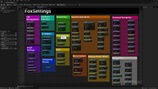
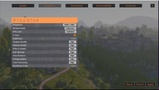
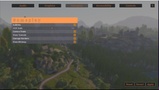
A complete, production-ready settings menu system. Define all settings via DataAssets bound to Console Variables — no code required. Includes Graphics, Audio, Controls with runtime keybinding, Gameplay, and Accessibility. Full gamepad navigation and hardware auto-detection built in.
Full documentation: https://alchemy-fox.de/settings/
Support: [email protected]
——————————————————————
WHAT'S INCLUDED
9 Widget Types | 5 Settings Categories | 60+ Blueprint Nodes | Hardware Detection | Gamepad Navigation | Full C++ Source | CVar Browser Editor Tool
——————————————————————
SETTINGS CATEGORIES
▸ Graphics (15+ Settings) Resolution Picker, Window Mode, V-Sync, FPS Limit, Brightness, Quality Preset, Shadow/Texture/Effects Quality, Anti-Aliasing, View Distance, Foliage, Post Processing, Upscaling (DLSS, FSR, TSR, XeSS), Resolution Scale
▸ Audio (6 Settings) Master Volume, Music, SFX, Dialogue, Ambient, Mute on Focus Loss
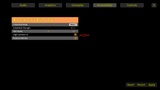
▸ Controls (10+ Settings + Keybindings) Mouse Sensitivity X/Y, Invert Y-Axis, Aim Assist, Vibration, Gamepad Sensitivity X/Y, Gamepad Deadzone, Toggle Sprint/Crouch, Runtime Keybinding with Conflict Detection (Primary, Secondary, Gamepad)
▸ Gameplay (8 Settings) Language, Subtitles, HUD Scale, Camera Shake, Auto-Save Interval, Show Tutorials, Damage Numbers, Show Minimap
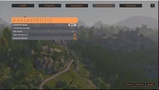
▸ Accessibility (5 Settings) Colorblind Mode (Protanopia, Deuteranopia, Tritanopia), Colorblind Strength, Text Scale, High Contrast UI, Reduced Motion
——————————————————————
WIDGET TYPES
Slider — Float/int values with min/max/step and optional suffix
Toggle — On/off checkbox
Switch — Visual slide switch
Dropdown — Multiple discrete options with custom CVar values
Resolution Picker — Auto-detects available screen resolutions
Keybind Row — 3-slot rebinding (KB Primary, KB Secondary, Gamepad)
Button — Action trigger with delegate
Section Header — Visual grouping divider
Spacer — Layout spacing
——————————————————————
KEY FEATURES
Data-Driven — All settings defined via DataAssets, zero code required
CVar Binding — Every widget directly reads/writes engine Console Variables
Auto-Import Keybindings — Scans from UE4 Project Settings or UE5 Enhanced Input
Runtime Rebinding — Keyboard, mouse, gamepad with conflict detection and swap
Gamepad Navigation — Full D-Pad support with automatic mouse/gamepad detection
Hardware Detection — GPU, CPU, RAM, VRAM, resolution detection
Quality Preset Recommendation — Auto-suggests Low/Medium/High/Ultra based on GPU
Upscaling Support — DLSS, FSR, TSR, XeSS with conditional visibility
Colorblind Simulation — Real-time engine-level color vision deficiency
Style Customization — Colors, fonts, spacing via DataAsset
Widget Class Overrides — Replace any widget with your own Blueprint version
Zebra-Stripe Rows — Alternating row colors with hover highlight
One-Call Menu — Show/Hide/Toggle with a single Blueprint node
INI Persistence — Auto-saves on Apply, loads on startup
Localization-Ready — All 60+ strings via LOCTEXT
Dedicated Server Safe — No UI code runs on servers
——————————————————————
EDITOR TOOLS
CVar Browser — Search, filter, and test 200+ game-relevant CVars (Window → Tools → FoxToolkit CVar Browser)
FoxSettings.SetupDemo — One console command creates a complete demo with all widgets, DataAssets, and a playable demo map
——————————————————————
BLUEPRINT NODES
Menu Control — ShowFoxSettingsMenu, HideFoxSettingsMenu, ToggleFoxSettingsMenu, IsFoxSettingsMenuVisible
Settings Read/Write — SetFoxSetting, GetFoxSetting, ApplyAllFoxSettings, RevertAllFoxSettings, ResetAllFoxSettingsToDefaults
Tab Management — RegisterTab, UnregisterTab, GetRegisteredTabs, GetTabByIndex, GetNumTabs
Widget Creation — CreateWidgetsForTab, CreateKeybindWidgets, WrapWidgetInZebraRow, GetDefaultWidgetClassOverrides
Hardware — DetectHardware, RecommendPreset, GetAvailableResolutions, GetDesktopResolution, IsDLSSAvailable, IsFSRAvailable, GetGPUVendor
Input/Keybind — ScanInputMappings, StartListeningForKey, RebindKey, ResetKeybinding, ApplyKeybindings, IsKeyboardKeyBound, IsGamepadButtonBound
Gamepad Navigation — NavigateUp/Down/Left/Right, Confirm, Cancel, SetFocusableWidgets, IsGamepadMode ——————————————————————
TECHNICAL DETAILS
Engine: Unreal Engine 5
Type: Code Plugin (C++)
Dependencies: None (Enhanced Input optional for UE5)
Platforms: Windows (Win64)
Full C++ source code included
All nodes have detailed tooltips
Integrates seamlessly into existing projects — show the menu with one Blueprint node ——————————————————————
DOCUMENTATION & SUPPORT Full documentation with setup guide, node reference, and examples: https://alchemy-fox.de/settings/
——————————————————————
MISSING A FEATURE? Feature requests are welcome! If you need a specific setting type, widget, or integration that is not included yet, let us know. We actively review requests and will include useful additions in future updates. Send your request to [email protected] with a short description.
——————————————————————
By Alchemy Fox Studio