Beschreibung
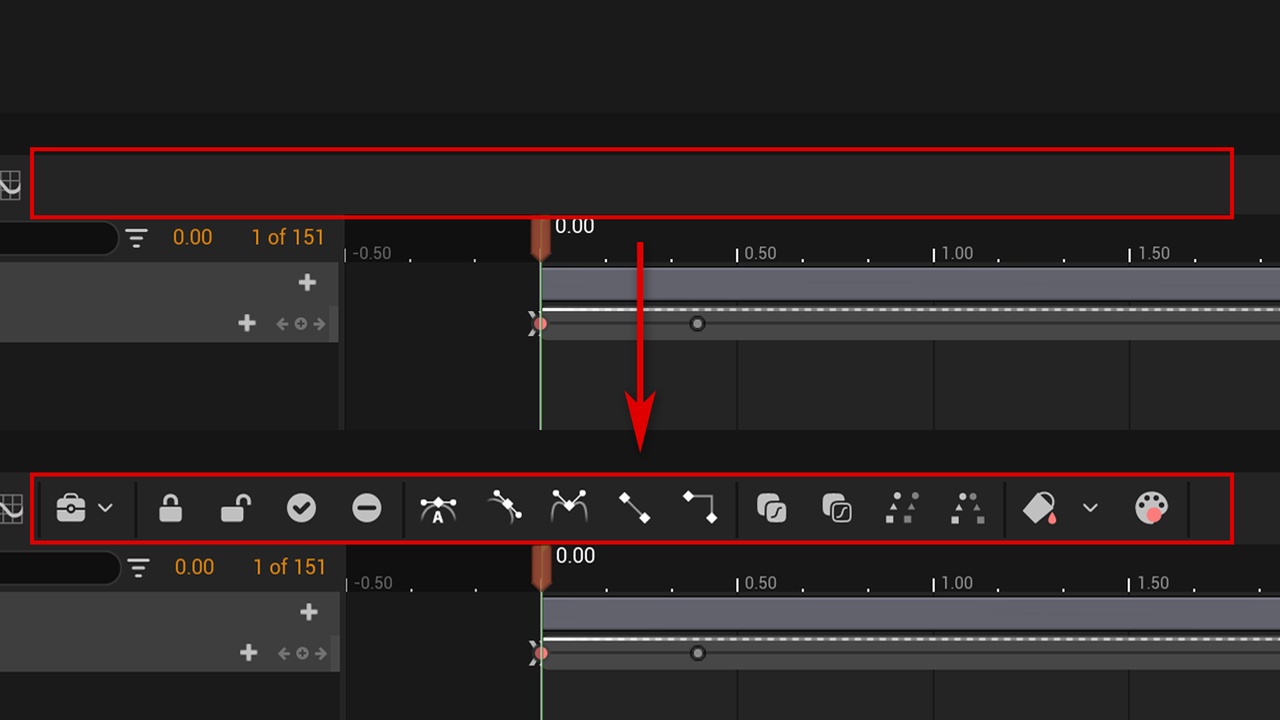
Enhance sequence is a plugin that can enhance the functionality of the sequence. It can add new features to the sequence toolbar. It provides functions such as Lock and unlock selected sections and tracks, active and inactive selected sections and tracks, set interpolation of selected keys, copy and paste the bezier curve of selected keys, clone or mirror selected keys to current time, set tracks color tint. In addition, Enhance sequence provides an environment that can customize the plugin. With the UI Effect Function Library, you can customize new buttons and corresponding button functions on the existing basis, which has a high degree of freedom.
Features:
Support Widget Animation and Level Sequence (as well as other types of Sequence).
Add many powerful feature buttons on the Sequencer.
Lock and unlock selected sections and tracks.
Active and inactive selected sections and tracks.
Set interpolation of selected keys.
Copy and paste the bezier curve of selected keys.
Clone or mirror selected keys to current time.
Set tracks color tint.
Supports Level Sequence (partially for now, full support will be provided in the future).
Code Modules:
EnhancedSequence(Editor)
Number of Blueprints: 1
Number of C++ Classes: 7
Network Replicated: No
Documentation:
https://docs.google.com/document/d/1dFaGUJfHivvnvPJOektE53bPgn8Q-tdlPLbw44KGC1U(EN)
https://docs.google.com/document/d/1954bAe0mJ8QZawiiWAqbEn3Oxj_nlSWnWbPaIukltNc(CN)
Dependency(Free Plugin):
https://www.unrealengine.com/marketplace/product/236a37aee6064f9183b7d77343d22f38
Version changes
V2.0.0
Fully support Level Sequence (including keyframe parts not supported in V1.0.1).
V1.0.3
Change the handle and added support for Unreal 5.4.
V1.0.2
Fix the bug where the dropdown menu for setting Section color is not working in some cases.
V1.0.1
Added some features of Level Sequence.
V1.0.0
Release the plugin.