





Descrição
Type one sentence. Watch it happen in Unreal Engine, Blender and Adobe Creative Cloud.
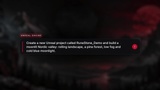
Wildframe Forge Bridge Complete connects your AI assistant to seven apps you already use: Unreal Engine, Blender, After Effects, Premiere Pro, Photoshop, Illustrator and Animate. Build a moonlit valley in Unreal, model a rune stone in Blender, design the poster in Photoshop, animate the title in After Effects and cut the teaser in Premiere Pro, all from plain-English prompts and inside your real projects. No copy-pasting scripts, no screenshots back and forth.
300+ Unreal commands, 60 Blender commands, nearly 300 Adobe commands, and one-call recipes for whole tasks.
Up and running in 3 steps
Add the plugin to your project from Fab.
Open the Setup page and click Fix all. It also installs the Adobe panels.
Ask your AI for something.
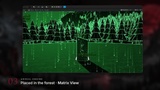
The AI doesn't work blind. The Bridge reports exactly what is in your scene or document, and the one-click Matrix View shows you the Unreal scene the way the AI reads it.
What sets it apart
Seven apps, one AI. Unreal, Blender and five Adobe apps in one plugin, so a single conversation can go from a 3D scene to a finished poster, title card and edit.
Send work between all seven apps. The AI hands renders, frames, models, textures and images from one app to the next: an Unreal render into Premiere Pro, a Photoshop poster into After Effects, a Blender model into your level. Between Unreal and Blender, a delivery waits in the hub's mailbox if the other app is closed and is imported the next time it opens.
Uses the AI plan you already have. No API keys to buy and no per-call charges: it works through Claude, ChatGPT or Codex as you use them today.
Several AIs at once. AI apps take turns in a fair queue per app, none can undo another's work, and an AI can reserve an Adobe app for a multi-step edit.
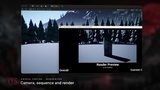
Cut to your music. Song analysis finds beats, bars and hits, then cuts your Sequencer shots in Unreal, places beat markers and cuts in Premiere Pro and After Effects, and adds beat pulses and flashes in After Effects.
What it does in each Adobe app
After Effects: comps, text, shapes, effects, expressions and camera moves, plus recipes for title cards, text reveals, color grades, beat-synced edits and audio-reactive visuals. Renders in the background or through Media Encoder.
Premiere Pro: import media, build sequences, cut, add transitions, captions and Lumetri looks, make vertical versions, then export.
Photoshop: layers, text, masks, adjustments, filters and background removal, plus recipes for thumbnails and social media sizes.
Illustrator: shapes, text, pathfinder, image trace and artboards, with transparent 4K PNG, SVG and PDF export.
Animate: symbols, classic and shape tweens, HTML5 Canvas publishing and video export.
Built for real projects
Ready-made recipes do a whole task in one call, so the AI uses far less of your plan's usage. Good news if you're on a lower-tier AI plan.
Unreal jobs run as one step: if a step fails, the changes it already made are undone automatically. In the Adobe apps, every change can be undone with Ctrl+Z.
Send models between Blender and Unreal in either direction with correct scale, axes and naming.
The AI opens Unreal, Blender and the Adobe apps itself and finds them on any drive.
An asset audit checks your Unreal content for outside dependencies before you ship.
Works with your AI
Works with any MCP-capable AI app: Claude (via the included connector), plus plugins for ChatGPT and Codex. Also tested with Grok Build. With no connector at all, the AI Scripts pages let you use any chat AI by copy and paste. Everything runs on your own PC: no cloud relay and no paid API keys needed.
The Blender add-on
The Blender side is a free, open-source add-on (GPL, as Blender requires). You don't need to download it yourself: the Setup page installs it with one click, and the AI installs it automatically the first time it opens Blender. Source: github.com/WildframeForge/wildframe-forge-blender
Works while Unreal is closed
After the Setup page in Unreal has run once, Blender and the Adobe apps keep working with your AI app on their own, even while Unreal is closed. The Setup page opens from the hub's tray icon, from Blender's sidebar or from any Adobe panel.
Security & privacy
Everything runs locally on 127.0.0.1. No data leaves your PC through this plugin. The package contains no programs or installers: on first setup, the Setup page downloads Node.js (the official build from nodejs.org), the hub's tray icon and the free Blender add-on, and checks each one against its fingerprint before it is used.
Raw Python/script execution and the PowerShell tool are OFF by default.
When you turn them on, the AI can run any command on your PC with your user rights. Turn them on only if you understand this.
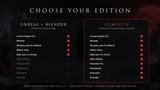
Only need Unreal and Blender?
Wildframe Forge Bridge (without the Adobe apps) is also available on Fab at a lower price. Everything in it is included in Complete.
Watch
Trailer: youtu.be/gT1Eksvggvw
More videos: youtube.com/@WildframeForge1
Requirements
Windows 10/11 (64-bit)
Unreal Engine 5.8 (the Setup page installs everything else)
Blender 4.2 or newer (tested with 5.2)
Adobe Creative Cloud apps with your own Adobe subscription (tested with After Effects, Premiere Pro, Photoshop and Illustrator 2026, and Animate 2024)
An AI assistant: Claude desktop app, ChatGPT, Codex or Grok Build
An internet connection for the one-time setup downloads
Support: [email protected]