
Açıklama
Tune your game on-device. Keep the values.
Every runtime tweaking tool lets you drag a slider and watch the game change. Then you stop playing and the value is gone — so you write it on a sticky note, alt-tab to the editor, and type it into the Inspector by hand. Hot Tuner closes that loop.
Mark any field with [Tunable]. Build to your phone, tablet, PC, or WebGL. Open the in-game panel, tune with real sliders and fields, and tap Apply — the values travel over your LAN to the Unity Editor and land in a diff view. Accept a change and it's written straight into your scene GameObjects, prefabs, or ScriptableObjects, and Ctrl+Z reverts it like any other edit.
Device → editor → saved asset. That round trip is what Hot Tuner is for.
The full documentation is public — quickstart, how the tiers work, network setup, and the complete API: https://hottuner.qinteract.com/
WHY YOU'LL USE IT EVERY DAY
- Balance where the game actually runs. Feel your jump height with a thumb on a real phone, not a mouse on a 27-inch monitor.
- No more re-typing values. The number you liked on the device is the number in your project.
- No rebuild between tweaks. Change, feel, change again — in seconds.
- Playtest with designers. Hand over a build, let them tune, collect the values afterwards.
KEY FEATURES
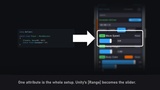
- Mark any field or property with [Tunable], and Unity's [Range] becomes the slider bounds.
- Values you apply are written into your scene GameObjects, prefabs, and ScriptableObjects, and Ctrl+Z reverts them.
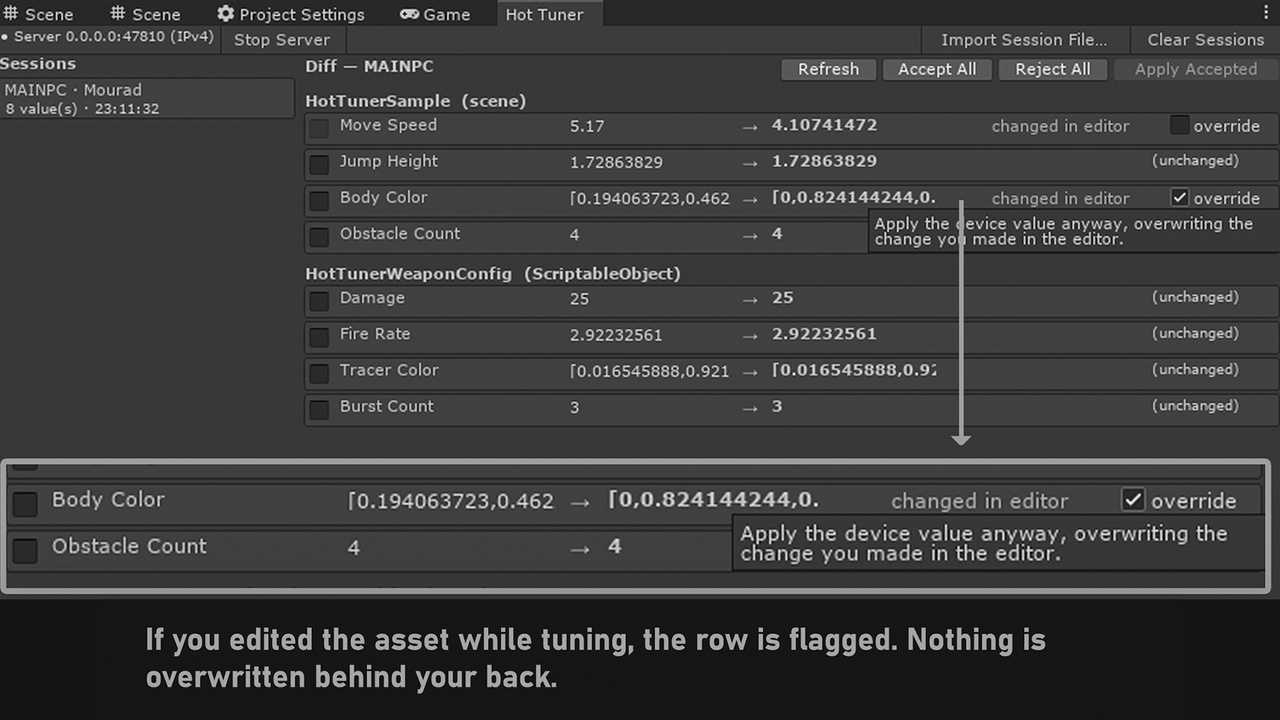
- Applied values arrive as a diff grouped by object, so you accept or reject them row by row.
- If an asset changed in the Inspector mid-session, the row is flagged and waits for your explicit override.
- A Live, Recompute, or Reload badge on every row tells you how that change takes effect.
- The panel is built entirely in code, so there are no prefabs, sprites, or fonts to conflict with your UI.
- Save named tuning sets on the device, then load and compare them as flat, git-diffable JSON.
- Export any snapshot as new ScriptableObject variants you can ship.
- With no editor connected, Apply writes a session file you import into the editor later.
- Register locals, third-party values, and computed values by hand with HotTuner.Register(...).
- Switch the tool off and it strips completely from your build, while your code still compiles.
READY IN FIVE MINUTES
1. Tools > Hot Tuner > Enable Hot Tuner
2. Add [Tunable] to a float
3. GameObject > Hot Tuner > Launcher
4. Press Play, open the panel, drag the slider
5. Tap Apply, accept the diff — the asset is updated
Open the included Demo Scene to see all three tiers working together before you touch your own code.
The panel opens with Ctrl+` on desktop, an on-screen button on mobile, and both thumbsticks on a gamepad. Optional corner-tap gesture, or call HotTuner.Show() from your own code.
REQUIREMENTS AND DEPENDENCIES
- Unity 2021.3 LTS or newer (tested through Unity 6).
- The Input System package — required; used by the launcher's open gesture. Install it from the Unity Package Manager before importing.
- A shared LAN between device and editor for live write-back. Optional — offline session files cover the rest.
- No other dependencies. No Newtonsoft, no DLLs, no binary assets — not even a font. Nothing is downloaded from GitHub, Google Drive, or Dropbox.
PLATFORMS
- Windows, macOS, Android, iOS, WebGL.
- Mono and IL2CPP. Reflection is plain FieldInfo / PropertyInfo / MethodInfo only — no Reflection.Emit, no expression trees, no dynamic codegen. AOT-safe on iOS, no link.xml needed for Hot Tuner types.
- WebGL has no UDP: use the manual IP:port field (discovery is LAN-only).
SUPPORTED TYPES
float, int, bool, enum, string, Vector2, Vector3, Color. Anything else marked [Tunable] is skipped and reported in one aggregated warning — never per-field log spam.
WRITE-BACK TARGETS
ScriptableObject and prefab assets via SerializedObject and Undo.RecordObject, so Ctrl+Z reverts cleanly and the Inspector updates immediately. Scene-instance values apply when the scene is open, and stay pending with a clear reason when it isn't. Static and manually registered values are shown as copy-to-clipboard rows. Hot Tuner never rewrites your .cs files.
NETWORKING
Device and editor talk over HTTP on a configurable port (default 47810), with UDP discovery on 47811 and a first-class manual IP:port field for networks that block broadcast. All I/O is off the game thread — it never stalls your frame. Multiple devices can connect at once; sessions are tracked separately and never merged.
ARCHITECTURE
- Separate Runtime and Editor assembly definitions; the runtime assembly has zero editor references.
- Full C# source included — nothing precompiled, nothing obfuscated.
LINKS
Overview and features: https://hottuner.qinteract.com/
Documentation: https://hottuner.qinteract.com/doc/
Tiers explained: https://hottuner.qinteract.com/doc/tiers
API reference: https://hottuner.qinteract.com/doc/api-reference
Networking and troubleshooting: https://hottuner.qinteract.com/doc/networking
Nothing is gated. If you want to know exactly how the write-back works, or whether your network setup will connect, the answer is on those pages.