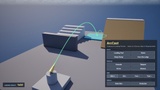
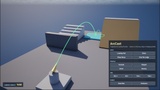
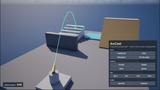
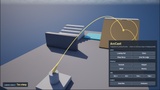
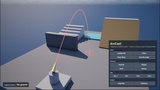
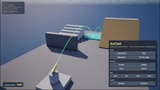
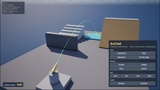
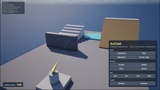

Descrição
The throw arc you can actually ship.
Unreal Engine 5.8 · one runtime module · built and verified on Win64, with Mac and Linux not in the PlatformAllowList and not built for this release · no third-party code · no Niagara, no materials, no meshes
THE SHORT VERSION
The engine already predicts the path. UGameplayStatics::PredictProjectilePath hands you the whole point list and it works.
It just cannot draw it. The only renderer is DrawDebugLine, and ENABLE_DRAW_DEBUG is 0 in a Shipping build — so the aiming aid you tested with is not in the build your players get.
ArcCast draws on UCanvas through AHUD instead. Same path as your crosshair. No material, no mesh, no Niagara system, no asset of any kind, and it survives -Shipping.
And while it was being written to draw properly, it went past the engine in three places that matter.
WHAT IT DOES THAT THE ENGINE'S PREDICTION DOES NOT
1. THE BOUNCE CHAIN
PredictProjectilePath stops at the first hit. ArcCast keeps going: the velocity is mirrored about the impact normal, damped by Restitution and Friction, and integrated on until MaxBounces, RestSpeed or MaxSimTime says stop.
Every stretch remembers which bounce it belongs to, so it is drawn thinner and fainter than the one before it. A grenade that comes to rest around a corner reads as exactly that, at a glance, with no legend.
2. THE LANDING VERDICT
Not just where it lands — whether landing there is allowed.
Valid · TooSteep · Blocked · OutOfRange · NoGround
Ground probe, slope angle against a walkable limit, and optionally a navigation-mesh projection. The verdict colours the arc and the ring — green, amber, red — and it is broadcast as an event, so a crosshair recolours without polling anything every frame.
Switch the navigation check on and the same plugin is a teleport target indicator: the landing point is snapped to the navigable point, so a teleport that follows the preview arrives exactly where the marker was drawn.
3. THE SPLASH RING THAT LIES ON THE GEOMETRY
The effect radius is built as a circle in the plane of the impact normal — and then every ring point is probed onto the surface individually.
So the ring follows stairs and slopes instead of hovering through them as a flat disc. It is the detail you can see in a still screenshot, and it is the difference between a preview and a placeholder.
4. OCCLUSION-AWARE DRAWING
Arc stretches the camera cannot see are not hidden — they are drawn faint and dashed. The player can see the arc carries on behind the wall without it shining through the wall as though the wall were glass.
Switchable, because it costs traces. The cost is measured and reported, not asserted.
AND IT ALSO WORKS WITH NO DRAWING AT ALL
Predict Arc runs the same simulation and hands back the whole result — bounces, landing point, verdict, flight time, path length — and registers nothing and draws nothing.
That is the half of this plugin that ends up in AI code: a bot working out whether a grenade would actually reach the cover it is aiming at, a server checking that a client's claimed throw was possible, an ability refusing to fire because the landing would be too steep. Same code as the drawn arc, so the two always agree.
WHAT'S IN THE BOX
UArcCastComponent — hang it on a hand, a weapon or a socket, assign a profile, switch the preview on. Ticks in the editor viewport, so a designer can aim it while building the level. Events for verdict changes and impact-actor changes.
UArcCastProfile — flight behaviour and appearance in one Data Asset. Four ready-made profiles ship in code (Grenade, Teleport, Arrow, Bouncy) so it previews something the moment it is enabled — before you have created a single asset.
Three drawing paths — automatic through AHUD::OnHUDPostRender (change nothing), the ready-made AArcCastHUD, or a component you call from your own DrawHUD. Keep the HUD class you already have.
UArcCastStatics — the whole plugin from Blueprint. No C++ required anywhere.
UArcCastSettings — project-wide defaults with runtime setters.
Console commands — ArcCast.Test, ArcCast.Bounces, ArcCast.Occlusion, ArcCast.Style, ArcCast.Clear, ArcCast.Stats.
Editor-viewport drawing — an editor-only second path, so the arc can be placed, framed and filmed while the level is being built, with no play session running. Press G for Game View: the path hangs off the engine's Game show flag, and in an ordinary perspective viewport it draws nothing. Game View is the mode you frame and film in anyway. The shipping path is the AHUD one and does not depend on this.
A measured budget — a hard cap on integration steps per frame. Over budget the step size is coarsened rather than arcs being dropped or deferred: a busy frame costs accuracy, not frame time.
A demo map with a wall, a pit, a steep ramp, a flat podium, an alcove and a staircase, so every verdict and every drawing feature can be seen in one scene, plus a click-driven demo HUD.
Full documentation and complete source.
WHAT THIS IS NOT
Stated plainly, because a plugin that hides its edges wastes your afternoon.
It is not a throwing or projectile system. ArcCast spawns nothing, deals no damage and replicates nothing. It is the preview that sits next to your throwing system — including alongside a replicated one. If you need the throw itself, buy or write that, and use this to show where it goes.
It is not ballistics. No air resistance, no wind, no drag, no penetration, no Magnus effect. A simple sub-stepped integrator with bounces, matching what UProjectileMovementComponent does. If you need a real ballistics simulation, that is a different product and this does not pretend otherwise.
It is not aim assist or target locking. It does not move the crosshair and does not choose targets.
No Niagara, no materials, no meshes. That is deliberate — it is why it runs in any project immediately and why it costs nothing to cook. If you want a glowing textured ribbon trail, this is not that plugin.
No network code. The preview is purely local, and it belongs on the controlling client. There is no reason to spend bandwidth replicating a line that only one player looks at, and no reason for other clients to see where you are about to throw. That is the correct design, not a missing feature.
No mandatory UMG dependency. The demo HUD in the content folder is example material, not the product.
A prediction is a prediction. If your projectile flies under different physics than the profile simulated, you get a different path. The documentation lists exactly which values have to match — and the component hands you the launch location and velocity it used, so the simplest correct answer is to spawn with those.
REQUIREMENTS
Unreal Engine 5.8
Built and verified on Win64. the plugin's PlatformAllowList is Win64 only
No third-party libraries, no external dependencies, no plugin dependencies
Blueprint-only projects fully supported; complete C++ source included
Documentation: https://wiki.teufel-engineering.com/en/ArcCast — Support: [email protected]
Copyright 2026 Silvan Teufel. All Rights Reserved.