

Descrizione
Built something cool with the Unreal MCP Server? Show it off.
We run a public showcase of real customer builds at strayspark.studio/showcase. A 2–5 minute raw screen recording is all it takes — no editing, no voiceover, no thumbnail. We judge what you built, not your video production. Featured entries earn a free StraySpark product of your choice, and each month one Build of the Month gets a dedicated blog feature and the pinned top spot.
Fab customers — your purchase counts. Redeem your Fab order ID at strayspark.studio/redeem to link it to a free StraySpark account. One step gets you your license key, full documentation access, and showcase eligibility.
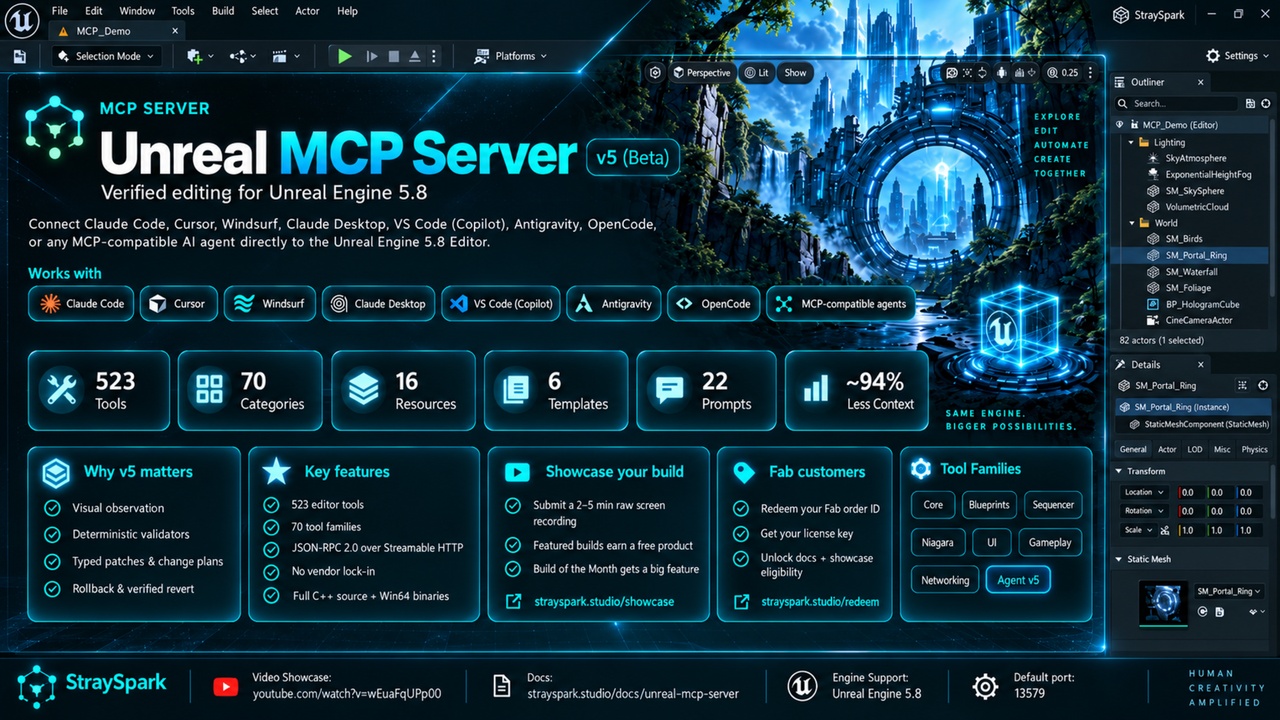
Full rules: strayspark.studio/showcase/rulesThe v5 release (beta) ships 523 editor tools across 70 categories, plus 16 context resources, 6 resource templates and 22 workflow prompts via JSON-RPC 2.0 over Streamable HTTP — turning your AI assistant into a co-developer that can see the editor, validate its own work and roll back what it changed, across level building, gameplay, cinematics, VFX, audio, animation, UI, networking, testing, modeling, Chaos and MetaHumans.
🎬 Video Showcase https://www.youtube.com/watch?v=wEuaFqUPp00
v4 gave agents reach; v5 gives them evidence.
The agent can see the editor
capture_editor_surface returns fresh Slate frames (frame_id, pixel hash, geometry, DPI) of the viewport, Blueprint graph, Widget designer or any docked tab — only after the operation finished AND the editor painted. Leased observers watch a surface over time, compare_editor_snapshots does pixel comparison, and the observe_edit_verify prompt closes the loop.
Validators for every authoring family
validate_blueprint, validate_widget_layout, validate_animation_setup, validate_material_setup, validate_niagara_system, validate_sound_setup, validate_pcg_graph, validate_assets — read-only, one shared issues[] shape. Agents fix what the validator reports instead of guessing.
Typed patches and preflight plans
apply_blueprint_patch / apply_widget_patch: validated node, variable, connection and hierarchy operations with preview, revision fingerprints (a stale patch is refused) and read-back. plan_actor_changes → apply_change_plan → revert_change_plan: edits bound to captured state, an effect journal, automatic rollback and verified restore. Snapshots and world-bound object refs stop agents editing the wrong actor after a reload.
Long work as owned operations
run_editor_scenario drives tick-based PIE sessions with waits, assertions, input and capture. measure_frame_times measures real frames. submit_generation_job runs fal.ai generation without blocking the editor. Every operation supports cancellation, deadlines and quotas.
Scopes, ownership, honest diagnostics
Read / Scene / Destructive scopes gate every tool, nested call and resource; each bearer token maps to a scope. Plans, snapshots, observers and operations belong to the session that made them. get_server_capabilities reports plugin state with reasons, export_diagnostic_bundle ships a redacted, checksummed bundle for support, and oversized results are paged, never silently truncated.
Catalog mode (default) — ~94% less agent context
tools/list returns discovery meta-tools + a core set (34 tools, 17 KB) instead of all 523 schemas (300 KB). Agents find the rest via search_tools, list_tool_categories and get_tool_schemas. Everything stays callable; set ToolExposureMode = Full for the old behavior.
Everything from v4 stays: run_tool_script one-transaction programs, describe_graph, structured errors, named undo transactions, the hardened HTTP core and the registry-wide test matrix — plus 49 new animation tools and a rebuilt Widget category (15 → 41 tools).
🚀 Key Features
523 Editor Tools across 70 categories — Actors, Materials, Substrate, Blueprints, Sequencer, Landscapes, Foliage, Niagara, MetaSounds, Physics, Chaos, Navigation, PCG, GAS, Enhanced Input, Networking, AI, AnimGraph, Montages, StateTree, Control Rig, CommonUI, AI 3D/Image gen, Source Control, Test Authoring, Runtime Debug, PIE, Modeling, MetaHuman, plus the v5 Visual, Operations, Change Plans, Snapshots and Diagnostics layers.
Visual Observation — the agent captures viewport, graph and designer surfaces and verifies its own edits pixel-for-pixel.
Deterministic Validators — Blueprint, UMG, animation, material, Niagara, sound, PCG and asset validation with one shared issues[] shape.
Typed Patches and Plans — revision-checked Blueprint and widget patches; actor change plans with preview, automatic rollback and verified revert.
Catalog Mode — progressive disclosure cuts a fresh session's tool-definition cost ~94% while keeping all 523 tools callable.
Tool Presets — Full / Scene Building / Gameplay / Minimal / Catalog. Switch instantly to manage AI context cost.
Universal AI Compatibility — Claude Code, Claude Desktop, Cursor, VS Code (Copilot), Windsurf, Antigravity, OpenCode, any MCP-compatible client. Streamable HTTP + SSE — no vendor lock-in.
65 Blueprint Tools — components, variables, wire nodes, set properties, full graph read-back, exec-path tracing, validation and typed patches.
Source Control Aware — works against any provider Unreal supports (Perforce, Git LFS, Plastic, Subversion).
Production-grade safety — Read/Scene/Destructive scopes, per-token bearer auth, origin allow-list, session-owned state, non-mutating previews, structured errors, cancellation, size caps, tool-call timeouts, exception guards, session GC, DNS-rebinding defense.
📦 What's Included
Full C++ source code with extensible architecture, plus prebuilt Win64 binaries
523 tools across 70 categories
5 tool presets (Full / Scene Building / Gameplay / Minimal / Catalog)
16 read-only context resources and 6 resource templates
22 reusable workflow prompts
AI-powered image generation and text/image-to-3D via fal.ai, sync or as background jobs
STDIO bridge for non-HTTP clients (Claude Desktop)
Live status bar indicator with one-click Copy Claude Code Config
Bearer-token auth with per-token scopes, origin allow-list, rate limiting
Registry-generated tool reference, checksummed packages, onboarding guides and validation evidence
🧩 Tool Categories (70) Core — Actor (17), Editor (7), Asset (6), Level (6), Asset Management (7), Batch (3), Search (2) Scene Building — Material (5), Material Graph (8), Material Layers (4), Substrate (1), Static Mesh (7), Environment (4), Lighting (3), Modeling (5), Gizmo (3) Scripting — Blueprint (65), Python Bridge (1), Change Plans (5), Snapshots (4) Cinematic — Sequencer (12), Sequencer Animation (7), Anim Mixer (4) Animation — Animation (10), Anim Data (16), Anim Graph (14), Anim Graph Nodes (13), Montage (14), Morph Target (4), Control Rig (2) World Building — Landscape (3), Foliage (4), Spline (7), World Partition (2), Spatial (10), PCG (16) VFX & Audio — Niagara (3), Audio (3), MetaSound (6), MetaSound Graph (8) Simulation — Physics (10), Navigation (3), Chaos (5) Characters — MetaHuman (4) Data — Data Tools (6) UI — Widget/UMG (41), CommonUI (5), UI Image (2) Gameplay — GAS (8), Enhanced Input (6), Game Framework (6), Gameplay Tags (3), State Tree (5), PIE (10) Networking — Networking (5), Iris (1) AI — AI Tools (8), 3D Model (3) DevOps — Source Control (8), Test Authoring (5), Runtime Debug (7), Diagnostics (4) Workflow — Macro (6), Build (7), Engine API (3), Performance (5), Epic Toolsets (3) Agent (v5) — Meta (8), Operations (6), Visual (9)
⚙️ Technical Specs
Protocol: MCP spec 2025-06-18, Streamable HTTP
Transport: JSON-RPC 2.0 over HTTP (default port 13579) + SSE fallback
Engine Support: Unreal Engine 5.8 (Windows, Win64 editor)
Threading: All UE API calls automatically dispatched to the game thread
Source Code: Full C++ access included
Auth: Bearer-token with Read/Scene/Destructive scopes + origin allow-list (localhost-only by default)
Documentation: https://www.strayspark.studio/docs/unreal-mcp-server