

説明
AgenticLink — Safe AI Automation for the Unreal Editor
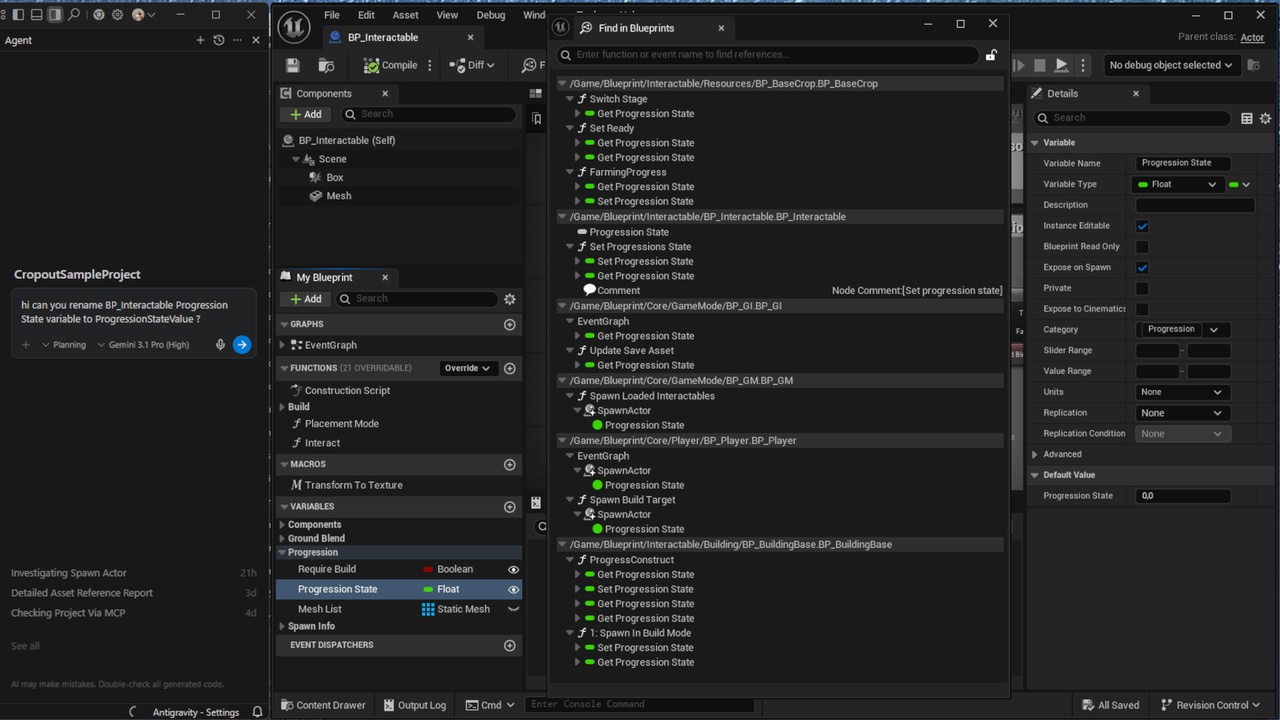
Let AI create, edit, and automate your Unreal project, with full native Undo/Redo support.
AgenticLink enables AI agents to control the Unreal Editor through structured C++ tools. Every action is validated, transaction-safe, and fully reversible, bringing AI automation into production workflows..
Designed for workflows involving AI assistants like Antigravity, Windsurf, Cursor, and custom LLM-based pipelines,
Key Capabilities
AI-Controlled Editor Actions
Spawn and modify Actors
Edit Materials and Blueprints
Create and rewire graphs with auto-layout
Manipulate Sequencer tracks and animations
Modify properties using Unreal's reflection system
Transaction-Safe Automation
Every AI action is recorded in Unreal’s native transaction system
Full Undo/Redo support
Batch operations roll back completely if any step fails
High-Frequency Agent Sessions
Compiled multi-platform CLI and MCP
Interactive mode for chained operations
Low-latency tool execution
Production-Oriented Architecture
Schema-validated tool execution
Permission controls for destructive operations
TCP-based JSON protocol with robust buffering
PID-based lifecycle watchdog
Technical Details
Module Type: Editor-Only.
Supported Platforms: Windows (Win64), MacOS (ARM64/x86_64).
Unreal Engine Version: 5.4 - 5.7.
Dependencies: Optional Requirement of Python Editor Script Plugin and Editor Scripting Utilities (included in UE).
What's Inside?
AgenticLink Editor Module: The primary C++ bridge and server.
AgenticLink CLI: Scripts for external agent communication.
Comprehensive Documentation: Markdown-based reference guides and an "Agent Guide" for seamless AI integration.
Why AgenticLink?
Unlike general-purpose scripting plugins, AgenticLink is purpose-built for production AI automation in Unreal Engine. It prioritizes predictable outputs, strict validation, and native transaction integration — ensuring the engine remains the final arbiter of state and safety.
Recommendations:
Divide and Conquer: Break complex Unreal Engine tasks into smaller, verifiable steps. Instead of asking to "build a complete dungeon," start with "spawn the floor tiles" and "verify placement."
Session Management: For AI-assisted workflows, keep chat sessions relatively short. Starting a fresh session after completing a major component prevents context bloat and maintains agent accuracy.
Model Disclaimer & Performance:
Model Accuracy: Results may vary significantly depending on the AI model used.
Thinking Models (Reasoning): For complex blueprint logic or intricate material graphs, we highly recommend using "thinking" or "reasoning" models. These models excel at multi-step problem solving and logical planning, which are essential for stable Unreal Engine development.
Documentation:
https://agenticlinkdocs.netlify.app/
Youtube Channel: https://www.youtube.com/channel/UC3VHKxbpC_BNAG9p-R47I6Q
Follow us on X https://x.com/AgenticLink
Join us on Discord: https://discord.gg/VMUWpqGurU